
Introduction
SharePoint has long been a cornerstone for businesses looking to manage content and collaborate effectively. With its user-friendly interface and out-of-the-box features, SharePoint enables users to create dynamic, engaging web pages with minimal technical knowledge. The Modern SharePoint experience has taken this a step further with new features like Section Templates, which allow you to create visually consistent pages without needing to start from scratch.
These templates not only save time but also ensure your pages are visually appealing, structured, and aligned with your brand's identity. SharePoint’s recent updates bring even more flexibility and real-time feedback to the content creation process, empowering users to build professional, polished pages.
In this blog, we’ll dive deep into how you can leverage Section Templates, customize section properties, and make the most of real-time previews to build dynamic pages that are ready for publication—without the need to save or publish.
Steps to Using SharePoint Modern Page Templates and Section Templates:
1. Navigating to the Page Editor
To get started, head to the Site Content section of your SharePoint site. From here:
- Click on ‘New’ and select ‘Page’. This action will open the Page Editor.


2. Accessing Section Templates
- Once you’re inside the page editor, on the right-side pane, you’ll find the ‘Section Templates’ option. Click on ‘See All Section Templates’ at the bottom to view a comprehensive list of pre-designed templates.
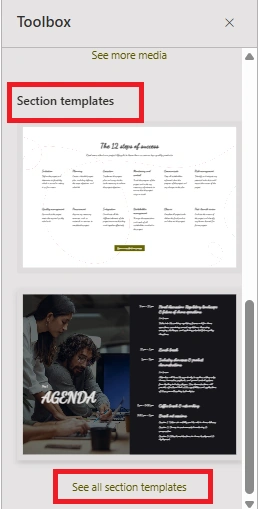
- These templates are organized based on the content type and layout, making it easy to choose one that fits your needs.
3. Selecting and Customizing Your Template
SharePoint gives you the ability to browse and select from a wide variety of templates. Once you pick one that fits your page’s needs, you can start customizing it to fit your brand’s style. You can:
- Modify text and images
- Change the layout and section arrangement
This allows you to design pages without needing to start from scratch, which is especially useful for non-developers or anyone looking to save time.
4. Customizing Section Properties
Once you’ve chosen your template, you can further customize individual sections to suit your specific needs. SharePoint allows you to modify several properties for each section, including:
- Collapsible Sections: You can make sections collapsible to save space and control how much content is visible. This is especially useful for pages with a lot of information.
- Heading Levels: Customize the heading structure for better hierarchy and readability.
- Divider Lines: Use divider lines to create separation between sections for a cleaner, more organized look.
- Alignment Options: Control the alignment of content within each section (e.g., left or right alignment for expand/collapse icons).
- Mobile and Email Reflow: Adjust how content reflows on mobile devices or in email formats (top to bottom, left to right). This ensures a seamless experience across all devices.


By customizing these properties, you can fine-tune the page layout and user experience, all while maintaining flexibility for different content types.
5. Previewing the Changes
One of the best features of SharePoint’s page editor is the Preview function. You can see how your page will look across devices (desktop, tablet, mobile) in real time. This means you can:
- Make adjustments without having to publish the page first.
- Fine-tune the layout to make sure it’s perfect across different screen sizes.

This feature eliminates the guesswork that typically comes with designing web pages, ensuring your page looks great before it’s live.
6. Saving and Publishing Your Page
Once you’ve customized the template, previewed your changes, and are happy with the result, it’s time to save and publish your page. SharePoint makes this process as easy as clicking a button, allowing you to get your content online quickly.
Benefits of Using Modern Section Templates and Real-Time Previews in SharePoint:
- Time Efficiency: With pre-designed templates, the process of creating web pages becomes much faster. Instead of starting from scratch, you can simply select a template that fits your needs and modify it to suit your content.
- Flexibility and Customization: The ability to customize section properties—from text and images to layouts and headings—ensures that your page aligns with your organization’s branding while allowing for personal adjustments.
- Real-Time Preview: The Preview feature allows you to instantly see how your page will look across devices. This ensures that your page is mobile-responsive, aesthetically pleasing, and ready for prime-time publishing.
- Empowering Non-Developers: Thanks to SharePoint’s drag-and-drop interface, even users with little to no development experience can quickly create professional pages. The ease of use is one of the platform's strongest features, making it accessible for everyone in your organization to contribute to content creation.
Advantages of Section Templates
- Consistency: Ensures uniform layout structure within a single page for a professional look.
- Time-saving: Pre-designed sections make it quick and easy to build structured content without starting from scratch.
- Flexibility: Offers customization options for text, images, and content layout within the selected section.
- Mobile Responsiveness: Automatically adjusts to provide an optimal viewing experience across devices.
- User-friendly: No coding required, making it easy for non-developers to create visually appealing pages.
Disadvantages to Consider
- Limited Scope: Section templates apply only to a single page, with no cross-page functionality for consistency across multiple pages.
- Customization Constraints: While flexible, templates may not allow advanced customizations for complex page layouts.
- Dependency on Pre-Designed Layouts: Overreliance on templates could lead to uniformity across pages, reducing uniqueness.
- Performance Issues: Certain complex sections might introduce performance bottlenecks if not optimized properly.
Conclusion
The introduction of Modern Section Templates in SharePoint has dramatically improved the content creation process. These tools allow users to quickly build professional, brand-consistent pages without needing advanced design skills or coding experience. Whether you’re updating a page with a new event, creating a team introduction, or posting an internal status update, these features make it easier than ever to create pages that look great and are optimized for mobile devices.
With real-time previews, customizable section properties, and a growing library of templates, SharePoint’s new features bring efficiency and flexibility to web content management. While there are limitations, such as limited customization options and potential for design uniformity, the benefits—time savings, ease of use, and consistency—are undeniable. These tools are a game-changer for both developers and non-developers alike.
So, whether you’re building your first page or refining an existing one, SharePoint’s Section Templates are here to help you create stunning web pages that are ready to publish at the click of a button.
Join the conversation! Your thoughts help the community grow.