

Introduction
This
article describes a simple approach to embedding and displaying PDF documents in
a web page through the use of a simple ASP.NET 2.0 VB built custom server
control. The approach indicated herein allows the developer the opportunity to
control the web page content surrounding the embedded PDF; this is in contrast
to linking directly to a PDF which uses the entire web page to display the PDF
but does not otherwise permit the developer to control the appearance of the
page.
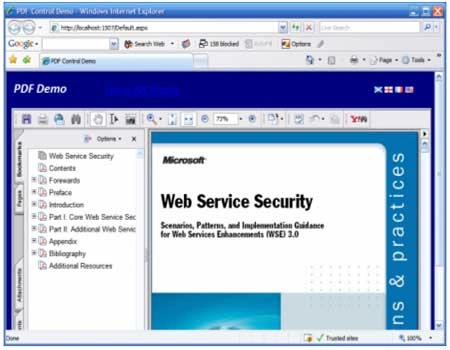
Figure 1: Embedding and Displaying PDF Documents in a Web Page.
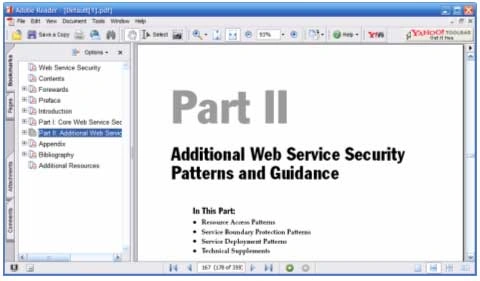
Figure 2: Linking directly to a PDF.
Getting Started
There are two solutions included with this download, one is web custom control library containing a single custom control used to render out the PDF, and the other is a test web site used to display a PDF through the use of the control.
Figure 3 (below) shows the solution explorer for the project. The project appearing at the bottom of the solution is the test web site, it contains only a single web page (default) and it includes a PDF file included for testing purposes. The bottom project is the web custom control library with the single control included ("ShowPdf ").
The
references in the test web site are per the default configuration; the custom
control library references include the default references but also include an
added reference to System.Design which is necessary to support
design time usage of the control.
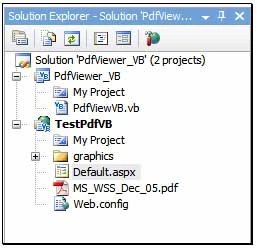
Figure 3: Solution Explorer with Both Projects Visible.
The Web Custom Control Project
Code: ShowPdf.vb.
Within the web custom control project, there is a single custom control provided in this example. The example is entitled, "ShowPdf.vb". The code for the project is very simple and should take very little time to implement. The control code starts out with the default imports and class declaration:
Imports System
Imports System.Collections.Generic
Imports System.ComponentModel
Imports System.Text
Imports System.Web
Imports System.Web.UI
Imports System.Web.UI.WebControls
<DefaultProperty("FilePath"), ToolboxData("<{0}:PdfViewVB runat=server></{0}:PdfViewVB>")> _
Public Class PdfViewVB
Inherits WebControl
The class contains a single property called FilePath, and the attributes for the class assign the default property attribute to point to the single added property. What this accomplishes is simple, when the control is dropped into a web page or selected by the developer at design time, the property editor will default to select this property. The toolbox data attribute is setup for a custom server control (runat=server).
After the class declaration, a declarations region was added and a single local member variable was defined and included within that region. The local member variable is used to retain the path to the PDF document loaded into the control.
#Region "Declarations"
Dim mFilePath As String
#End Region
The next bit of code in the class is contained in a new region called "Properties". Within this region is a single property entitled, "FilePath". The property is used to provide public member access to the file path member variable. The attributes associated with this property indicate that the property is visible (Browsable) in the property editor, defines the property editor category under which to show the property in the editor, and provides the text used to describe the property which viewed in the property editor (Description). The editor defined specifies an association between this property and the URL Editor; when the developer using the control edits the property at design time, the URL editor will be displayed to allow the developer to navigate to and select a target file based using this editor. The System.Design reference is needed to support this portion of the design.
#Region "Properties"
<Category("Source File")> _
<Browsable(True)> _
<Description("Set path to source file.")> _
<Editor(GetType(System.Web.UI.Design.UrlEditor),
GetType(System.Drawing.Design.UITypeEditor))> _
Join the conversation! Your thoughts help the community grow.