

Imagine opening a unified analytics platform where any user—not just data engineers or BI developers—can create powerful analytical assets with just a few clicks. That’s the reality in Microsoft Fabric, where the ability for users to create Fabric Items is transforming how organisations build, share, and consume data.
In this article, we’ll explore what it means for users to create Fabric Items, why this capability is a game changer, and how it accelerates productivity across every department.
What Are Fabric Items?
Fabric Items are the core building blocks inside Microsoft Fabric. They represent the tools, artifacts, and components users can create to carry out analytics across the platform.
These items span the entire analytics lifecycle, including:
Data ingestion
Data engineering
Data science and machine learning
Real-time analytics
Data warehousing
Reporting and visualisation
A single workspace can contain dozens of different item types, enabling seamless end-to-end data product development.
Why Allow Users to Create Fabric Items?
Giving users the power to create their own Fabric Items unlocks significant benefits:
1. Democratized Data Creation
Instead of waiting for IT or engineering teams, business analysts, finance professionals, HR partners, or operational leads can create the items they need—Lakehouses, Pipelines, Datasets, Reports, and more.
This dramatically accelerates innovation.
2. Acceleration of Data Product Delivery
Every domain can now build and iterate on its own analytical products at speed.
Sales can build forecasting datasets.
HR can design workforce dashboards.
Operations can craft real-time monitoring pipelines.
No bottlenecks, no delays.
3. Increased Collaboration and Ownership
With users able to create items independently, cross-functional teams collaborate more and build shared assets that reflect real business needs.
4. Supports Data Mesh Principles
Decentralised creation of Fabric Items aligns perfectly with domain-driven ownership.
Each team can build its own high-quality, governed assets that feed into the wider organisation.
What Fabric Items Can Users Create?
Here are some of the most impactful Fabric Items users can create today:
✔ Lakehouse
A unified storage and analytics engine combining tables, files, and Delta architecture. Perfect for data engineering and analytical processing.
✔ Warehouse
A relational, SQL-based environment optimised for BI, reporting, and star-schema modelling.
✔ Pipelines
Visual data workflows used for ingestion, transformation, scheduling, and orchestration.
✔ Notebooks
Ideal for data scientists, engineers, and analysts who want to use Python, SQL, or Spark for advanced analytics.
✔ KQL Databases
Designed for log analytics, event processing, IoT data, and streaming use cases.
✔ ML Models
Users can train, register, and operationalise machine learning models with built-in lifecycle management.
✔ Reports & Dashboards
Business users can create rich insights backed by data models, visuals, and calculations.
✔ Semantic Models
Reusable datasets that support organisation-wide BI, metrics, and reporting.
✔ Dataflows
Great for no-code or low-code data preparation using familiar Power Query tools.
How Users Can Create Fabric Items: The Experience
Creating a new Fabric item is intuitive and consistent across the platform:
Go to a workspace.
Click New.
Select the item you want to create (Lakehouse, Notebook, Report, etc.).
Configure the item or start building immediately.
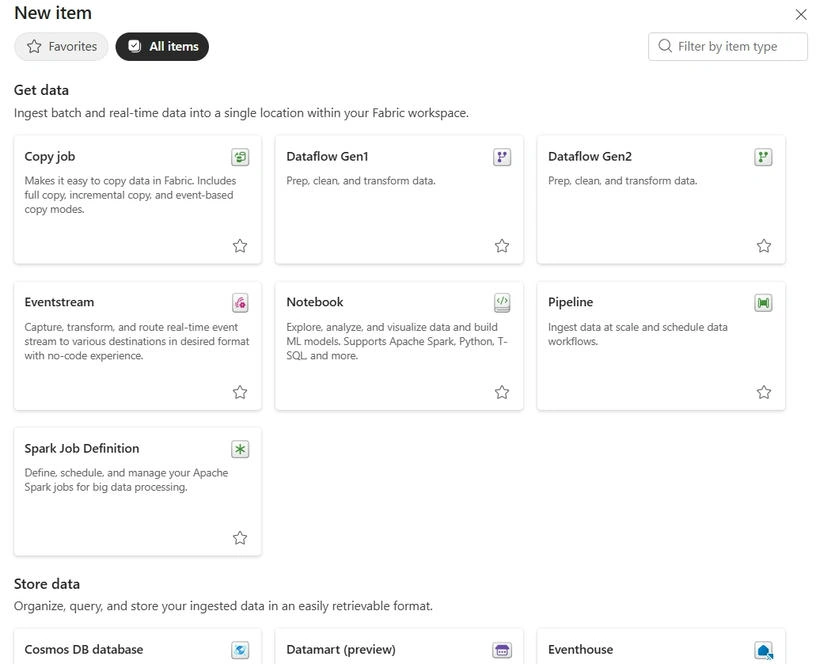
Fabric removes the traditional barriers of setting up infrastructure, managing clusters, or configuring advanced dependencies. Everything is serverless, seamless, and instantly available.
The Impact on Organisations
Allowing users to create Fabric Items fundamentally transforms analytics culture:
A More Agile Enterprise
Teams act quickly—without depending on central engineering.
Better Data Products
Items created by domain experts (finance, HR, supply chain) reflect deeper business context.
Reduced Backlog Pressure
IT teams can focus on governance, platform configuration, and strategic work instead of servicing every request.
Stronger Governance Through Workspaces
Even though users create items, workspaces ensure:
proper security boundaries,
permissions,
version control,
and oversight.
This keeps data creation safe, scalable, and compliant.
Real-World Examples
Finance Analyst Creates a New Warehouse
Instead of waiting for a data team, a finance analyst creates a Warehouse, loads budget data, and publishes a semantic model for monthly reporting.
HR Manager Builds an Attrition Notebook
An HR professional creates a Notebook, brings in employee data, and runs Python-based analytics to identify trends.
Operations Team Deploys a Real-Time KQL Database
Operational staff spin up their own streaming database to monitor live equipment performance.
Marketing Builds Its Own Dataflows
Marketers connect online campaign data and build a semantic model—no engineering needed.
Final Thoughts
Empowering users to create Fabric Items turns Microsoft Fabric into a true self-service analytics ecosystem. It brings together business users, analysts, engineers, and data scientists in a unified workspace where anyone can create, collaborate, and innovate.
By lowering the barrier to entry and promoting a product-driven mindset, this capability accelerates value delivery and transforms how organisations work with data.
If you’d like, I can turn this into a LinkedIn post, video script, or a more technical deep-dive version.
Join the conversation! Your thoughts help the community grow.