
Generally, SharePoint blog site, Post list doesn't have attachment facility to
add documents to the list.
Here we will see, how we can handle it in different ways.
Approach 1: we handle it in site definition level.
Go the following location to Enable Attachments:
C:\Program Files\Common Files\Microsoft Shared\Web Server
Extensions\12\TEMPLATE\SiteTemplates\Blog\Lists\Posts\schema.xml
Open the Schema.xml
Change from
<Forms>
<Form
Type="DisplayForm"
Url="ViewPost.aspx"
WebPartZoneID="Main"
/>
<Form
Type="EditForm"
Url="EditPost.aspx"
ToolbarTemplate="BlogEditFormToolBar"
Template="BlogForm"
WebPartZoneID="Main"
/>
<Form
Type="NewForm"
Url="NewPost.aspx"
ToolbarTemplate="BlogNewFormToolBar"
Template="BlogForm"
WebPartZoneID="Main"
/>
</Forms>
Change to
<Forms>
<Form
Type="DisplayForm"
Url="ViewPost.aspx"
WebPartZoneID="Main"
/>
<Form
Type="EditForm"
Url="EditPost.aspx"
WebPartZoneID="Main"
/>
<Form
Type="NewForm"
Url="NewPost.aspx"
WebPartZoneID="Main"
/>
</Forms>
Once it is updated then do IIS rest as iisreset /noforce
After Changing, it will be available while adding new item.
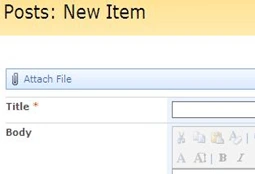
Approach 2: we will add the Following Code inside the Default list pages.
Add the following Code into Newpost.aspx and Editpost.aspx page.
Add the Row next to the Webpart zone Row. It will work only with sharepoint
default list pages.
Note:- if you using customized form pages, it will not work
<tr>
<td>
<div>
<a
title="Attach File"
class="ms-toolbar"
accessKey="I"
onclick="javascript:UploadAttachment();"
href="javascript:UploadAttachment()">
<img
width="16"
height="16"
align="absMiddle"
style="border-right-width:
0px; border-top-width:
0px; border-bottom-width:
0px; border-left-width:
0px;"
alt="Attach File"
src="/_layouts/images/attachtb.gif"
complete="complete"/>
</a>
<a
id="ctl00_m_g_7df5d998_1390_4e67_8fc4_2da066cbcf7d_ctl00_ctl01_ctl00_toolBarTbl_RptControls_diidIOAttach{generate-id()}"
style="visibility:
hidden;"
href="javascript:UploadAttachment()"/>
<a
class="ms-toolbar"
id="ctl00_m_g_7df5d998_1390_4e67_8fc4_2da066cbcf7d_ctl00_ctl01_ctl00_toolBarTbl_RptControls_diidIOAttach_LinkText"
accessKey="I"
onclick="javascript:UploadAttachment();"
href="javascript:UploadAttachment()">Attach
Photo</a>


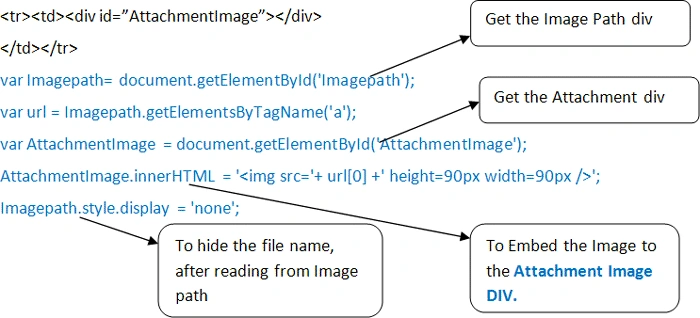
Enable Attachment in SharePoint Blog post list and display the list Attachments
Join the conversation! Your thoughts help the community grow.
Sign in to leave a comment
It is the same account you read, post and publish with — and you will come straight back to this page.


Srividya RaviPosted Jan 4, 2012, 5:54 AM
Thank you for the steps. They were useful and solved the doubt to a great extent. But i want the paperclip icon to be displayed in the list and want to know where the atachments are being saved. When I tried, the path is appearing on the screen with the delete button, but on clicking OK, the attachment is not being saved. Is there a way out to solve this issue?