

Let me tell you a little bit of the background of this article. Today I was tasked to develop a sitemap for one application of our organization. A Sitemap is an easy task but the criteria was for a menu of the sitemap that will be visible and invisible depending on role.
So, the concept is that, the menu will be enabling and disable depending on role. The truth to be told, I spent a couple of hours solving it, then in meantime, I was misguided by a fellow developer, hahah.. Oh, he too doesn't know, not intentionally.
Fine, so I thought that, let's show my POC to the community and someday one can save her a couple of hours. Fine, so I am planning to make the article as simple as possible and focus only on our necessary parts.
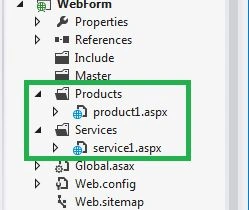
First of all, since we will work with a sitemap, we need to create one sitemap XML file and here is mine.
- <?xml version="1.0" encoding="utf-8" ?>
- <siteMap xmlns="http://schemas.microsoft.com/AspNet/SiteMap-File-1.0" >
- <siteMapNode url="default.aspx" title="Home" page" roles="P,S">
- <siteMapNode url="products.aspx" title="Products" roles="P">
- <siteMapNode url="products/product1.aspx" title="Product 1" roles="P" />
- <siteMapNode url="products/product2.aspx" title="Product 2" roles="P"/>
- <siteMapNode url="products/product3.aspx" title="Product 3" roles="P" />
- </siteMapNode>
- <siteMapNode url="services.aspx" title="Services" roles="S" >
- <siteMapNode url="services/service1.aspx" title="Services 1" roles="S" />
- <siteMapNode url="services/service2.aspx" title="Services 2" roles="S" />
- <siteMapNode url="services/service3.aspx" title="Services 3" roles="S" />
- </siteMapNode>
- </siteMapNode>
- </siteMap>
Add one Web form in the application and paste the following code into it.
- <%@ Page Language="C#" AutoEventWireup="true" CodeBehind="WebForm1.aspx.cs" Inherits="WebForm.WebForm1" %>
- <!DOCTYPE html>
- <html xmlns="http://www.w3.org/1999/xhtml">
- <head runat="server">
- <title></title>
- </head>
- <body>
- <form id="form1" runat="server">
- <div>
- <asp:Menu ID="Menu1" runat="server" Orientation="Horizontal" DataSourceID="SiteMapDataSource1">
- </asp:Menu>
- <asp:SiteMapDataSource ID="SiteMapDataSource1" runat="server" />
- </div>
- </form>
- </body>
- </html>
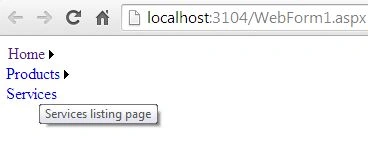
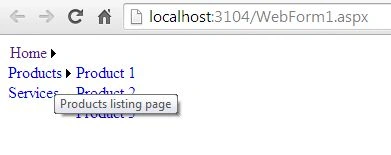
The code is very simple, we have just added one sitemap data source and one menu element. The menu item will be displayed depending on role.
The view of the page is something like this.

Here is the C# code of the same file:
Karthi RathinaveluPosted Aug 9, 2016, 12:49 AM
Nice.... Machi... u save my time
Upendra Pratap ShahiPosted Jun 12, 2015, 12:46 AM
nice..