

Automation tools like n8n make it easy to connect apps and services, but protecting sensitive data is crucial. This article explains what encryption in n8n means, why it’s important, where and when to use it, and how to implement it. We’ll also cover prerequisites, pros and cons, and examples.
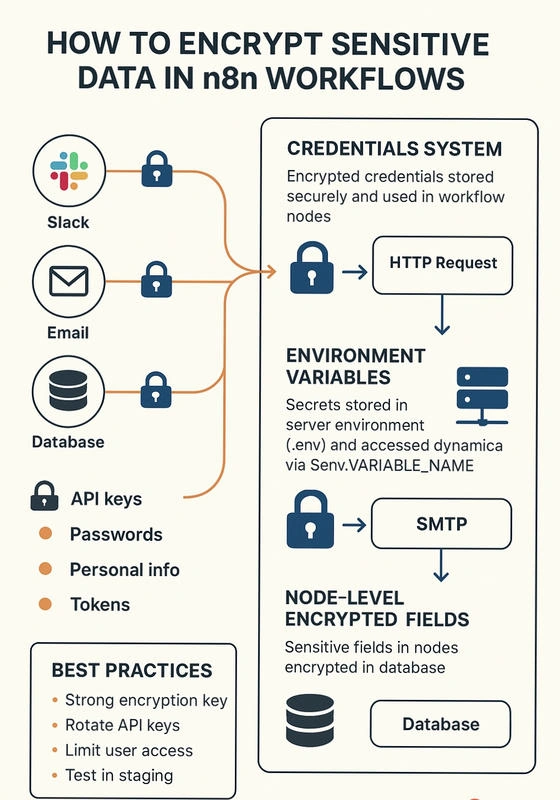
What is Encrypting Sensitive Data in n8n?
Encrypting sensitive data means converting secrets (like passwords, API keys, tokens) into a secure format that is unreadable without the proper decryption key.
In n8n, this is typically applied to:
API credentials
Database usernames and passwords
Tokens and access keys
Personal or financial information
Encryption ensures that even if someone gains access to your workflow files or database, your sensitive information cannot be easily read.
Why Encrypt Sensitive Data?
Encryption is critical for:
Security: Prevent unauthorized access to your credentials.
Compliance: Meet standards like GDPR, HIPAA, or SOC2.
Reliability: Protect your automation workflows from leaks.
Trust: Ensure clients or users know their data is safe.
Where and When to Use Encryption in n8n
Where
In Credentials (Slack, Google APIs, SMTP, HTTP Request nodes).
In environment variables for dynamic secrets.
On sensitive fields within nodes (password, token, or secret fields).
When
Before storing any secret in workflows
When creating connections to third-party services
When handling personal or financial information
For production workflows with real user data
How to Encrypt Sensitive Data in n8n
a) Using n8n Credentials
Go to Settings → Credentials.
Create a new credential for your service (e.g., Slack, API).
n8n encrypts these credentials automatically.
Use these credentials in your nodes instead of hardcoding secrets.
b) Using Environment Variables
Store sensitive values in your server environment (e.g.,
.envfile).Access them in nodes using
$env.VARIABLE_NAME.
const apiKey = $env.MY_API_KEY;c) Node-Level Encrypted Fields
Some nodes allow marking fields as sensitive.
n8n encrypts them in the database.
Avoid hardcoding secrets in nodes.
Prerequisites
n8n installed and running (cloud or self-hosted).
Basic knowledge of workflow creation.
Access to the .env file if using environment variables.
Appropriate API tokens or credentials for connected services.
Pros and Cons
Pros:
Protects sensitive information from leaks.
Meets compliance and regulatory requirements.
Centralized management of credentials.
Reduces risk in production workflows.
Cons:
Slightly more setup overhead.
Misconfigured encryption keys can break workflows.
Requires careful handling of environment variables and backups.
Examples
Example 1: Encrypting an API Key for an HTTP Request Node
Create credential
MyAPI Credential.Use it in the HTTP Request node → Authentication → Credential → MyAPI Credential.
The API key is encrypted and safely stored.
Example 2: Using Environment Variables
Add
MY_API_KEYto.envfile.Access it in a node:
$env.MY_API_KEY.
Example 3: Node-Level Encrypted Field
SMTP node → Password field marked as sensitive.
n8n encrypts it in the database automatically.
Additional Tips
Always set a strong
N8N_ENCRYPTION_KEYin.envbefore storing credentials.Rotate API keys regularly.
Limit workflow access to authorized users only.
Test workflows in a staging environment before production.
Encrypting sensitive data in n8n workflows is essential for security, compliance, and reliability. Using credentials, environment variables, and encrypted fields ensures that your automation remains secure while still being powerful and flexible.
Automation is powerful, but without proper encryption, your secrets are at risk.
Join the conversation! Your thoughts help the community grow.