

Introduction
RSA algorithm is an asymmetric cryptography algorithm. Asymmetric actually means that it works on two different keys, i.e., public key and private key. As the name describes, the public key is given to everyone, and the private key is kept private.
We are going to encrypt and decrypt data as "The encryptRSA method encrypts large data by breaking it into smaller chunks (86 bytes), encrypting each chunk individually with RSA, and then concatenating the Base64-encoded encrypted chunks into a final string. This approach is necessary because RSA can only encrypt a limited amount of data at a time due to its key size limitations. The final result is a single string that represents the encrypted data."
Step 1. Install the jsencrypt Library.
npm install jsencrypt
Step 2. Import Forge in the component or service that you would like to use.
import * as Forge from 'node-forge';
Step 3. Complete Encryption Method.
// RSA Encryption
encryptRSA(data: any): string {
  const publickey: string = ``; // Replace your own public key
  const rsa = Forge.pki.publicKeyFromPem(publickey);
  const jsonData = data;
  const chunkSize = 86;
  let finalEncrypted = '';

  for (let i = 0; i < jsonData.length; i += chunkSize) {
    const chunk = jsonData.substring(i, i + chunkSize);
    const encryptedChunk = rsa.encrypt(chunk);
    finalEncrypted += Forge.util.encode64(encryptedChunk);
  }
  return finalEncrypted;
}
Breakdown of the encryption method
Step 1. Forge.pki.publicKeyFromPem: Converts the PEM-encoded public key into a format that the node-forge library can use for encryption.
const rsa = Forge.pki.publicKeyFromPem(this.publickey);
Step 2
- for (let i = 0; i < jsonData.length; i += chunkSize): Iterates through the data in chunks of chunkSize (86 bytes in this case).
- jsonData.substring(i, i + chunkSize): Extracts a chunk of the data starting from index i with a length of chunkSize.
- rsa.encrypt(chunk): Encrypts the extracted chunk using the RSA public key.
- Forge.util.encode64(encryptedChunk): Encodes the encrypted chunk into Base64 format. This is necessary because RSA encryption produces binary data, which might not be suitable for text-based transmission or storage.
- finalEncrypted = finalEncrypted + Forge.util.encode64(encryptedChunk): Appends the Base64-encoded encrypted chunk to the final result.
for (let i = 0; i < jsonData.length; i += chunkSize) {
  const chunk = jsonData.substring(i, i + chunkSize);
  const encryptedChunk = rsa.encrypt(chunk);
  finalEncrypted += Forge.util.encode64(encryptedChunk);
}
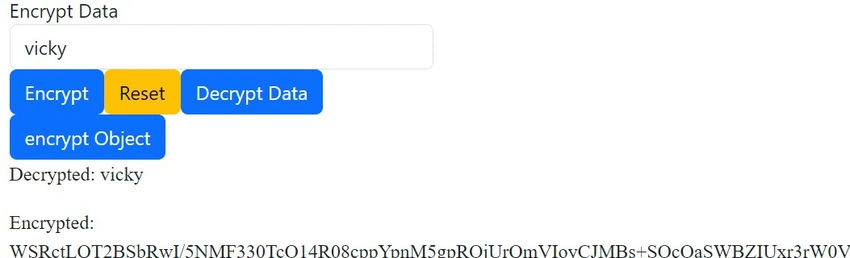
Output Sample for Encryption
Decryption Complete Method
// RSA Decryption
decryptionRSA(value: any): any {
  var privatekey: string = ``; // replace your private key

  const rsa = Forge.pki.privateKeyFromPem(this.privatekey);
  var ctBytes = Forge.util.decode64(value);
  var plaintextBytes = rsa.decrypt(ctBytes);

  return plaintextBytes.toString();
}
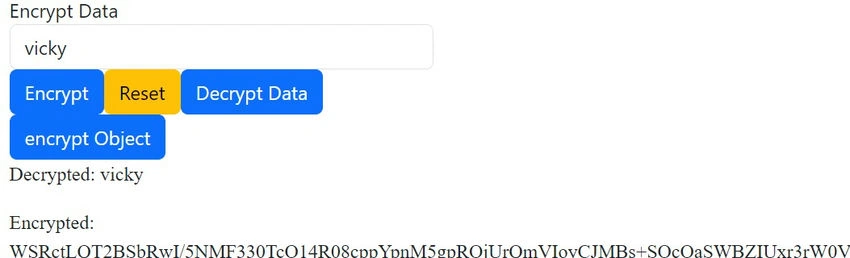
Output Sample for Decryption
Complete encryption and decryption Service
import { Injectable } from '@angular/core';
import * as CryptoJS from 'crypto-js';
import * as Forge from 'node-forge';

@Injectable({
  providedIn: 'root'
})
export class EncryptionService {

  private secretKey: string = ''; // Replace with a secure key
  private Vector: string = '';
  private publickey: string = ``;
  private privatekey: string = ``;

  constructor() {}

  // AES encryption
  encrypt(value: string): string {
    return CryptoJS.AES.encrypt(value, this.secretKey, {
      iv: CryptoJS.enc.Utf8.parse(this.Vector),
      mode: CryptoJS.mode.CBC,
      padding: CryptoJS.pad.Pkcs7,
    }).toString();
  }

  encryptObject(value: any): string {
    return CryptoJS.AES.encrypt(JSON.stringify(value), this.secretKey, {
      iv: CryptoJS.enc.Utf8.parse(this.Vector),
      mode: CryptoJS.mode.CBC,
      padding: CryptoJS.pad.Pkcs7,
    }).toString();
  }

  // AES Decryption
  decrypt(encryptedText: string): string {
    const decrypted = CryptoJS.AES.decrypt(encryptedText, this.secretKey, {
      iv: CryptoJS.enc.Utf8.parse(this.Vector),
      mode: CryptoJS.mode.CBC,
      padding: CryptoJS.pad.Pkcs7,
    });
    return decrypted.toString(CryptoJS.enc.Utf8);
  }

  // Encryption using CBC Triple DES
  encryptUsingTripleDES(res: any, typeObj: boolean): string {
    const data = typeObj ? JSON.stringify(res) : res;
    const keyHex = CryptoJS.enc.Utf8.parse(this.secretKey);
    const iv = CryptoJS.enc.Utf8.parse(this.Vector);
    const mode = CryptoJS.mode.CBC;
    const encrypted = CryptoJS.TripleDES.encrypt(data, keyHex, { iv, mode });
    return encrypted.toString();
  }

  // Decryption using CBC Triple DES
  decryptUsingTripleDES(encrypted: string): string {
    const keyHex = CryptoJS.enc.Utf8.parse(this.secretKey);
    const iv = CryptoJS.enc.Utf8.parse(this.Vector);
    const mode = CryptoJS.mode.CBC;
    const decrypted = CryptoJS.TripleDES.decrypt(encrypted, keyHex, { iv, mode });
    return decrypted.toString(CryptoJS.enc.Utf8);
  }

  // RSA Encryption
  encryptRSA(data: any): string {
    const rsa = Forge.pki.publicKeyFromPem(this.publickey);
    const jsonData = data;
    const chunkSize = 86;
    let finalEncrypted = '';

    for (let i = 0; i < jsonData.length; i += chunkSize) {
      const chunk = jsonData.substring(i, i + chunkSize);
      const encryptedChunk = rsa.encrypt(chunk);
      finalEncrypted += Forge.util.encode64(encryptedChunk);
    }
    return finalEncrypted;
  }

  encryptObjectRSA(data: any): string {
    const rsa = Forge.pki.publicKeyFromPem(this.publickey);
    const jsonData = JSON.stringify(data);
    const chunkSize = 86;
    let finalEncrypted = '';

    for (let i = 0; i < jsonData.length; i += chunkSize) {
      const chunk = jsonData.substring(i, i + chunkSize);
      const encryptedChunk = rsa.encrypt(chunk);
      finalEncrypted += Forge.util.encode64(encryptedChunk);
    }
    return finalEncrypted;
  }

  // RSA Decryption
  decryptionRSA(value: any): any {
    const rsa = Forge.pki.privateKeyFromPem(this.privatekey);
    const ctBytes = Forge.util.decode64(value);
    const plaintextBytes = rsa.decrypt(ctBytes);
    return plaintextBytes.toString();
  }
}
When working with RSA encryption, several options and configurations can affect how encryption is performed. Below are the different options you can consider.
1. Key Size
- 512-bit: Provides minimal security and is considered outdated. It is not recommended for any sensitive data.
- 1024-bit: Provides moderate security but is generally not recommended due to vulnerabilities to modern attacks.
- 2048-bit: Currently considered secure and is the minimum recommended key size for most applications.
- 4096-bit: Offers strong security but is slower in terms of performance due to the larger key size.
2. Padding Schemes
- PKCS #1 v1.5
- Description: A commonly used padding scheme for RSA encryption. It’s simple but has some vulnerabilities, such as the Bleichenbacher attack.
- Use Case: Legacy systems and compatibility with older systems.
- OAEP (Optimal Asymmetric Encryption Padding)
- Description: A more secure padding scheme that includes additional randomness, making it resistant to a variety of attacks.
- Use Case: Recommended for new applications due to its stronger security properties.
- Example: rsa.encrypt(data, "RSA-OAEP") in libraries that support specifying the padding scheme.
3. Block Size and Chunking
- Encrypt Small Data: If your data fits within the maximum block size for your key size (e.g., 245 bytes for a 2048-bit key using OAEP), you can encrypt the entire data block at once.
- Encrypt Large Data: For larger data, you’ll need to split the data into smaller chunks and encrypt each chunk separately (as shown in your previous example).
4. RSA Modes
- Raw RSA
- Description: The simplest form of RSA encryption without padding. It’s rarely used due to security concerns.
- Hybrid Encryption
- Description: Combines RSA with symmetric encryption (e.g., AES) to leverage the strengths of both algorithms. RSA is used to encrypt the symmetric key, and the symmetric key encrypts the data.
- Use Case: Encrypting large files or data streams efficiently while maintaining strong security.
5. Asymmetric vs. Symmetric Encryption in Hybrid Models
- Symmetric Key Encryption (e.g., AES)
- Speed: Much faster than RSA for encrypting large amounts of data.
- Usage in RSA: RSA is often used to encrypt the symmetric key, while the symmetric key encrypts the actual data.
- Asymmetric Key Encryption (e.g., RSA)
- Security: Ensures secure key exchange over untrusted channels but is slower for encrypting large data.
- Usage: Best for small data (like keys) or when the communication channel is insecure.
6. Implementation Libraries
- node-forge
- Pros: Provides a wide range of cryptographic functions, including RSA, with support for different padding schemes.
- Cons: Larger in size compared to other libraries.
- jsencrypt
- Pros: Lightweight and easy to use for basic RSA encryption/decryption tasks.
- Cons: Limited to 1024 and 2048-bit key sizes and only supports PKCS #1 v1.5 padding.
- WebCrypto API
- Pros: Native browser API, offering strong performance and security.
- Cons: More complex to use and requires an understanding of promises and asynchronous programming.
7. Encoding Formats
- Base64 Encoding
- Description: Commonly used to encode the binary output of RSA encryption into a text format suitable for transmission or storage.
- Use Case: Transmitting encrypted data over text-based protocols (e.g., HTTP).
- Hex Encoding
- Description: Encodes the binary data in hexadecimal format.
- Use Case: When a more compact text representation is needed.
8. Error Handling and Security Considerations
- Timing Attacks
- Mitigation: Use constant-time operations where possible and avoid revealing timing information that could help an attacker.
- Key Management
- Consideration: Ensure that private keys are securely stored and handled, as compromise of a private key can lead to the exposure of all encrypted data.
Summary
The options for RSA encryption revolve around key size, padding schemes, data chunking, and the specific implementation library you choose. For the strongest security, using a 2048-bit or larger key with OAEP padding is recommended. For larger data, consider using hybrid encryption where RSA encrypts a symmetric key, and the symmetric key encrypts the data. Additionally, selecting the appropriate encoding format and properly managing keys is critical for secure RSA encryption.
Join the conversation! Your thoughts help the community grow.