

A student thought
An algorithm may be similar to basic algorithms of Information Security books.
I'm thankful to my colleague Mr.Jayesh Patel and my cousin Maulik Trivedi, currently a computer engineering student at Marwadi College of Engineering and Technology, Rajkot.
I will describe an algorithm with practical steps proven with JavaScript code, or you can perform it in any language you choose.
The graphic layout of the tool works on this algorithm and depends on your thoughts.
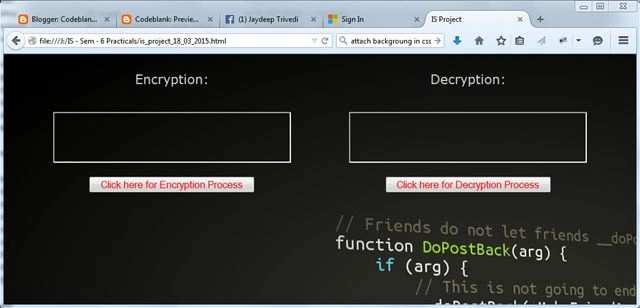
I am designing a webpage like the following screenshot,
Description of algorithm
A simple algorithm works with & plays with an ASCII value of characters. The algorithm works within the following six different steps.
Step 1. Convert input string characters in respected ASCII codes & store them in an array like the following example of JavaScript code.
for(i = 0; i < inputString.length; i++)
{
    asciiArr[i] = inputString[i].charCodeAt(0);
}
Step 2. Fill the A to Z array in capital or small letters,
for(i = 0, code = 65; i < 26; i++, code++)
{
    atozArr[i] = String.fromCharCode(code);
}
Step 3. Choose randomly single character index from A to Z and differentiate its position in one variable & its respected ASCII value in the second variable.
Write a function outside the main function of your code. Note. I am referencing a function returning a random value from the minimum-maximum range.
position = randomIndexFromInterval(0, atozArr.length - 1);
positionAscii = atozArr[position].charCodeAt(0);

function randomIndexFromInterval(min, max)
{
    return Math.floor(Math.random() * (max - min + 1) + min);
}
Step 4. Addition of every input String each element to positionAscii.
for(i = 0; i < inputString.length; i++)
{
    encryptedString[i] = parseInt(asciiArr[i]) + parseInt(atozArr[position].charCodeAt(0));
}
Step 5. Attachment of the key to the encrypted string or not it's your choice & it's your modification scenario. Here I am attaching a key with an encrypted string.
Step 6. Finally, your encryption is ready to send.
for(i = 0; i < encryptedString.length; i++)
{
    outputString.innerHTML = outputString.innerHTML + String.fromCharCode(encryptedString[i]);
}
Here outputString is an HTML element to display output on a webpage. For the decryption process, reverse steps apply.
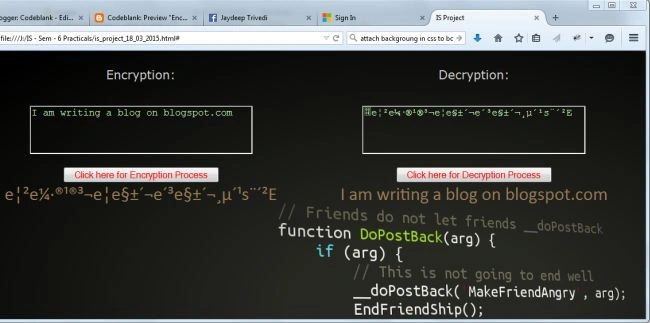
Plain Text
Hi, I am writing a blog on blogspot.com.

Anish AnsariPosted Nov 16, 2015, 12:59 AM
nice
Santhakumar MunuswamyPosted Nov 11, 2015, 8:41 AM
Good one
Mohamed Gani MnPosted Nov 6, 2015, 9:34 AM
Nice Algorithm
Sibeesh VenuPosted Nov 4, 2015, 11:24 PM
Nice Share
Dominique CejaPosted Nov 4, 2015, 4:51 PM
Great
Harshad PansuriyaPosted Nov 4, 2015, 3:08 AM
Nice one