

Introduction:
Article Flow
- Remote Data Source For Kendo Grid
- Building a Kendo grid with remote data source
- Implement Endless scrolling in Kendo Grid
Remote Data Source for Kendo Grid
I am going to use the API response given below to construct my remote data source for Kendo Grid which was created in my previous article using ASP.NET CORE.
API - http://github-ci-staging.azurewebsites.net/api/Technologies/TechnologiesList
Type - GET.
Testing the APIs, using POSTMAN.
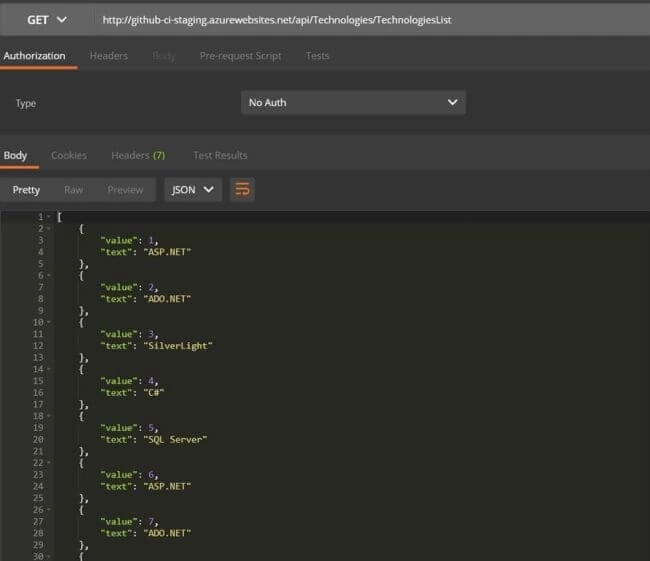
This API will give a response with 10,000 Technology list result set which is a repeated set of information and it is used just for a demo purpose.
Create a new HTML page. In my case, I named it as KendoGridInfiniteScrolling.cshtml.
KedoGridInfiniteScrolling.html
- <!DOCTYPE html>
- <html>
- <head>
- <base href="http://demos.telerik.com/kendo-ui/sortable/integration-grid">
- <style>
- html {
- font-size: 14px;
- font-family: Arial, Helvetica, sans-serif;
- }
- </style>
- <title></title>
- <link rel="stylesheet" href="https://kendo.cdn.telerik.com/2017.3.913/styles/kendo.common-material.min.css" />
- <link rel="stylesheet" href="https://kendo.cdn.telerik.com/2017.3.913/styles/kendo.material.min.css" />
- <link rel="stylesheet" href="https://kendo.cdn.telerik.com/2017.3.913/styles/kendo.material.mobile.min.css" />
- <script src="https://kendo.cdn.telerik.com/2017.3.913/js/jquery.min.js"></script>
- <script src="https://kendo.cdn.telerik.com/2017.3.913/js/kendo.all.min.js"></script>
- </head>
- <body>
- <div id="example">
- <div id="grid"></div>
- <script>
- $(document).ready(function() {
- var grid = $("#grid").kendoGrid({
- dataSource: {
- type: "json",
- transport: {
- read: "http://github-ci-staging.azurewebsites.net/api/Technologies/TechnologiesList"
- },
- schema: {
- model: {
- fields: {
- value: { type: "number" },
- text: { type: "string" },
- }
- }
- },
- },
- numeric: false,
- previousNext: false,
- messages: {
- display: "Showing {2} data items"
- }
- },
- height: 550,
- columns: [
- { field: "value", title: "S No", width: "130px" },
- { field: "text", title: "Technology", width: "130px" },
- ]
- }).data("kendoGrid");
- });
- </script>
- </div>
- </body>
- </html>
Result
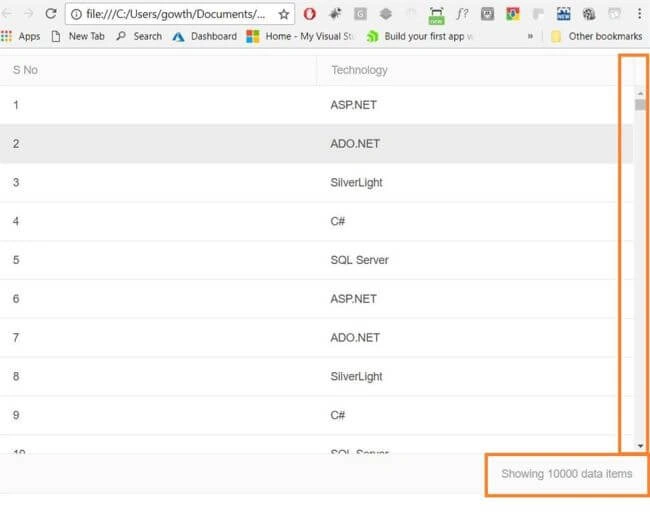
Figure 2
Implement Endless scrolling in Kendo Grid
Endless scrolling feature is available in Kendo Grid from its latest release R3 2017.
Endless/ Infinite scrolling
- Displays a large amount of data
- Appends data on demand to the bottom of the View
- Load occurs dynamically
KedoGridInfiniteScrolling.html
- <!DOCTYPE html>
- <html>
- <head>
- <base href="http://demos.telerik.com/kendo-ui/sortable/integration-grid">
- <style>
- html {
- font-size: 14px;
- font-family: Arial, Helvetica, sans-serif;
- }
- </style>
- <title></title>
- <link rel="stylesheet" href="https://kendo.cdn.telerik.com/2017.3.913/styles/kendo.common-material.min.css" />
- <link rel="stylesheet" href="https://kendo.cdn.telerik.com/2017.3.913/styles/kendo.material.min.css" />
- <link rel="stylesheet" href="https://kendo.cdn.telerik.com/2017.3.913/styles/kendo.material.mobile.min.css" />
- <script src="https://kendo.cdn.telerik.com/2017.3.913/js/jquery.min.js"></script>
- <script src="https://kendo.cdn.telerik.com/2017.3.913/js/kendo.all.min.js"></script>
- </head>
- <body>
- <div id="example">
- <div id="grid"></div>
- <script>
- $(document).ready(function() {
- var grid = $("#grid").kendoGrid({
- dataSource: {
- type: "json",
- transport: {
- read: "http://github-ci-staging.azurewebsites.net/api/Technologies/TechnologiesList"
- },
- schema: {
- model: {
- fields: {
- value: { type: "number" },
- text: { type: "string" },
- }
- }
- },
- pageSize: 20,
- },
- scrollable: { endless: true }, // Enabling the kendo Endless scrollable
- pageable: {
- numeric: false,
- previousNext: false,
- messages: {
- display: "Showing {2} data items"
- }
- },
- height: 550,
- columns: [
- { field: "value", title: "S No", width: "130px" },
- { field: "text", title: "Technology", width: "130px" },
- ]
- }).data("kendoGrid");
- });
- </script>
- </div>
- </body>
- </html>
Compatibility of endless scrolling
- Works with both, local and remote, data.
- Workz with grouping, hierarchy, and editing in Kendo Grid.
Result
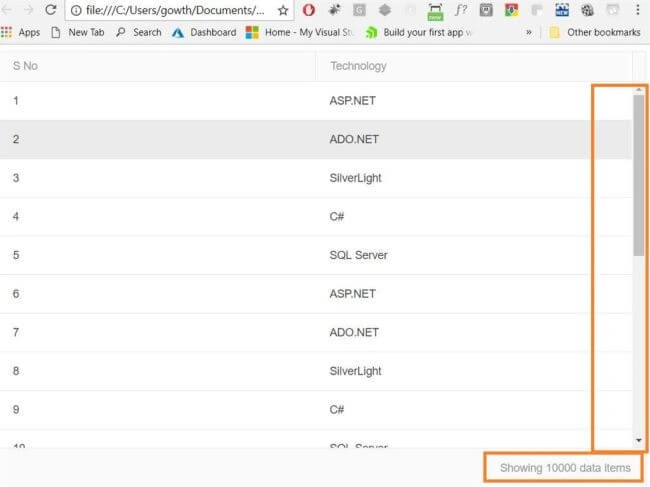
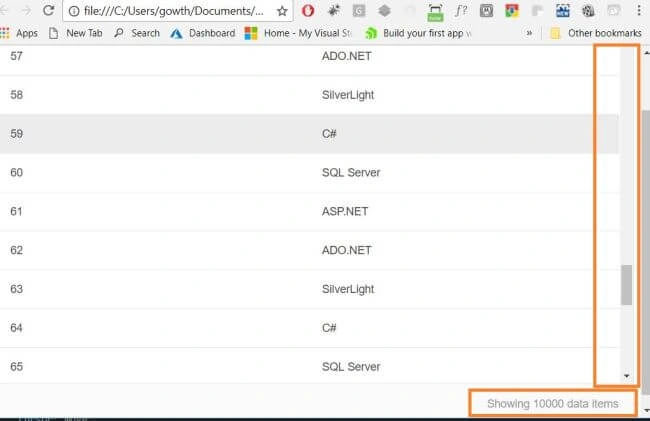
After scrolling down, the rest of the data will load based on demand, as shown in the below figure.
https://docs.telerik.com/kendo-ui/api/javascript/ui/grid
I hope you have enjoyed this article. Your valuable feedback, questions, or comments about this article are always welcome.
Join the conversation! Your thoughts help the community grow.