

Here are the steps,
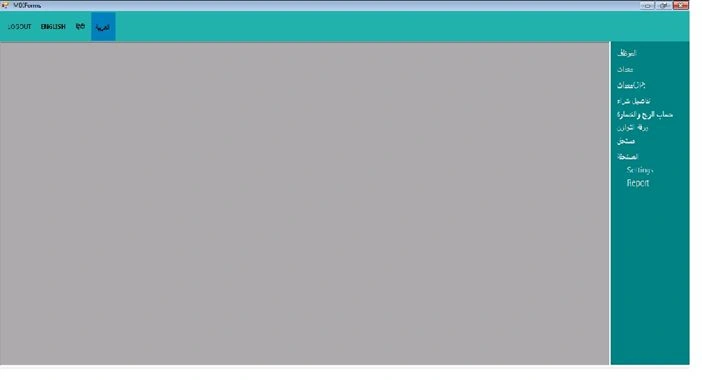
Step 1: Create MDI forms in Windows Forms Application as in the following figure 1,
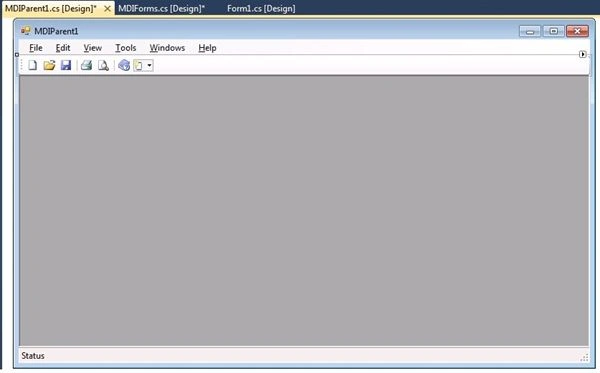
Figure 1
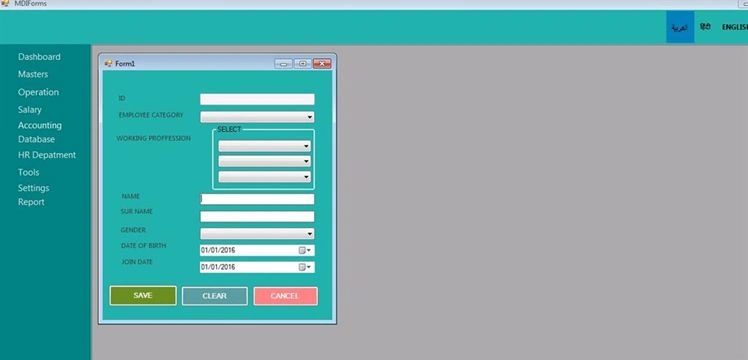
Step 2: Make some designs using two menustrips as in the following figure 2,
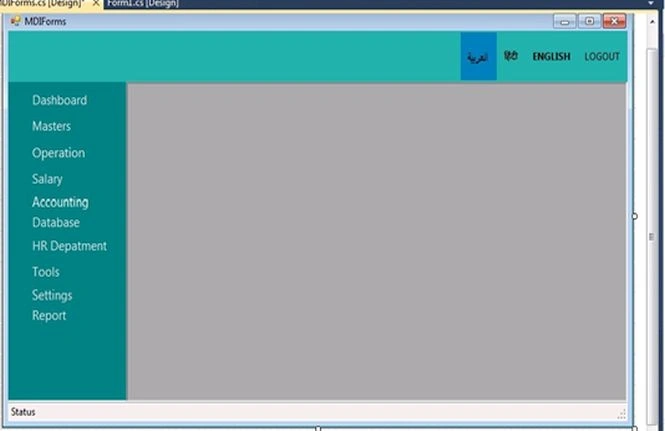
Figure 2
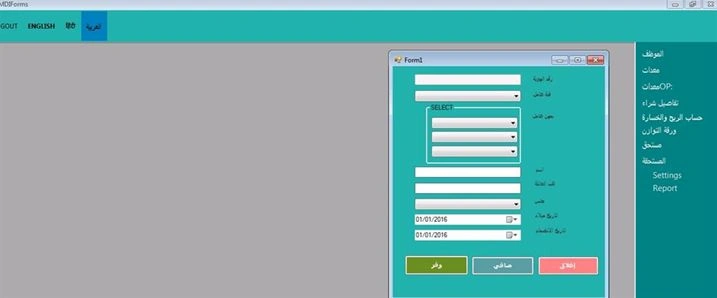
Step 3: Make a new folder named language, then add two resource files, open one resource file and add corresponding Arabic word instead English menu items as in the following figure 3.
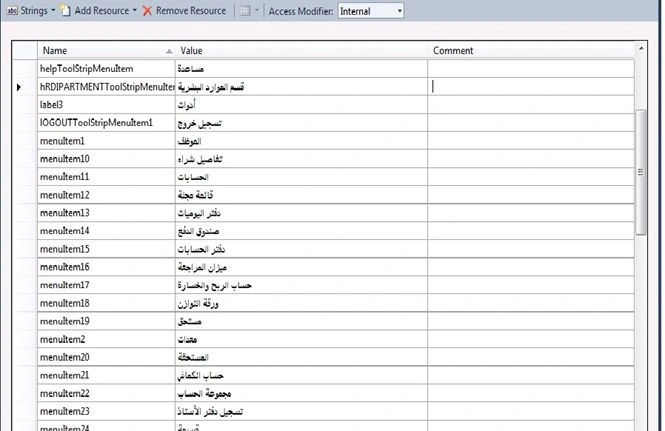
Figure 3
Step 4: Open resource 2 file, add corresponding English word instead menus strip as in the following figure 4.
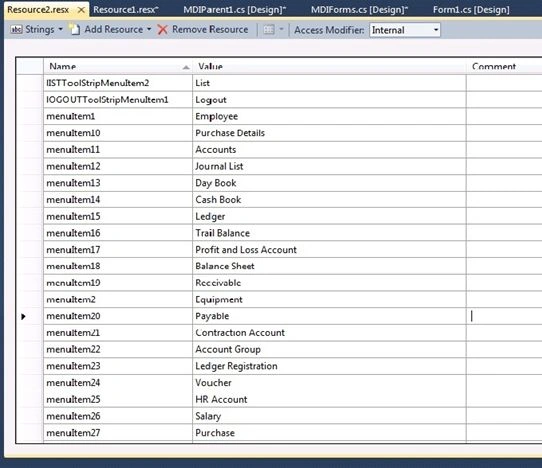
Figure 4
Step 5: Create table on SQL server then update code status to whether English or Arabic and add this code.
Source code:
- using System;
- using System.Collections.Generic;
- using System.ComponentModel;
- using System.Data;
- using System.Drawing;
- using System.Linq;
- using System.Text;
- using System.Windows.Forms;
- using System.Resources;
- using System.Globalization;
- using System.Data;
- using System.Data.SqlClient;
- namespace WindowsFormsApplication1
- {
- public partial class MDIForms : Form
- {
- private int childFormNumber = 0;
- public MDIForms()
- {
- InitializeComponent();
- }
- ResourceManager res_man;
- // ResourceManager res_man1; // declare Resource manager to access to specific cultureinfo
- CultureInfo cul;
- private void switch_language()
- {
- menuItem1.Text = res_man.GetString("menuItem1", cul);
- menuItem2.Text = res_man.GetString("menuItem2", cul);
- menuItem3.Text = res_man.GetString("menuItem3", cul);
- menuItem4.Text = res_man.GetString("menuItem4", cul);
- menuItem5.Text = res_man.GetString("menuItem5", cul);
- menuItem6.Text = res_man.GetString("menuItem6", cul);
- menuItem7.Text = res_man.GetString("menuItem7", cul);
- menuItem8.Text = res_man.GetString("menuItem8", cul);
- menuItem9.Text = res_man.GetString("menuItem9", cul);
- menuItem10.Text = res_man.GetString("menuItem10", cul);
- menuItem11.Text = res_man.GetString("menuItem11", cul);
- menuItem12.Text = res_man.GetString("menuItem12", cul);
- menuItem13.Text = res_man.GetString("menuItem13", cul);
- menuItem14.Text = res_man.GetString("menuItem14", cul);
- menuItem15.Text = res_man.GetString("menuItem15", cul);
- menuItem16.Text = res_man.GetString("menuItem16", cul);
- menuItem17.Text = res_man.GetString("menuItem17", cul);
- menuItem18.Text = res_man.GetString("menuItem18", cul);
- menuItem19.Text = res_man.GetString("menuItem19", cul);
- menuItem20.Text = res_man.GetString("menuItem20", cul);
- menuItem21.Text = res_man.GetString("menuItem21", cul);
- menuItem22.Text = res_man.GetString("menuItem22", cul);
- menuItem23.Text = res_man.GetString("menuItem23", cul);
- menuItem24.Text = res_man.GetString("menuItem24", cul);
- menuItem25.Text = res_man.GetString("menuItem25", cul);
- menuItem27.Text = res_man.GetString("menuItem27", cul);
- menuItem28.Text = res_man.GetString("menuItem28", cul);
- menuItem29.Text = res_man.GetString("menuItem29", cul);
- menuItem30.Text = res_man.GetString("menuItem30", cul);
- menuItem31.Text = res_man.GetString("menuItem31", cul);
- menuItem32.Text = res_man.GetString("menuItem32", cul);
- }
- private void CloseAllToolStripMenuItem_Click(object sender, EventArgs e)
- {
- foreach (Form childForm in MdiChildren)
- {
- childForm.Close();
- }
- }
- //string GetConStr();//***************** add sql connection
- private void logOutToolStripMenuItem_Click(object sender, EventArgs e)
- {
- //SqlConnection conn = new SqlConnection(GetConStr());
- //conn.Open();
- //SqlCommand cmd = new SqlCommand("UPDATE Language SET status='Arabic' WHERE status='English' ", conn);
- //cmd.ExecuteNonQuery();
- res_man = new ResourceManager("WindowsFormsApplication1.language.Resource", typeof(MDIForms).Assembly);
- cul = CultureInfo.CreateSpecificCulture("Ar");
- switch_language();
- menuStrip.Font = new Font("Segoe UI", 12, FontStyle.Regular);
- menuStrip1.RightToLeft = RightToLeft.No; ;
- menuStrip.Dock = DockStyle.Right;
- }
- private void eNGLISHToolStripMenuItem_Click(object sender, EventArgs e)
- {
- //SqlConnection conn = new SqlConnection(GetConStr());
- //conn.Open();
- //SqlCommand cmd = new SqlCommand("UPDATE Language SET status='English' WHERE status='Arabic' ", conn);
- //cmd.ExecuteNonQuery();
- res_man = new ResourceManager("WindowsFormsApplication1.language.Resource", typeof(MDIForms).Assembly);
- cul = CultureInfo.CreateSpecificCulture("en");
- switch_language();
- menuStrip.Font = new Font("Segoe UI", 12, FontStyle.Regular);
- menuStrip1.RightToLeft = RightToLeft.Yes; ;
- menuStrip.Dock = DockStyle.Left;
- }
- }
- }
Santhakumar MunuswamyPosted Jan 9, 2016, 2:30 AM
Thanks for nice share
Vinodh NarayananPosted Jan 7, 2016, 9:12 AM
Good one
Ankur MistryPosted Jan 7, 2016, 5:35 AM
Helpful article thanks for sharing
Aparna M RPosted Jan 7, 2016, 2:47 AM
GOOD...
Humayun Kabir MamunPosted Jan 7, 2016, 2:03 AM
Nice...
Debasis SahaPosted Jan 6, 2016, 11:53 PM
Good One..
Kumaresh RajalingamPosted Jan 6, 2016, 9:00 PM
Good one