
Power Automate is a Microsoft tool used to create automated workflows between applications and services. It helps streamline repetitive tasks and processes across different apps and platforms. In Power Apps, Power Automate can be integrated to trigger actions based on user input or specific events within an app, like submitting a form or updating a record. Here automating an approval workflow for tasks created in a SharePoint list using Power Apps and Power Automate. The goal is to streamline the process of submitting tasks, obtaining supervisor approval, and updating the task status based on the approval outcome.
Advantages
- User-friendly: The intuitive interface allows users with minimal technical expertise to create complex workflows.
- Cost Effective: Reduces the need for manual intervention, cutting down on operational costs.
- Scalability: Can be scaled to handle increasing workloads as your business grows.
- Integration with Microsoft Ecosystem: Seamlessly integrates with other Microsoft services like SharePoint, OneDrive, Dynamics 365, Power Apps, Teams, and Outlook, enabling smooth data flow and process automation.
- Customizable Workflows: Allows users to create custom workflows tailored to specific business processes, making them adaptable to a wide range of scenarios.
- Approval Processes: Easily set up approval workflows with predefined conditions, enabling structured decision-making within organizations, such as document or task approval flows.
Disadvantages
- Limited Debugging and Error Handling: Error handling features are not as robust as in some other automation tools, making it challenging to troubleshoot and debug complex flows.
- Dependency on Internet Connectivity: Requires a stable internet connection to run workflows, and any network interruptions can halt the process or result in failed runs.
- Learning Curve for Advanced Features: While basic workflows are easy to create, users may need time to learn more advanced features, such as integrating with custom APIs, using expressions, or handling condition-based flows.
- Limited Offline Support: Power Automate flows run in the cloud, so there is limited support for running automation when offline, which may not suit all use cases.
Steps to Send Emails
Open Power Automate
From the Power Apps ribbon, select Power Automate > Create a new flow.
Create an Automated Flow
- Choose the Automated Cloud Flow option

- Trigger: Select When an item is created (SharePoint) as the trigger.
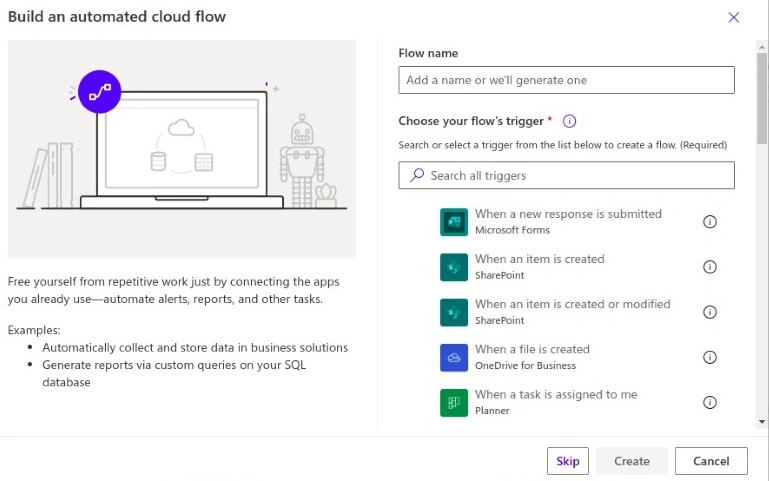
- Choose your SharePoint site and the Task list as the target.

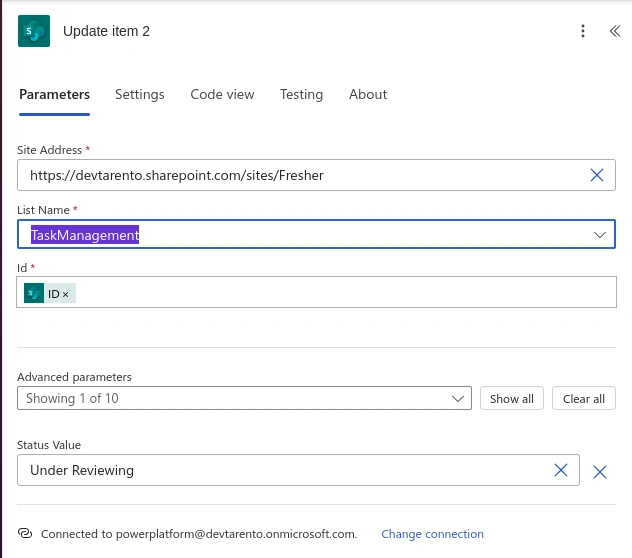
Configure the Update Item Action
- Choose your SharePoint Site and Task List.
- Set the ID to the ID of the item that was just created using dynamic content.
- In the Advanced Parameters select the column that we want to update.
- Locate the name of your status column and set the value to "Under Reviewing".
- This marks the task as under review when it's first created and before the approval process begins.
Add Approval Action
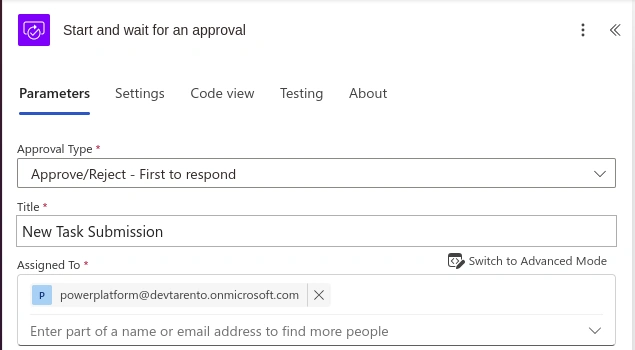
- Click + New Step, then search for Approval select Start, and wait for an approval action.
- Configure the approval.
- Approval Type: Approve/Reject – First to respond.
- Title: New Task Submission.
- Assigned To: Choose any email id from the tenant.
Condition for Approval/Reject
- After the approval action, click + New Step, and add a Condition.
- Set the condition as.
If the "Outcome" is "Approve".

There are two cases true or false. In true first, give an action update item and then Send an email (V2), same as in false condition also
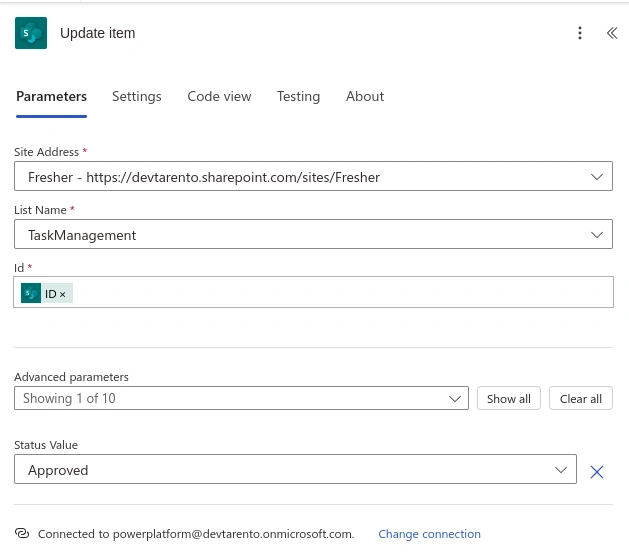
In True
- In Update Item Action: In the advanced parameter set the field needs to be updated as Approved.
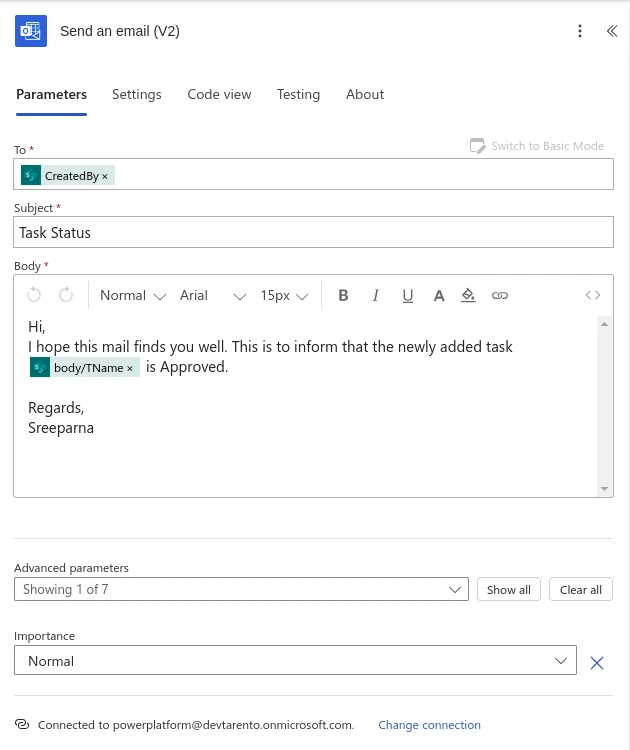
- Send an email (V2)
- This action is to notify the task creator about the approval, including any comments from the approval response.
- In the To field, enter the email of the task creator (from SharePoint).
- In the Subject field write the subject name.
- In the Body field, add dynamic content such as the task name, approval status, and any comments from the approval process.
In False
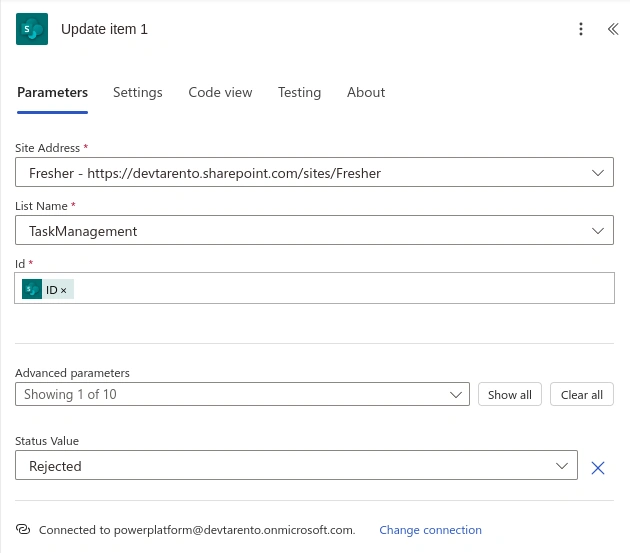
- In Update Item Action: In the advanced parameter set the field needs to be updated as Rejected.
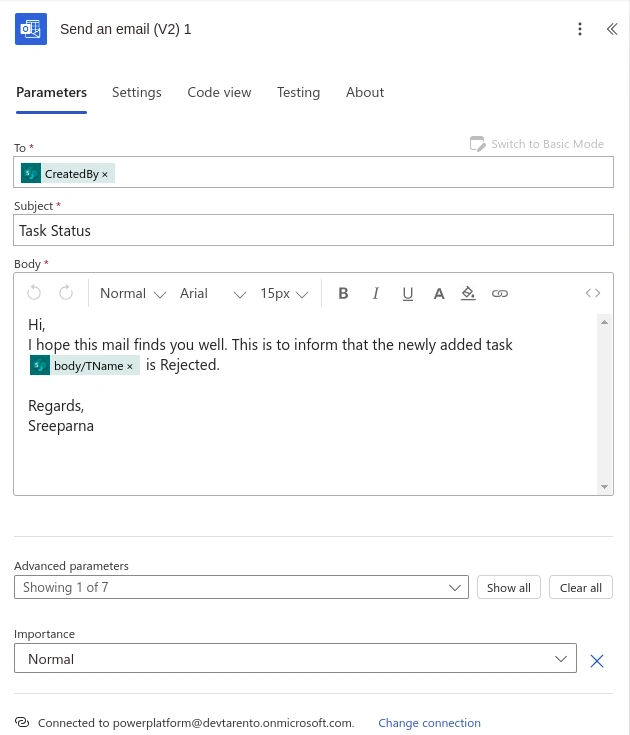
- Send an email (V2)
- In the To field, enter the email of the task creator (from SharePoint).
- In the Subject field write the subject name.
- In the Body field, add dynamic content such as the task name, approval status, and any comments from the approval process.
Save and Test the flow
- Once completed all the steps in the flow click the Save button located at the top of the Power Automate interface.
- Test the flow by creating an item in your SharePoint list to see if the email is sent successfully.
Join the conversation! Your thoughts help the community grow.