

Pre-requisite to understand this
Before understanding HPA-based auto scaling, you should be familiar with:
Basic Docker concepts (images, containers, Dockerfile)
Kubernetes fundamentals
Pods
Deployments
Services
What CPU / Memory metrics are
Basic cloud concepts (AWS / GCP / Azure managed Kubernetes)
YAML configuration basics
Understanding of microservices architecture
High-level idea of load balancing
Introduction
Auto-scaling Docker applications in the cloud is most commonly achieved using the Kubernetes Horizontal Pod Autoscaler (HPA). HPA automatically adjusts the number of running container instances (pods) based on real-time resource usage such as CPU, memory, or custom metrics. This allows applications to dynamically respond to traffic changes while maintaining performance and optimizing cost. HPA is a core feature of Kubernetes and is widely used in cloud-native architectures.
What problem can we solve with this?
Without auto scaling, applications face several operational challenges.
Problems solved by HPA:
Application crashes due to traffic spikes
Over-provisioning of resources during low traffic
Manual intervention needed to scale applications
Poor user experience during high load
Inefficient cloud cost management
Key benefits:
Automatic response to load
High availability
Better performance consistency
Reduced operational effort
How to implement / use this?
To auto scale Docker apps using HPA, your Docker containers must run inside a Kubernetes cluster. HPA works by monitoring metrics from running pods and increasing or decreasing replicas of a Deployment.
High-level steps:
Deploy Docker app as a Kubernetes Deployment
Ensure Metrics Server is installed
Define resource requests/limits
Create an HPA object
Kubernetes automatically manages scaling
Key components involved:
Kubernetes API Server
Metrics Server
HPA Controller
Deployment Controller
Pods (Docker containers)
Sequence Diagram (HPA Workflow)
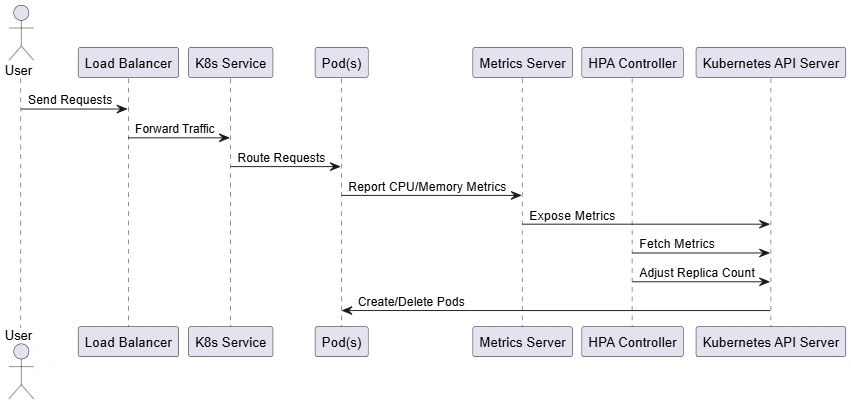
User traffic flows through the Load Balancer to Kubernetes Service
Service distributes requests to running Pods
Pods report CPU/memory usage to Metrics Server
HPA polls Metrics Server via API Server
If thresholds exceed target:
HPA increases pod replicas
If usage drops:
HPA reduces pod replicas
Kubernetes automatically schedules new Pods
Component Diagram (Architecture)
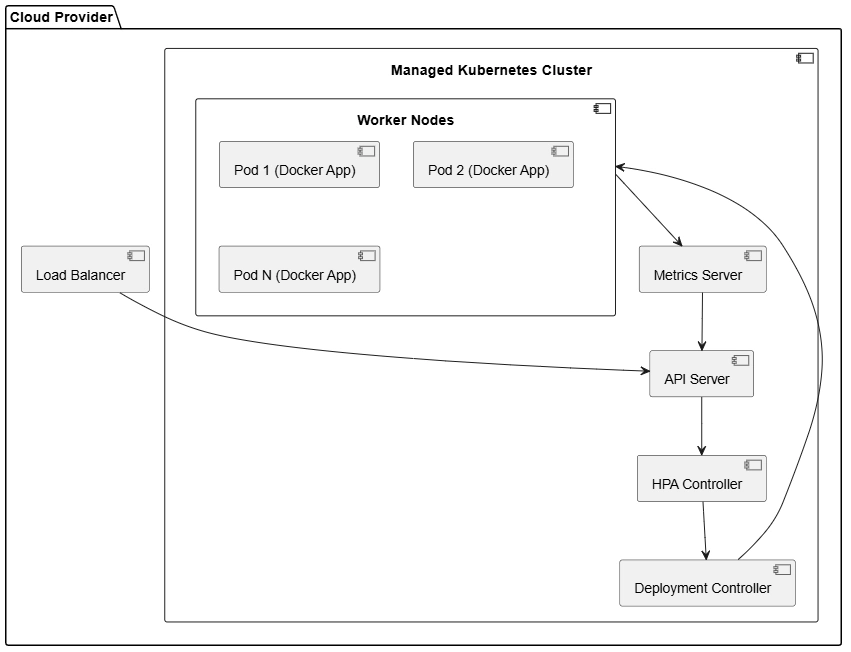
Load Balancer exposes application to the internet
API Server acts as control plane entry point
Metrics Server gathers resource usage
HPA Controller evaluates scaling rules
Deployment Controller adjusts pod replicas
Worker Nodes host Docker containers (Pods)
Advantages
Automatically scales based on real usage
Improved application reliability
Cost-efficient resource usage
No downtime during scaling
Native Kubernetes feature
Supports custom metrics (Prometheus, etc.)
Works seamlessly with cloud providers
Summary
Auto scaling Docker applications using Kubernetes HPA is a foundational cloud-native practice. By continuously monitoring resource usage and adjusting the number of running pods, HPA ensures applications remain responsive under load while minimizing infrastructure costs. When deployed in cloud environments with managed Kubernetes services, HPA provides a robust, automated, and production-ready scaling mechanism essential for modern microservices architectures.
Join the conversation! Your thoughts help the community grow.