

In this article, you will learn how to use an exception Microsoft Enterprise Library 5.0 Exception Handling Application Block with real-world example in ASP.Net.
- What is an Exception Handling Block? The Enterprise Library Exception Handling Application Block helps developers and policy makers to create a consistent strategy for processing exceptions that occur in all architectural layers of an enterprise application. It provides commonly used exception handling functions, such as the ability to log exception information, the ability to hide sensitive information by replacing the original exception with another exception, and the ability to maintain contextual information for an exception by wrapping the original exception inside another exception. These functions are encapsulated in .NET classes named exception handlers.
Read more: http://msdn.microsoft.com/en-us/library/ff649140.aspx
Install Enterprise Library
Please follow this link to download the Enterprise Library 5.0:
http://www.microsoft.com/en-in/download/details.aspx?id=15104
To install an Enterprise Library Exception Handling Application Block, run the following command in the Package Manager Console:
PM> Install-Package EnterpriseLibrary.ExceptionHandling
Getting Started
Begin using the following procedure:
- Start Visual Studio
- Create a new website
- Provide the name and location of website
- Click "Next"
Now add a reference for the following two assemblies in the bin folder: "Microsoft.Practices.EnterpriseLibrary.ExceptionHandling.dll.
Now open the web.config file in edit mode and edit the exception handling settings.
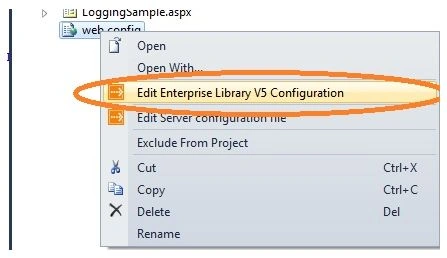
Image 1.
Now add Exception Handling Settings from blocks tab.
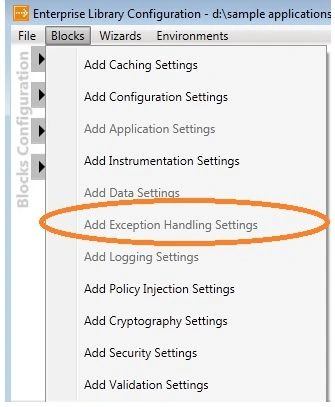
Image 2.
Now you need to provide policy name and exception type.
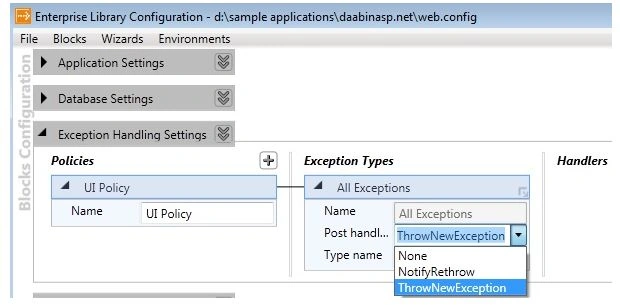
Image 3.
Now check that your web.config has been updated. It adds an exceptionhadling section in the section tag and exception handling tag.
qaz wsxPosted Mar 26, 2015, 3:43 AM
I am not getting the option to edit the web.config file for editing the exception handling settings, I am missing something?
jaya kumarPosted Dec 18, 2014, 7:35 AM
I got below error: Must set an ExceptionManager in the ExceptionPolicy class using the SetExceptionManager method.
Sagar GohilPosted Dec 3, 2014, 1:03 AM
how to store these exceptions in Database or azure table storage?