

In this article, we are showing how to practically implement the “Database First” approach in Entity Framework Core 7 using Command Line (CLI). EF7 model can be “reverse engineered” from the database using CLI EF Core tools.
1. Introduction
Entity Framework Core is giving preference to the “Code First” approach and a bit neglects the “Database First” approach, which resulted, among other things, that the GUI interface for “Database First” in Visual Studio is not officially implemented (as of May 2023). Users are officially pointed to the use of Command Line (CLI) for “reverse engineering” database schema into C# Entity classes. Usage of Command Line commands is always difficult to remember and non-intuitive compared to GUI usage. I would definitely call this a step back compared to the nice GUI tools that were available for EF6 (from .NET 4.8 Framework). This article has aim to outline practical steps to “reverse engineer” a database and create EF7 entity classes for usage in serious applications.
1.1. Importance of the “Database First” Approach
Many information systems, particularly banking, are “data-centered” where the database plays the central role. Applications are organized around databases, which are the center of the universe in such organizations. Changes to databases are often done by independent Database Analysts or Business Analysts, and applications need to cope with changes to database schemas and adapt their Data Access Layer (DAL) to changes done to the database by other actors. Typically, there are several applications in use, some legacy, using ADO.NET technology or similar. Talking about the “Code First” approach in such a situation is not realistic. The only possible approach is “Database First” for the application that uses EF/.NET, and also, other applications around the database need to apply their own analogous “Database First” steps, like recreating the model for ADO.NET, etc. Therefore, it is a big disappointment that the Microsoft Entity Framework team so rudely neglected the “Database First” approach in EF7 Core and pushed it to the command line (CLI).
1.2. EFCorePowerTools
This article would not be complete without mentioning the EFCorePowerTools [3], which is a GUI tool to implement the “Database First” approach for EF7 Core. It is not clear to me; it looks like that is not an “official” Microsoft tool but a “community open source”. It is, in my opinion highly usable tool, but this article is not about it. Here we focus on the “official” command line interface (CLI) approach.
2. Sample Project
2.1. Sample Console.NET7 application
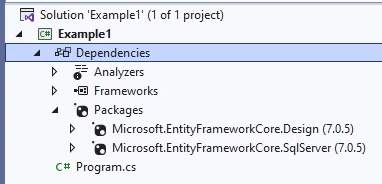
We created a sample Console .NET7 application which we will use. Please use NuGet package manager to add the following packages (dependencies) to the application, as in the screenshot:
- Microsoft.EntityFrameworkCore.Design
- Microsoft.EntityFrameworkCore.SqlServer
2.2. Sample SqlServer database
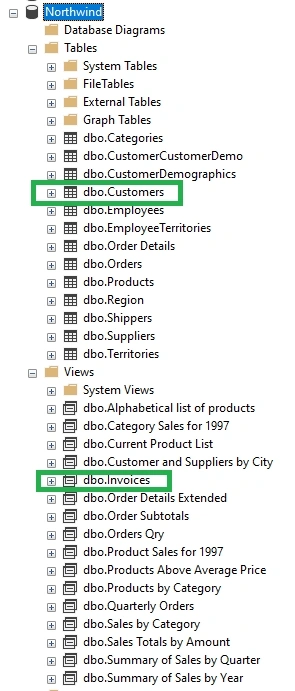
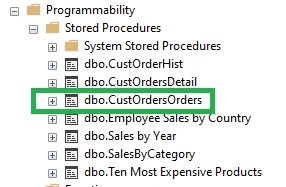
We will be using a sample SqlServer database Northwind. Since there are many database objects, we will focus on only one 1)table “Customers”, 2)view “Invoices”, 3) stored procedure “CustOrdersOrders”. They are outlined in the screenshots. We will just check how “reverse engineering” went for those objects.
3. Installing CLI EF Core tools
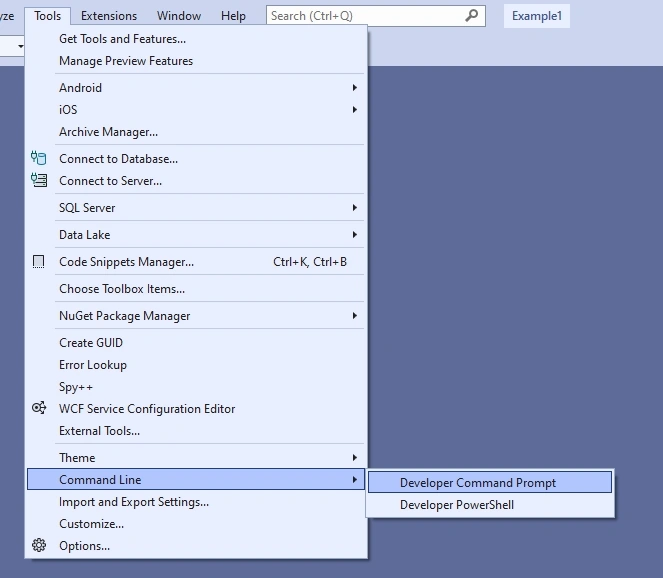
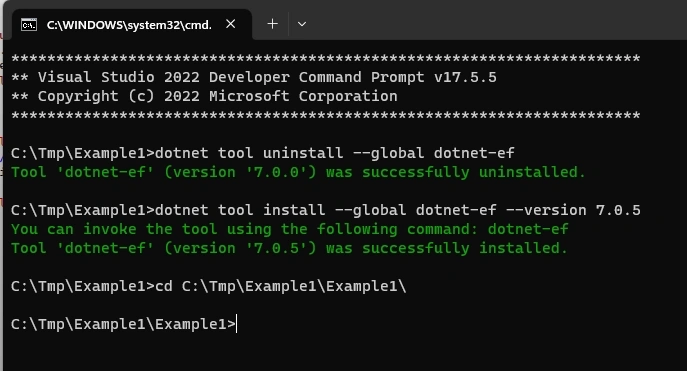
You need to install CLI EF Core tools and navigate to the project folder. Here are the commands you will need.
dotnet tool uninstall --global dotnet-ef
dotnet tool install --global dotnet-ef --version 7.0.5
cd C:\Tmp\Example1\Example1\
Here are screenshots
4. Reverse Engineering Entities (Scaffolding)
4.1. Database First – creating model
Now is the time to do actual work. You will need a command similar to the following. I like my entity names to be as similar to table names as possible, so that is the reason for some flags used. Also, I do not want a database connection string embedded into the code, I want to use a configuration file and load it from there. Also, I want my model to be in a separate folder named NorthwindDB.
Here is a command for Reverse Engineering (Scaffolding) entities.
//Here is command I used (should be  one line command)
//===============================================
dotnet ef dbcontext scaffold
  "Data Source=.;User Id=sa;Password=dbadmin1!;Initial Catalog=Northwind;Encrypt=False"
Microsoft.EntityFrameworkCore.SqlServer
  --use - database - names
  --output - dir NorthwindDB--context - dir NorthwindDB
  --no - pluralize--no - onconfiguring--force
//===============================================
//Here is a legend
ef dbcontext scaffold = command name "Data Source=.;User Id=sa;Password=dbadmin1!;Initial Catalog=Northwind;Encrypt=False" = commection string to database
  --use - database - names = I want entity names same / similar to db - object names
  --output - dir NorthwindDB = output directory in my project
for entities
--context - dir NorthwindDB = output directory in my project
for context
--no - pluralize = I want entity names same / similar to db - object names
  --no - onconfiguring = no OnCongiguring method with connect string
  --force = will override any existing model
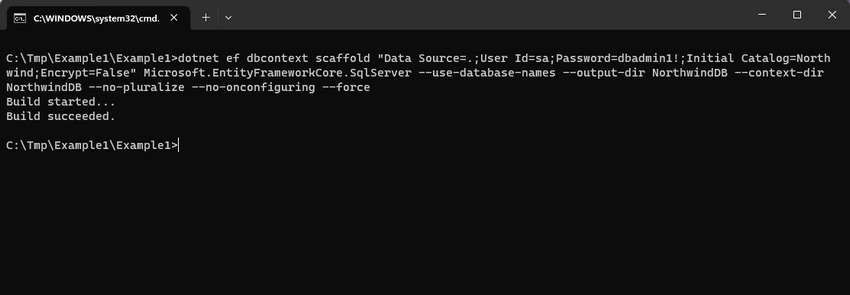
And here is a screenshot of the execution.
And here is the generated model in our application.
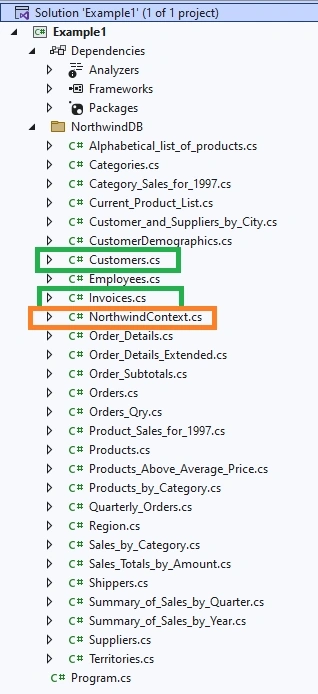
Note that there are created entities for 1)table “Customers”, 2)view “Invoices”, but not for 3) stored procedure “CustOrdersOrders”. Also, the database context file NorthwindContext has been generated.
4.2. No Support for Stored Procedures
It is sad, but CLI EF tools for EF7 Core do not offer support for Stored Procedures at all in the “Database First” approach. That is a big disappointment since EF6 design GUI tools (From .NET 4.8 Framework) supported Stored Procedures.
For example, in my production system on SQL Server, I have maybe 300 stored procedures and other guys from other teams sometimes change some stored procedures, and if tooling is not helping me with those changes, I need to manually detect them or wait for bugs to be reported to get notified that something changed.
The good news is that before mentioned EFCorePowerTools [3] support Stored Procedures, but we have a strange situation the “official” tool does not support it, “community open source” supports it, etc. Also, I have read about some limitations of EFCorePowerTools regarding support of Stored Procedures on some forums.
Nevertheless, you can still work with Stored Procedures in EF7's “Database First” approach as described in [4]; just you need to create Entity classes manually.
5. Reading configuration files
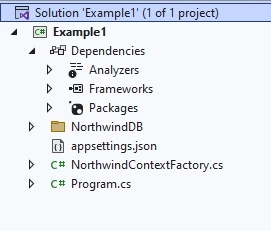
To make the application more professional, we will place the database connection string into the config file appsettings.json and create the factory method to create DbContext. We do not want to make changes to NorthwindContext class since changes will be lost if the EF model is regenerated.
{
  "ConnectionStrings": {
    "NorthwindConnection": "Data Source=.;User Id=sa;Password=dbadmin1!;Initial Catalog=Northwind;Encrypt=False",
  }
}
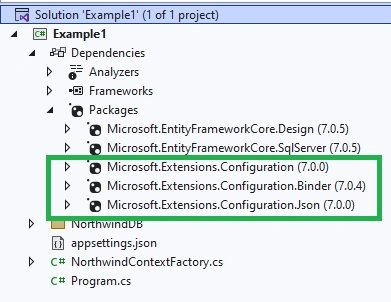
You will need to install more packages from the NuGet package manager.
internal class NorthwindContextFactory : IDesignTimeDbContextFactory<NorthwindContext>
{
    static NorthwindContextFactory()
    {
        IConfiguration config = new ConfigurationBuilder()
           .SetBasePath(Directory.GetCurrentDirectory())
           .AddJsonFile("appsettings.json", true, true)
           .Build();

        connectionString = config["ConnectionStrings:NorthwindConnection"];
        Console.WriteLine("ConnectionString:"+connectionString);
    }

    static string? connectionString = null;

    public NorthwindContext CreateDbContext(string[] args)
    {
        var optionsBuilder = new DbContextOptionsBuilder<NorthwindContext>();
        optionsBuilder.UseSqlServer(connectionString);
        return new NorthwindContext(optionsBuilder.Options);
    }
}
Here is a look at the application now.
6. Testing application
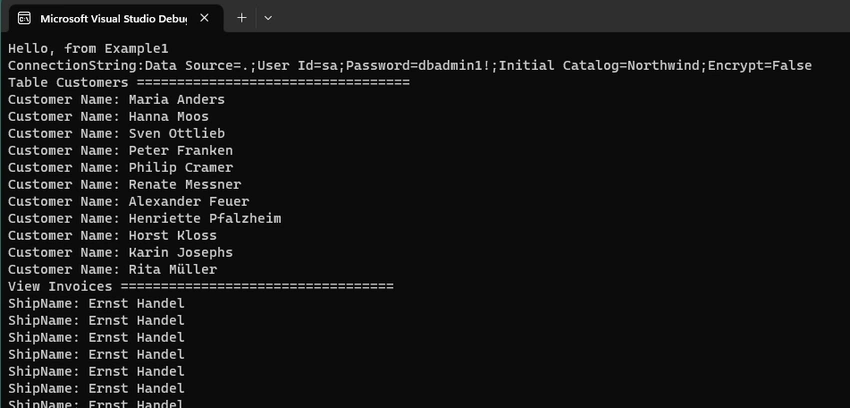
We will create some code to test our EF-generated model. Here is the test code.
Console.WriteLine("Hello, from Example1");

using NorthwindContext ctx = new NorthwindContextFactory().CreateDbContext(new string[0]);

Console.WriteLine("Table Customers ==================================");
var tableCustomers = ctx.Customers.Where(p => p.Country == "Germany");
foreach (var customer in tableCustomers)
{
    Console.WriteLine("Customer Name: " + customer.ContactName);
}

Console.WriteLine("View Invoices ==================================");
var viewInvoices = ctx.Invoices.Where(p => p.ShipCity == "Graz");
foreach (var invoice in viewInvoices)
{
    Console.WriteLine("ShipName: " + invoice.ShipName);
}
And here is the execution result.
7. Changes to the database
So, what if you change your database schema? You need to regenerate the EF model, and the above command will work because of the “–force” flag that will override the old model with the new one. That is the reason you can not put any code into generated classes since the new EF model generation will erase your changes. You can and need to, however, exploit the fact that those classes are created as “partial” so you can extend generated classes with custom “partial” classes.
8. Conclusion
We showed how “Database First” EF7 model class generation works from the command line (CLI) using CLI EF Core tools. The process is not difficult, although not as intuitive as the GUI approach we had in EF6 from .NET 4.8 Framework.
It is interesting to read at [5] comment from Arthur Vickers, Engineering Manager for .NET Data and Entity Framework at Microsoft, that,
- “Visual tools such as the Model Browser - this is something we have no plans to implement”
- “…visual tools (especially those in Visual Studio) are very expensive to both build and maintain… not sure the ROI would be worth it…”
So, no chance of Visual EF Tools from Microsoft, which is bad news for many .NET developers.
A serious problem is the absence of support for Stored Procedures. That almost puts in question the maturity of those EF7 Core tools for serious usage. It even, in some cases, seriously questions the usability of EF7 Core for certain cases.
The next article I plan is on EFCorePowerTools.
References
- https://learn.microsoft.com/en-us/ef/core/cli/
- https://learn.microsoft.com/en-us/ef/core/managing-schemas/scaffolding/?tabs=dotnet-core-cli
- https://github.com/ErikEJ/EFCorePowerTools/
- https://www.entityframeworktutorial.net/efcore/working-with-stored-procedure-in-ef-core.aspx
- https://github.com/dotnet/efcore/issues/15105
Join the conversation! Your thoughts help the community grow.