Introduction
Entity splitting gives us the ability to take an entity in our model and split this entity into multiple database tables. When we query an entity, Entity Framework will create a query that automatically joins the related physical tables for us. Earlier, the database first approach is known as Table Per Type (
TPT). In this article, I am explaining it with the Code First Approach.
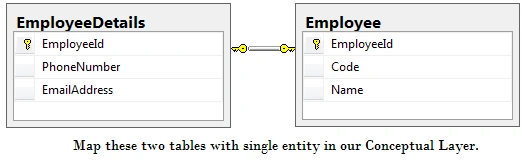
Table Per Type is an inheritance type and uses a separate table in the database to maintain the data and uses a single entity in the Entity Framework. In other words, entity splitting involves mapping a single entity in a conceptual layer to multiple tables in a store (database) layer. Suppose we have a high normalized database structure in which the database has two tables that store Employee basic information (Code and Name) and employee additional information (email address and phone number).
Consider the following entity in the Code First model.
- public partial class Employee
- {
-
- public int EmployeeId { get; set; }
-
- [StringLength(10)]
- public string Code { get; set; }
-
- [StringLength(50)]
- public string Name { get; set; }
-
-
- [StringLength(25)]
- public string PhoneNumber { get; set; }
-
- [StringLength(255)]
- public string EmailAddress { get; set; }
- }
The preceding model stores information about an employee in our system. The Employeeid, Code, and Name properties will be stored in the employee table and email address and phone number properties will be stored in the Employee details table. In the default configuration, Entity Framework generates five columns in a single table (employee). In the store (database) we have two tables to store this information, so we need to change this configuration by overriding the "OnModelCreating" method of the DbContext Class.
- public partial class Model : DbContext
- {
- public Model() : base("name=EntityModel")
- {
- Database.Log = Console.WriteLine;
- }
- public virtual DbSet<Employee> Employees { get; set; }
-
- protected override void OnModelCreating(DbModelBuilder modelBuilder)
- {
- modelBuilder.Entity<Employee>()
- .Map(map =>
- {
- map.Properties(p => new
- {
- p.EmployeeId,
- p.Name,
- p.Code
- });
- map.ToTable("Employee");
- })
-
- .Map(map =>
- {
- map.Properties(p => new
- {
- p.PhoneNumber,
- p.EmailAddress
- });
- map.ToTable("EmployeeDetails");
- });
- }
- }
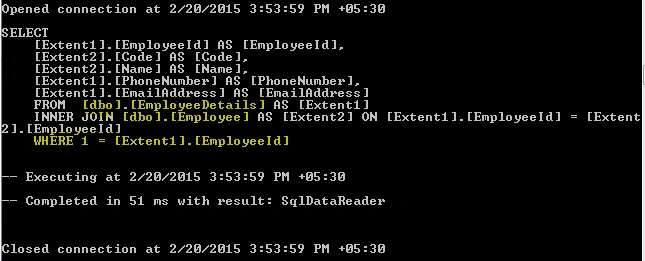
As said earlier, when we query the employee entity, the Entity Framework automatically generates a join query between the two tables. To analyze the query, we just turn on "Logging SQL" of Entity Framework.
Let us consider the four scenarios: select, insert, update, and delete and check the behavior of the Entity Framework.
Select scenario
When we query on the employee entity, the Entity Framework generates a join query between the employee and employeedetails tables.
Example code:
- using (Model context = new Model())
- {
- var Employee = context.Employees.Where(o => o.EmployeeId == 1).ToList();
- }
Output:
Insert entity scenario
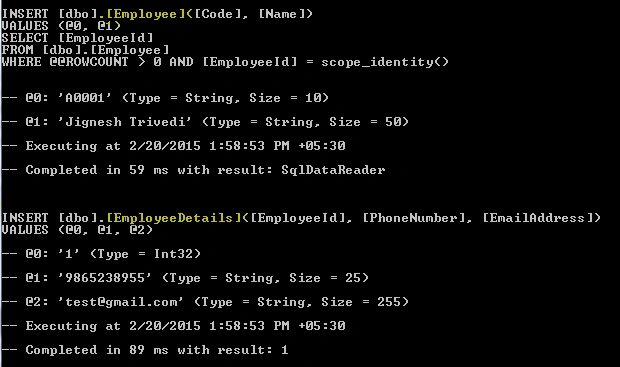
When we perform an insert operation on an employee entity, Entity Framework generates an insert query for both tables (employee and employeedetails).
Example code:
- using (Model context = new Model())
- {
- Employee employee = new Employee();
- employee.Code = "A0001";
- employee.Name = "Jignesh Trivedi";
- employee.EmailAddress = "[email protected]";
- employee.PhoneNumber = "9865238955";
-
- context.Employees.Add(employee);
- context.SaveChanges();
- }
Output:
Update entity scenario
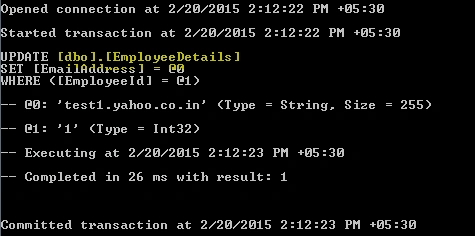
When we do an update operation on an employee entity, Entity Framework generates an update query for the table that the column has been updated. In the following example, I have an update email address column, Entity Framework generates an update query only for the employee details table.
Example code:
- using (Model context = new Model())
- {
- Employee employee = context.Employees.Where(p => p.EmployeeId == 1).FirstOrDefault();
- employee.EmailAddress = "test1.yahoo.co.in";
- context.SaveChanges();
- }
Output:
Delete entity scenario
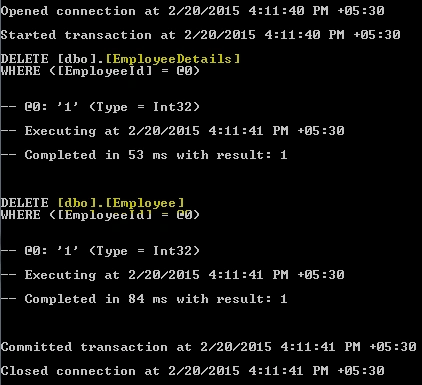
When we do a delete operation on an employee entity, Entity Framework generates a delete query for both tables (employee and employeedetails).
Example code:
- using (Model context = new Model())
- {
- Employee employee = context.Employees.Where(p => p.EmployeeId == 1).FirstOrDefault();
- context.Employees.Remove(employee);
- context.SaveChanges();
- }
Output:
Conclusion
The main advantage of Entity Splitting is that the SQL schema is normalized as we want and the entity looks very simple. In addition, model enhancement is very straightforward.


Coder6652Posted Mar 7, 2023, 3:21 AM
If the Employee model contained a nested EmployeeContactInfo class instead of the individual properties, I assume that we would map it as EmployeeContactInfo.EmailAddress when splitting the columns? If the splitting involves a lot of columns this would be very cumbersome. However, if you defined a nested class for each set of properties, and .EF understood to include all properties of each nested class when splitting to a different table, it would make it easier.
Ahmed ZunaidPosted Feb 21, 2019, 4:52 PM
Is it possible to this sort of entity splitting in one-to-many relationship. I am guessing its not possible right ? Can you please give an example if its is.
Tuan Anh LuongPosted Apr 30, 2015, 6:03 AM
It's very clear. View more Implementing Entity Framework with MVC https://youtu.be/hYUASO5dnAk
Rahul Kumar SaxenaPosted Feb 25, 2015, 12:18 PM
Love it...
Prasham SabadraPosted Feb 21, 2015, 11:46 PM
Nice Article. Thanks for sharing!