

Background
In this article we will learn about the Environment class of C#,which provides the machine configuration details,Program execution Environment details as well as some properties which is used to break the one line into new line which is written in the program for output.
Let us learn the definition of array so beginners can also understand.
What is Environment class ?
Environment class is static class which Provides the system configuration,Current program execution Environment as wel some properties for string manipulation such as news line,System Namespace represents the Environment Class.
Environment class is a combination of functions and Properties which represent the Environment variable details using IDictionary in the form of key,value pairs.
we can also loop through Dictionary to get all Environment variable details,before introducing all Environment variable,let us go through some frequently used Environment variable details.
as we Environment class is the static class because of this we directly access the methods and properties with help of class name itself without creating object.
Let us see
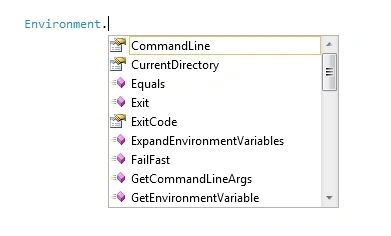
As explained above defination ,Environment class is the static class which provides the some properties and function as you can see in the above Image.
You can access the particular property or function as
Example
- Environment.OSVersion.ToString(); //Operating system Details
- Environment.NewLine.ToString(); //string will split into New line
- Environment.MachineName.ToString();//Machine Name
- Environment.Is64BitProcess.ToString();//checkes whether the system is 64 bit
- Environment.ProcessorCount.ToString();//gets the number of process currently running on current machine
- Environment.UserDomainName.ToString();//gets the network domain name which is currently associated with current User Computer
- Environment.UserName.ToString();//gets the username of person who currently logged on the windows operating System system
- Environment.WorkingSet.ToString();//gets the Amount of physical memory mapped to the process contex
- Environment.Exit(12);//terminates the process and gives the underlying operating system the Specified exit code
- Environment.CurrentDirectory.ToString();//gets the full path of current working directory.
- Environment.HasShutdownStarted.ToString();//Gets the Value whether CLR is shutting down
- Environment.SystemPageSize.ToString();//gets the Amount of memory for an operating system's Page file.
To demonstrate the above properties lets us create the one console application,as
- using System;
- using System.Collections;
- namespace UsingEnvironmentClass
- {
- class Program
- {
- static void Main(string[] args)
- {
- ArrayList ar = new ArrayList();
- ar.Add("OSVersion: " + Environment.OSVersion.ToString()); //Operating system Details
- ar.Add("OSVersion Platform: " + Environment.OSVersion.Platform.ToString()); //Operating system Platform Details
- ar.Add("OS Version: " + Environment.OSVersion.Version.ToString()); //Operating system version Details
- ar.Add("NewLine :" + Environment.NewLine.ToString()); //string will spilt into New line
- ar.Add("MachineName :" + Environment.MachineName.ToString());//Machine Name of the current computer
- ar.Add("Is64BitProcess : " + Environment.Is64BitProcess.ToString());//Checks whether the OS has 64 bit process
- ar.Add("UserDomainName: " + Environment.UserDomainName.ToString());//gets the network domain name which is currently associated with current User Computer
- ar.Add("UserName : " + Environment.UserName.ToString());//gets the username of person who currenlty logged on the windows operating Sytem system
- ar.Add("WorkingSet :" + Environment.WorkingSet.ToString());//gets the Amount of physical memory mapped to the process contex
- ar.Add("CurrentDirectory: " + Environment.CurrentDirectory.ToString());//gets the full path of current working directory.
- ar.Add("HasShutdownStarted:" + Environment.HasShutdownStarted.ToString());//Gets the Value whether CLR is shutting down
- ar.Add("SystemPageSize:" + Environment.SystemPageSize.ToString());//gets the Amount of memory for an operating system's Page file.
- Console.WriteLine(Environment.NewLine+"Environment Class Details"+Environment.NewLine+"---------------------------");
- foreach (var item in ar)
- {
- Console.WriteLine(item);
- }
- Console.ReadLine();
- }
- }
- }
Now run the above console application,the output will be as
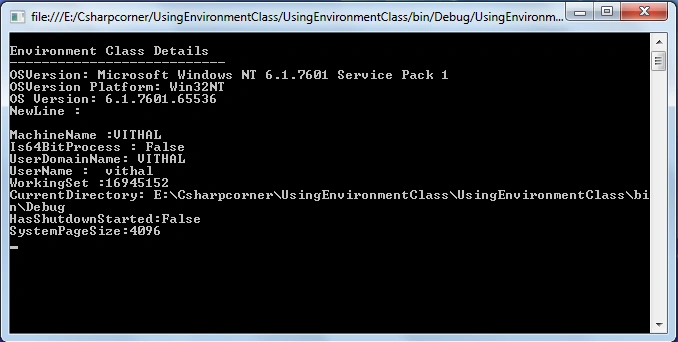
You can also loop through the Environment class variable as
- IDictionary id;
- id = Environment.GetEnvironmentVariables();
- foreach (DictionaryEntry DE in id)
- {
- string VariableName =DE.Key.ToString();
- VariableName += " = ";
- VariableName += DE.Value.ToString();
- Response.Write("<li>" + VariableName +',' +"</li>");
- }
The output of the above program will be as
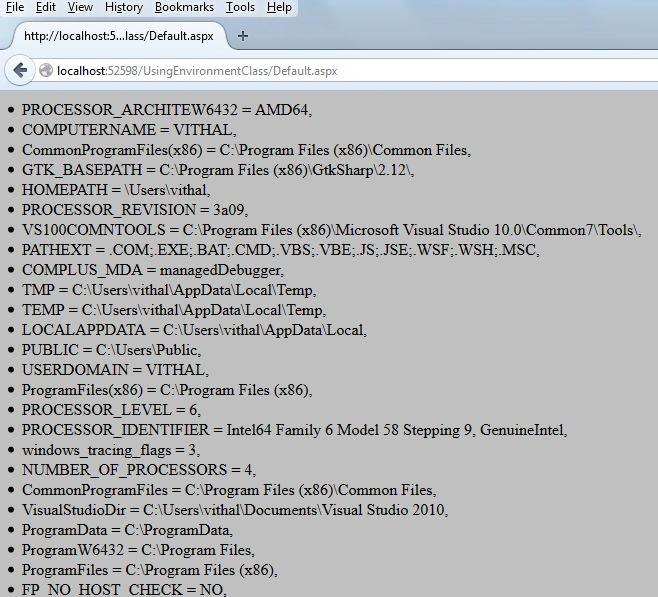
From the above output its also clear that Environment Variables details contains in the form of key -value pairs.
Note:
- Download the Zip file from the attachment for the full source code of the application.
Summary
In the preceding article, I have briefly explained the use of a Environment class to make them understandable to beginners and newcomers. If you have any suggestion regarding this article then please contact me.
Join the conversation! Your thoughts help the community grow.