

Here we discuss event handling in WPF. Here we manually organize an event via coding. Here we take an example in which, we take a Button control and we set the event of this Button Control via managed code. In this example, we take both of the technique of event handling (XAML or Managed Code). Now we discuss the example:
Step1: First we take a Grid in our WPF project.
<Grid>
<Grid.RowDefinitions>
<RowDefinition Height="50"></RowDefinition>
<RowDefinition Height="50"></RowDefinition>
<RowDefinition Height="50"></RowDefinition>
<RowDefinition Height="50"></RowDefinition>
</Grid.RowDefinitions>
<Grid.ColumnDefinitions>
<ColumnDefinition Width="100"></ColumnDefinition>
<ColumnDefinition Width="*"></ColumnDefinition>
</Grid.ColumnDefinitions>
</Grid>
Step 2: Now we take Two Button Controls (btnxamlevent and btnmanagedevent) and two TextBlocks (txtxamlevent and txtmanagedevent) in our program. When we click on the first Button Normal XAML event handler is Calling and in the second Button we set the event handler code via coding. The answer will be displayed in the TextBlocks according to the code. Now we add the following Code in the Grid:
<Button Margin="10,10,15,17" Name="btnxamlevent" Grid.Row="1">Button 1</Button>
<TextBlock Margin="13,12,45,17" Name="txtxamlevent" Grid.Column="1" Grid.Row="1" Text="Click Me(XAML Event)" />
<Button Margin="10,10,15,17" Name="btnmanagedevent" Grid.Row="2">Button 2</Button>
<TextBlock Margin="13,12,0,17" Name="txtmanagedevent" Grid.Column="1" Grid.Row="2" Text="Click Me(Managed Event)" HorizontalAlignment="Left" Width="140" />
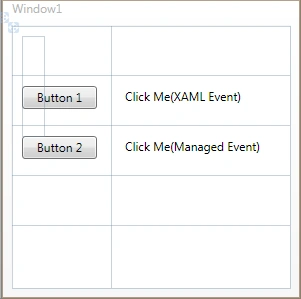
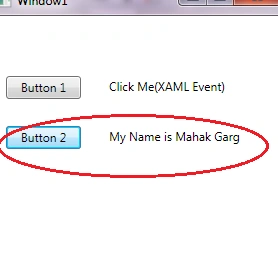
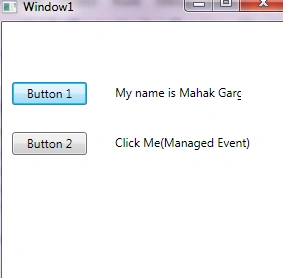
Step 3: Now we add the events in our Button Control. In the XAML event, we should declare it in a .xaml page and in the managed code event handler, which we want to declare we should call it on the .xaml.cs page.
Vivek MalikPosted Oct 25, 2017, 12:46 PM
M facing error "Cannot Assign because it's in a method group" on this this.btnmanagedevent_Click += new RoutedEventHandler(btnmanagedevent_Click);
Nitish SPosted May 16, 2014, 8:09 AM
Gr8 answer....... No one is referring for the number of ways of handling, they are asking for the what are all the different ways to handle the same. If you, @Arun Sharma, are not capable of doing this why the hell are you giving false replies. That too after one long year!!!!!!! Gr8 work Arun Sharma
Arun SharmaPosted May 30, 2013, 8:04 AM
we have 3 different ways to handle event.
Vineet Kumar SainieditedPosted Apr 10, 2012, 6:18 PMEdited Apr 10, 2012, 7:14 PM
Using this post one can easily understand event handling in WPF. How many ways we can handle events in WPF ?