

Introduction
In this article, we discuss event handling in Java Applets.
Event Handling in Applet
We perform event handling in Swing and AWT and we can also do it in Applets.
As we know, Graphical Programming Interfaces (GUIs) contain the components of the user interface. The GUI components are responsible to generate events based on user interactions like clicking the mouse or a key and so on. When an applet is designed, these events are captured and the appropriate actions are performed in response to each of those events provided.
For handling events, we need event handlers, that must be available in Java. The procedure to be followed when an event is generated is:
- First, we must find the type of event that took place.
- Now, find the component that generated the event.
- Finally, we need the appropriate code that handles the event.
Button event handling
It is the most common event generating components in user interfaces. When we click on a button, an action is generated. In fact, the term action is used in button event handling.
Properties
Some of the properties of a button event are:
- It manages the list of button objects that implement the ActionListener interface.
- The actionPerformed method is invoked when we click or press on a button, it is invoked for all of the ActionListener instances in its list.
- The abstract actionPerformed method overrides the ActionListener classes to perform the task for the button.
- As an argument of actionPerformed, an ActionEvent object is passed and from it you can extract information about the event such as which ActionListener initiated the event.
- To add an instance of ActionListener to a button, we must invoke its addActionListener(ActionListener) method.
The following example will help in the understanding of event handling in Applets.
Example
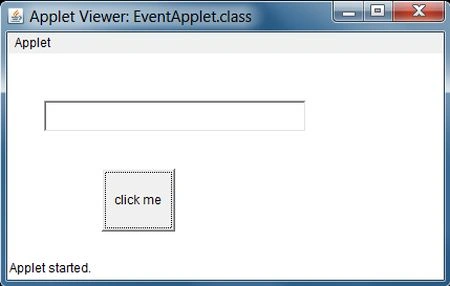
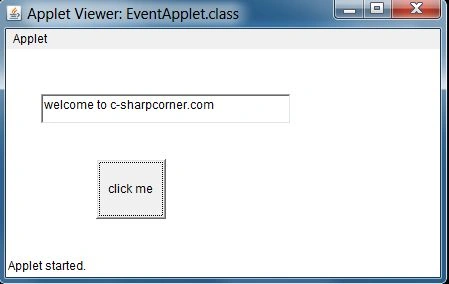
In this example, we perform event handling in an Applet that prints a message by clicking on the button.
- import java.awt.event.*;
- import java.applet.*;
- import java.awt.*;
- public class EventApplet extends Applet implements ActionListener
- {
- Button bttn;
- TextField txtfld;
- public void init()
- {
- txtfld=new TextField();
- txtfld.setBounds(35,45,250,30);
- bttn=new Button("click me");
- bttn.setBounds(90,110,70,60);
- add(bttn);add(txtfld);
- bttn.addActionListener(this);
- setLayout(null);
- }
- public void actionPerformed(ActionEvent ae)
- {
- txtfld.setText("welcome to c-sharpcorner.com");
- }
- }
- /*
- <applet code="EventApplet.class" width="400" height="400">
- </applet
- */
Join the conversation! Your thoughts help the community grow.