

In JavaScript, events are actions or occurrences that happen within the browser, triggered by users (like clicking, typing, or hovering) or by the system (like page load or media playback). These events are central to creating dynamic, interactive web applications. To respond to these events, JavaScript uses event handlers, which are functions specifically designed to execute when an event occurs. This relationship is what powers everything from button clicks to real-time form validation.
Think of it like a smart home system.
The event is pressing a doorbell. The event handler is the system that plays a sound and turns on the porch light.
JavaScript provides multiple ways to handle events, such as using addEventListener() for clean separation between HTML and logic, and inline onclick attributes for quick demo setups.
What is an Event Listener in JavaScript?
An event listener is a JavaScript mechanism that waits for a specific event to occur on a webpage, such as a user clicking a button, pressing a key, or resizing the window, and then executes a function (called an event handler) in response.
How does it work?
- We attach an event listener to an element using the addEventListener() method.
- It listens for a specific type of event (e.g., "click", "keydown", "submit").
- When the event occurs, it triggers the associated function.
How Events and Event Handlers Work in JavaScript?
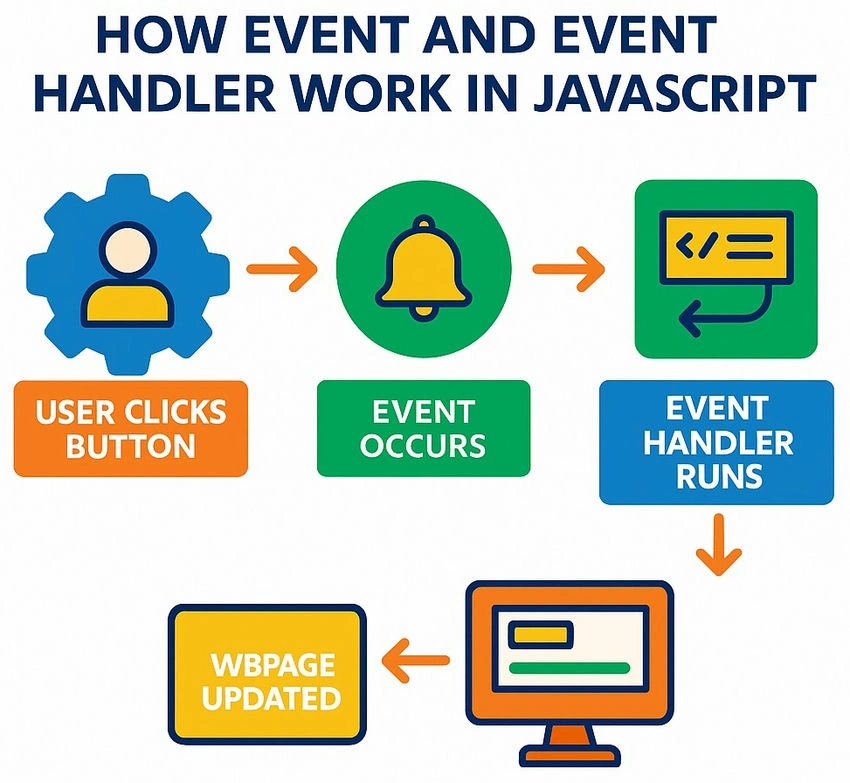
- Browser Waits for Events: The browser constantly listens for user interactions like clicks, keypresses, form submissions, etc.
- JavaScript Registers a Handler: We use addEventListener() to tell JavaScript, “When this specific event happens on this element, run this function.”
- Event Occurs: When the event (like a button click) happens, the browser detects it and notifies JavaScript.
- Event Handler Executes: The assigned handler function runs, performing your custom logic (e.g., showing a message, updating the UI, sending data).
Example
<!DOCTYPE html>
<html>
<head>
  <title>JavaScript Event Example</title>
</head>
<body>

  <!-- A button element the user can interact with -->
  <button id="clickMeBtn">Click Me!</button>

  <script>
    // Step 1: Access the button element by its ID
    const button = document.getElementById('clickMeBtn');

    // Step 2: Define the event handler function
    function handleClick() {
      // This code runs when the button is clicked
      alert("Welcome to C# corner!");
    }

    // Step 3: Attach the 'click' event and bind it to the handler function
    button.addEventListener('click', handleClick);
  </script>

</body>
</html>
Join the conversation! Your thoughts help the community grow.