

Microsoft Excel has long been a staple for number-crunching and data analysis, but recent additions to its formula arsenal, such as the LET function and dynamic arrays, take spreadsheet calculations to a whole new level. In this article, we'll explore a sophisticated advanced Excel formula that generates randomized dates and at the same time, extracts day, month, year, and quarter using a single formula in Excel. Let's get started.
Dates to Extract
In the screenshot below, we've got two dates in cells G2 and G3 we want to extract 100,000 rows of randomized date values and at the same time, extra other components of the dates such as day, month, year, and quarter.
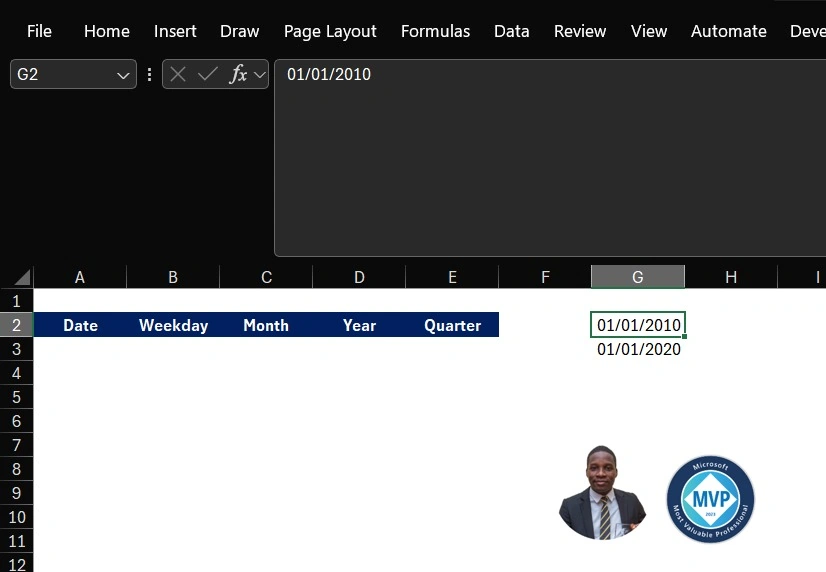
In cell A3, execute this formula.
=LET(
randomDate,RANDBETWEEN(SEQUENCE(100000,,G2,4),SEQUENCE(100000,,G3,4)),
day_extract,TEXT(randomDate,"dddd"),
month_extract, TEXT(randomDate,"mmmm"),
year_extract,YEAR(randomDate),
quarter_extract,"Qtr"&"-"&ROUNDUP(MONTH(randomDate)/3,0),
calc,HSTACK(randomDate,day_extract,month_extract,year_extract,quarter_extract),calc)
Click Enter
Formula Explanation
The formula involves several steps in creating a dynamic single-cell advanced formula:
- random date: generates a random date by using the RANDBETWEEN function. The date falls within the range specified by SEQUENCE(100000, G2,4) and SEQUENCE(100000, G3,4).
- day_extract: retrieves the day of the week from the random date using the TEXT function, formatting it as "D" to display the full-day name.
- month_extract: extracts the full month name from the random date using the TEXT function, with the format set to "mmmm" for the complete month name.
- year_extract: The YEAR function is employed to extract the year from the random data.
- quarter_extract: constructs a string that represents the quarter of the year (e.g., "Qtr-1") by concatenating "Qtr-" with the result of rounding up the month divided by 3.
- calc: The HSTACK function combines the results from random date, day_extract, month_extract, year_extract, and quarter_extract into a horizontal stack.
The HTSTACK function, which was stored in the calc variable, was used to horizontally stack the random date, day of the week, month, year, and quarter. The use of the LET function in this formula is pivotal, allowing for the definition and naming of the above-mentioned intermediate variables within the formula itself.
In the screenshot below, the single formula delivered 100,000 rows of randomized Dates with an additional 4 columns representing the Weekday, Month, Year, and Quarter.

Join the conversation! Your thoughts help the community grow.