

Introduction
Excel is a Microsoft Office component. We often need to convert an Excel document to a tag-based format like XML.
Here I will write a program in C# to convert an Excel file to XML.
First of all we see our requirement of what type of XML file we want, in other words which column comes first and so on.
So, here we are starting.
Excel file
Here we have an Excel file named Birthday list Feb 15 for team.xlsx.
In which we have 5 columns and we sorted them by day in ascending order.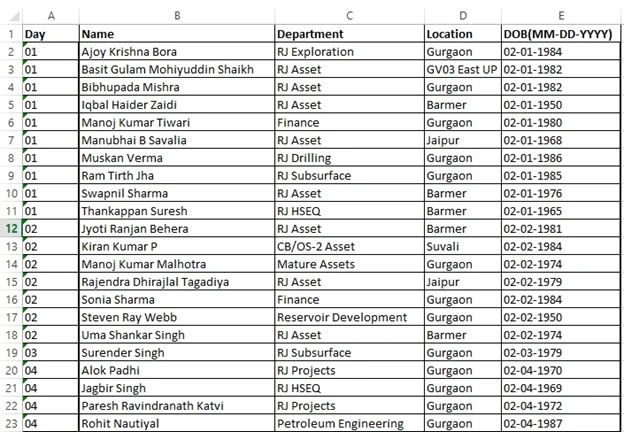
And now we will convert this file to a XML document.
So now start your Visual Studio.
Create a new project, ASP.NET web application, named ExcelXml.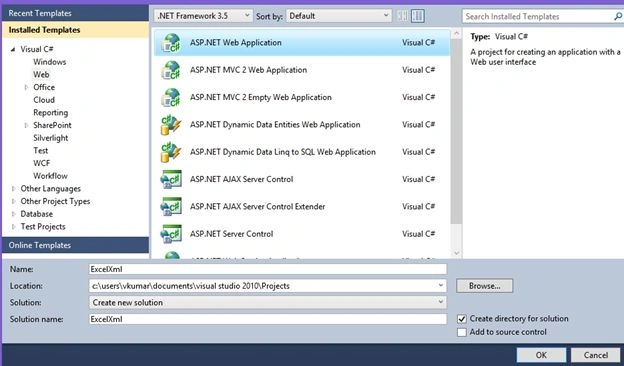
In Solution Explorer click on Default.aspx.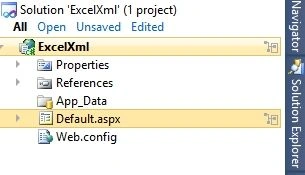
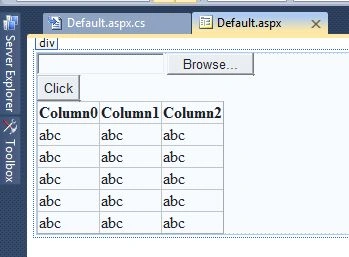
And place the following 3 controls:
- A file upload control.
- A button.
- A Gridvew to display Excel data is coming or not.
Now we will write C# code to convert an Excel file. So in Default.aspx.cs we write our code as in the following:
- using System;
- using System.Collections.Generic;
- using System.Linq;
- using System.Web;
- using System.Web.UI;
- using System.Web.UI.WebControls;
- using System.IO;
- using System.Data.OleDb;
- using System.Data;
- using System.Xml;
- using System.Text;
- namespace ExcelXml
- {
- public partial class _Default : System.Web.UI.Page
- {
- protected void Page_Load(object sender, EventArgs e)
- {
- }
- protected void btncnvrt_Click(object sender, EventArgs e)
- {
- string day, day1 = "";
- string connStr = "";
- int i = 0;
- int oItem = 0;
- if (file1.HasFile)
- {
- string filename = Path.GetFileName(file1.PostedFile.FileName);
- string fileExtension = Path.GetExtension(file1.PostedFile.FileName);
- string filelocation = "C:/Users/VKumar/Desktop/" + filename;
- if (fileExtension == ".xls" || fileExtension == ".XLS")
- {
- connStr = "Provider=Microsoft.Jet.OLEDB.4.0;Data Source=" + filelocation + ";Extended Properties=\"Excel 8.0;HDR=Yes;IMEX=2\"";
- }
- else if (fileExtension == ".xlsx" || fileExtension == ".XLSX")
- {
- connStr = "Provider=Microsoft.ACE.OLEDB.12.0;Data Source=" + filelocation + ";Extended Properties=\"Excel 12.0;HDR=Yes;IMEX=2\"";
- }
- OleDbConnection conn = new OleDbConnection(connStr);
- OleDbCommand cmd = new OleDbCommand();
- cmd.Connection = conn;
- OleDbDataAdapter da = new OleDbDataAdapter(cmd);
- DataTable dt = new DataTable();
- conn.Open();
- DataTable dtSheet = conn.GetOleDbSchemaTable(OleDbSchemaGuid.Tables, null);
- string sheetName = dtSheet.Rows[0]["table_name"].ToString();
- cmd.CommandText = "select * from [" + sheetName + "]";
- da.SelectCommand = cmd;
- da.Fill(dt);
- conn.Close();
- grdExcel.DataSource = dt;
- grdExcel.DataBind();
- DataSet ds = new DataSet();
- ds.Tables.Add(dt);
- oItem = dt.Rows.Count;
- oItem -= 1;
- XmlDocument doc = new XmlDocument();
- XmlDeclaration declaire = doc.CreateXmlDeclaration("1.0", "utf-8", null);
- // -----------------------create root-----------------------------
- XmlElement rootnode = doc.CreateElement("root");
- doc.InsertBefore(declaire, doc.DocumentElement);
- doc.AppendChild(rootnode);
- while (i < oItem)
- {
- day = dt.Rows[i].ItemArray[0].ToString();
- if (day != day1)
- {
- day1 = day;
- DateTime d = Convert.ToDateTime(dt.Rows[i].ItemArray[4]);
- string str = Convert.ToDateTime(d.ToString("dd-MMMM-yyyy")).ToString("MMMM-dd-yyyy");
- string finaldate = str.Replace(d.Year.ToString(), DateTime.Now.ToString("yyyy"));
- XmlElement dobEle = doc.CreateElement("DOB");
- dobEle.SetAttribute("date", finaldate);
- do
- {
- XmlElement emp = doc.CreateElement("EmpDetails");
- XmlElement name = doc.CreateElement("Name");
- XmlElement desig = doc.CreateElement("Designation");
- XmlElement dept = doc.CreateElement("Dept");
- XmlElement loc = doc.CreateElement("Location");
- name.InnerText = dt.Rows[i].ItemArray[1].ToString();
- desig.InnerText = dt.Rows[i].ItemArray[2].ToString();
- dept.InnerText = desig.InnerText;
- loc.InnerText = dt.Rows[i].ItemArray[3].ToString();
- emp.AppendChild(name);
- emp.AppendChild(desig);
- emp.AppendChild(dept);
- emp.AppendChild(loc);
- dobEle.AppendChild(emp);
- i++;
- } while (day1 == dt.Rows[i].ItemArray[0].ToString() && i < oItem);
- doc.DocumentElement.AppendChild(dobEle);
- }
- }
- doc.Save("C:/Users/VKumar/Desktop/Output.xml");
- Response.Write("Created");
- }
- }
- }
- }
Press F6 to build.

Run the project.
Press F5.
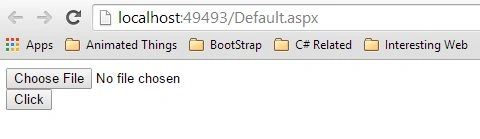
Choose your file from your desktop or where you put your file.
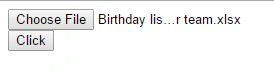
Then click the button.
You get the following result in your browser.

To find the desired output file in XML go to your desktop and look for Output.xml.
Here it is.
Output.xml

Conclusion
So in this way we convert an Excel file to XML. One thing we need to remember is that we need to sort the columns of the Excel file depending on which column comes first.
Akash VOhraPosted Oct 24, 2020, 5:18 PM
Hello Sir, This error is coming at below line .System.IndexOutOfRangeException: 'There is no row at position 0.' string sheetName = dtSheet.Rows[0]["table_name"].ToString();
Frank ByrdPosted Jun 16, 2020, 9:24 AM
Dear sir, as I copy this ..I am getting following errors:1)Error 1 The name 'file1' does not exist in the current context.2)Error 4 The name 'grdExcel' does not exist in the current contex. Please help me out. Thanks . I checked the ID assigned to the text box and the gridview and named them the same as your code shows but still doesnt work
JohnPosted Jun 11, 2018, 2:28 AM
Is der any way to get the cell background color using this code
aamir aliPosted Mar 9, 2017, 4:54 AM
Dear sir,The 'Microsoft.ACE.OLEDB.12.0' provider is not registered on the local machine.
Aamir AliPosted Mar 7, 2017, 5:41 AM
Dear sir, as I copy this ..I am getting following errors:1)Error 1 The name 'file1' does not exist in the current context.2)Error 4 The name 'grdExcel' does not exist in the current contex. Please help me out. Thanks .
SubashPosted Oct 27, 2016, 12:22 AM
Very nice start sir easy to understand crisp point thanks for sharing sir
Upendra Pratap ShahiPosted Jun 15, 2015, 5:06 AM
nice...
Vijai Anand RamalingamPosted Feb 4, 2015, 6:46 PM
Good start!!!
Nitin PanditPosted Feb 3, 2015, 8:00 AM
Good start bro good luck
Pranay RanaPosted Feb 3, 2015, 5:24 AM
it looks good but if possbile try solution with linq to xml and linq to dataset...this code will become less and better to undersood
Dinesh BeniwalPosted Feb 3, 2015, 1:51 AM
Good start Vipin.
Vipin TyagiPosted Feb 2, 2015, 11:52 PM
I need your suggestion on this as it is my first article on any forum.Please help to improve more.