

In previous articles, we covered Logging Application Block In Microsoft Enterprise Library 6.0.
Introduction
Exception handling is one of the most important tasks in any application. Many applications either do not handle applications or they handle it in an Adhoc manner.
In this section, we will see how we can use the readymade exception handling block so that we need not code, and build error handling routines from scratch.
How
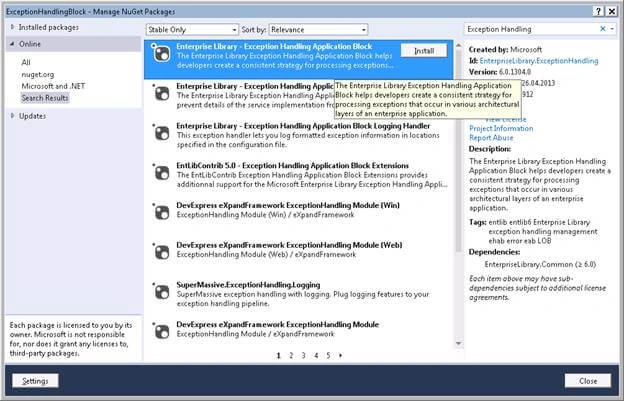
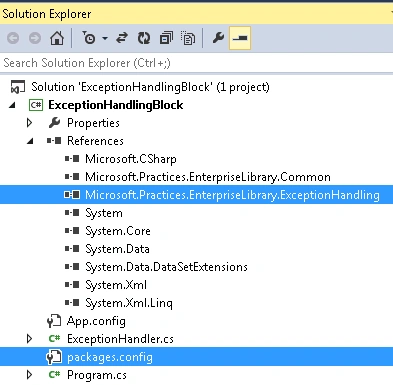
We have to install Enterprise Library – Exception Handling Application Block from NuGet Packages.
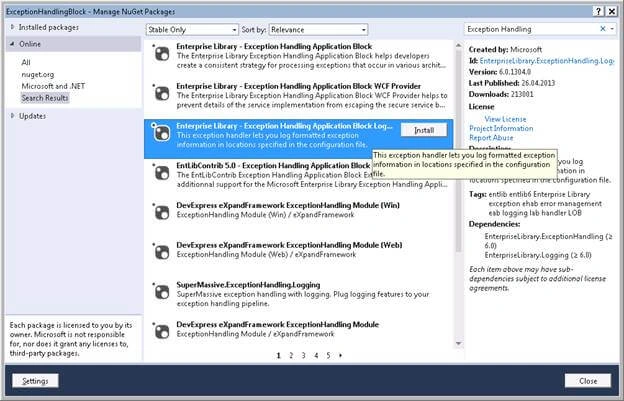
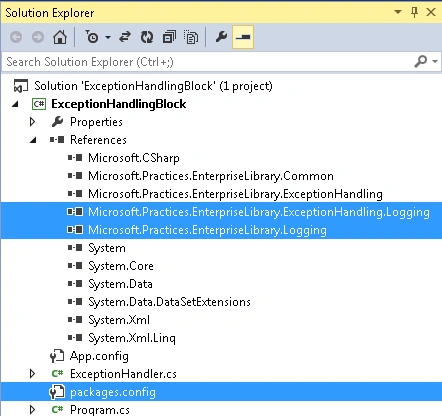
Install Enterprise Library – Exception Handling Application Block Logging Handler from NuGet Packages to log the exceptions that are going to be thrown by the application.
Microsoft Enterprise Library Configuration Tool
This tool will be used to configure different blocks for the application. Now, we need to install the Microsoft Enterprise Library from the below URL by following the installation instructions.
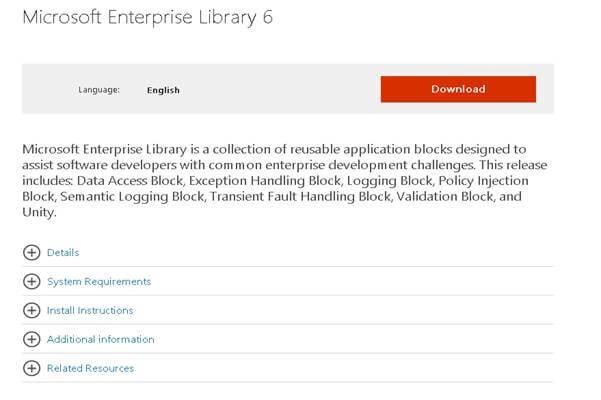
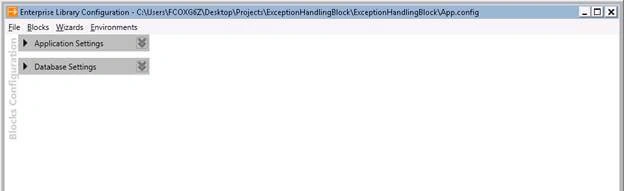
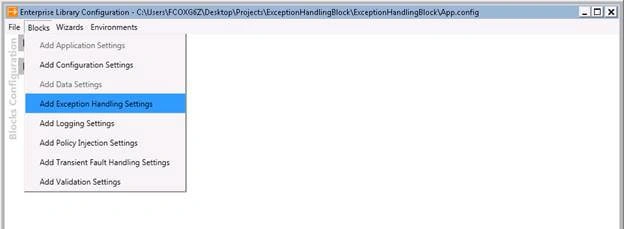
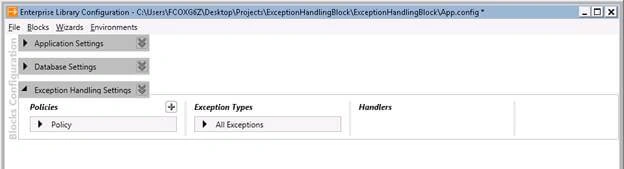
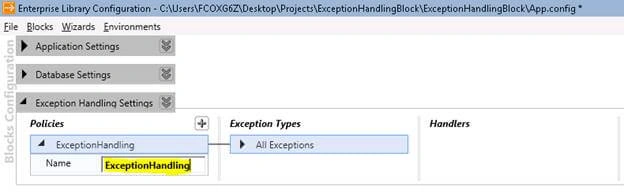
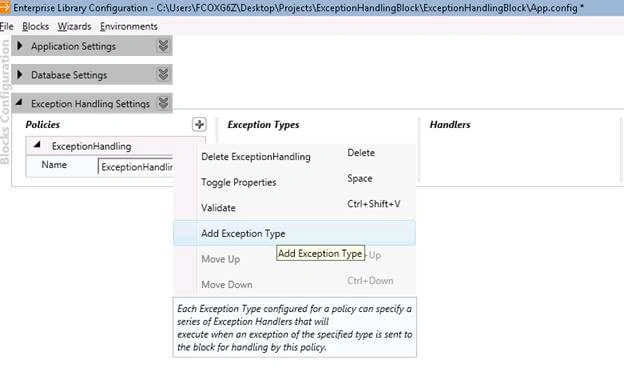
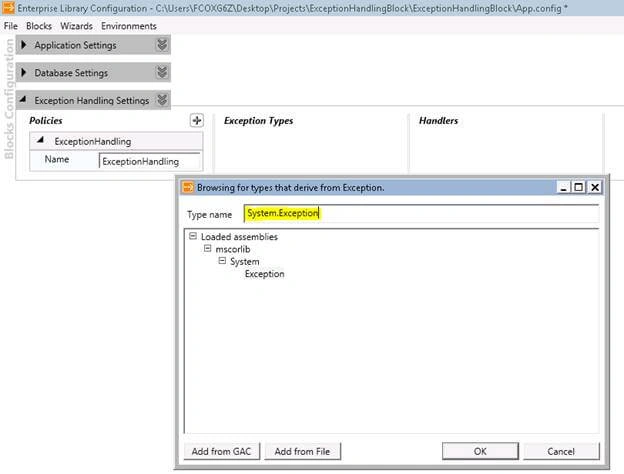
As in this article, we are just going to discuss the Exception Application Block, we will now configure the exception handling configuration details for our application.
Please follow the configuration steps below
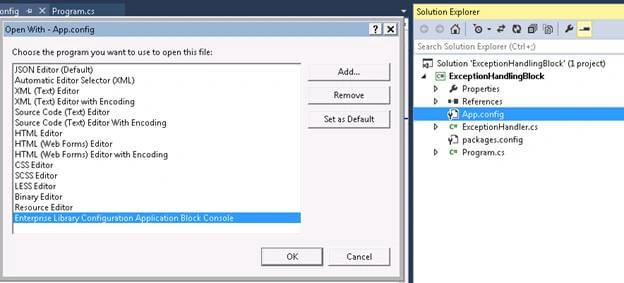
Right-click on the App.config >> Open with Enterprise Library Application Block Console. If it is not available in the list, you can add it manually by clicking on the "Add" button.

Using Exception Handlers
The Exception Handling Application Block is designed to support the typical code contained in catch statements in application components. Instead of repeating this code (such as - logging exception information), throughout the identical catch blocks in an application component, the application block allows developers to encapsulate this logic as reusable exception handlers.
Exception handlers are .NET classes that encapsulate exception handling logic and implement the Exception Handling Application Block interface named IExceptionHandler.
The Exception Handling Application Block includes five exception handlers:
- Wrap Handler
This exception handler wraps one exception around another.
- Replace Handler
This exception handler replaces one exception with another.
- Logging Exception Handler
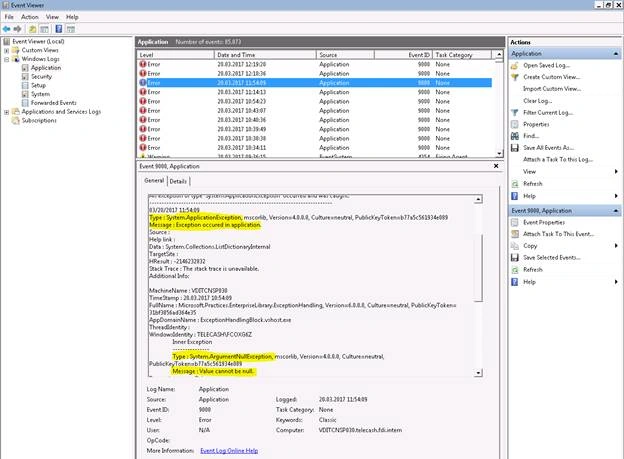
This exception handler formats exception information, such as the message and the stack trace. Then the logging handler gives this information to the Enterprise Library Logging Application Block so that it can be published.
- Fault Contract Exception Handler
This exception handler is designed for use at Windows Communication Foundation (WCF) service boundaries and generates a new Fault Contract from the exception.
- Custom Exception Handler
This exception handler is designed to create our own custom exception handlers.
In this article, we are going to cover Wrap, Replace, and Logging Exception Handler.
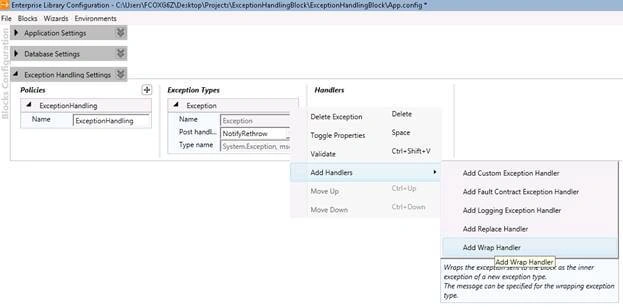
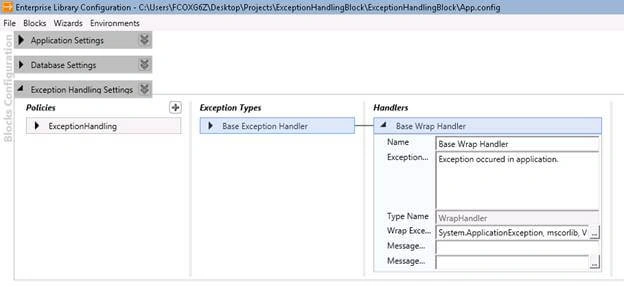
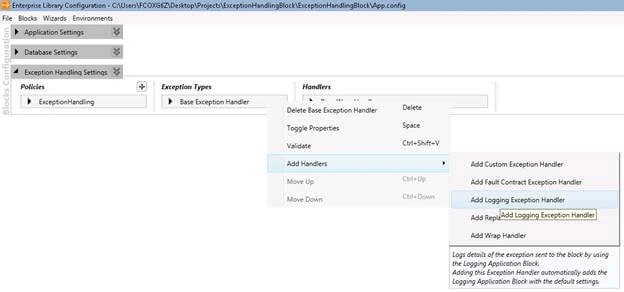
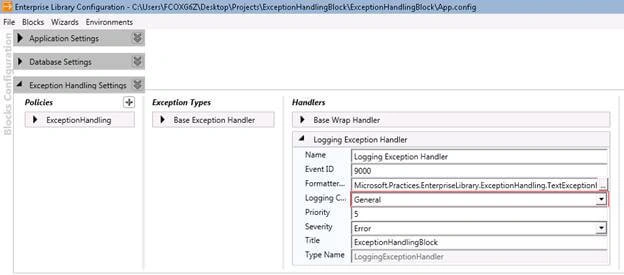
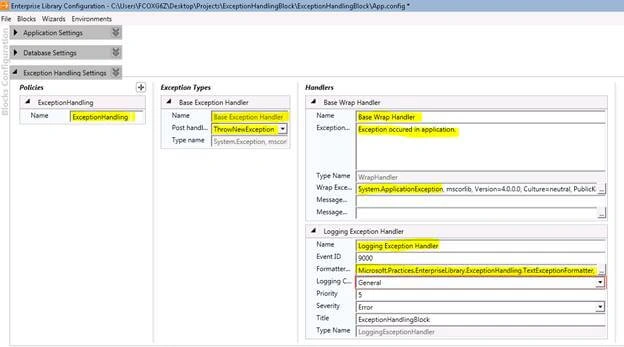
In the same way, we can configure the settings for Replace Handler also. The total configuration will look something like the image shown below:

Now, we are done with our configuration for the Exception Handling Block; and, we are going to configure the Logging Application Block here to log the exceptions that are going to be thrown by our application.
I am not going to explain regarding configuring Logging Application Block here as we have already covered that in my previous article. Click here to have a look at the Logging Application Block.
After configuring the Exception Handling and Logging Block, the configuration tool will look as below.
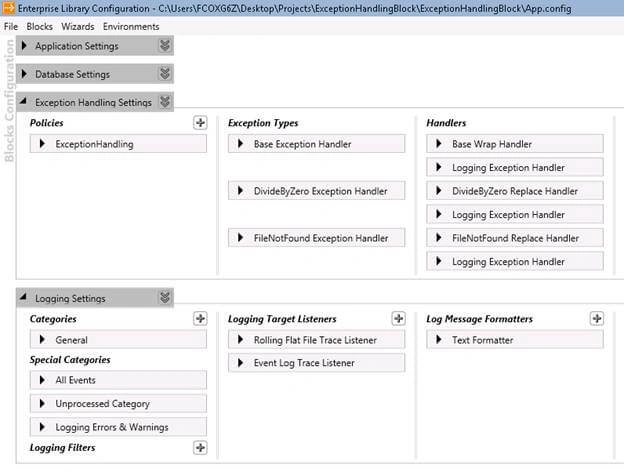
All the above configuration will generate the below sections in our App.config.
You can directly add the below configuration blocks to your App.config under <configuration> section if you don’t want to configure through the configuration console.
- <configSections>
- <section name="loggingConfiguration" type="Microsoft.Practices.EnterpriseLibrary.Logging.Configuration.LoggingSettings, Microsoft.Practices.EnterpriseLibrary.Logging, Version=6.0.0.0, Culture=neutral, PublicKeyToken=31bf3856ad364e35" requirePermission="true" />
- <section name="exceptionHandling" type="Microsoft.Practices.EnterpriseLibrary.ExceptionHandling.Configuration.ExceptionHandlingSettings, Microsoft.Practices.EnterpriseLibrary.ExceptionHandling, Version=6.0.0.0, Culture=neutral, PublicKeyToken=31bf3856ad364e35" requirePermission="true" />
- </configSections>
- <loggingConfiguration name="" tracingEnabled="false" defaultCategory="General" logWarningsWhenNoCategoriesMatch="false">
- <listeners>
- <add name="Rolling Flat File Trace Listener" type="Microsoft.Practices.EnterpriseLibrary.Logging.TraceListeners.RollingFlatFileTraceListener, Microsoft.Practices.EnterpriseLibrary.Logging, Version=6.0.0.0, Culture=neutral, PublicKeyToken=31bf3856ad364e35" listenerDataType="Microsoft.Practices.EnterpriseLibrary.Logging.Configuration.RollingFlatFileTraceListenerData, Microsoft.Practices.EnterpriseLibrary.Logging, Version=6.0.0.0, Culture=neutral, PublicKeyToken=31bf3856ad364e35" fileName="RollingFlatFile.log" footer="----------------------------------" formatter="Text Formatter" header="" rollInterval="Day" traceOutputOptions="DateTime, Timestamp" filter="All" />
- <add name="Event Log Trace Listener" type="Microsoft.Practices.EnterpriseLibrary.Logging.TraceListeners.FormattedEventLogTraceListener, Microsoft.Practices.EnterpriseLibrary.Logging, Version=6.0.0.0, Culture=neutral, PublicKeyToken=31bf3856ad364e35" listenerDataType="Microsoft.Practices.EnterpriseLibrary.Logging.Configuration.FormattedEventLogTraceListenerData, Microsoft.Practices.EnterpriseLibrary.Logging, Version=6.0.0.0, Culture=neutral, PublicKeyToken=31bf3856ad364e35" source="Application" formatter="Text Formatter" log="Application" machineName="." traceOutputOptions="None" />
- </listeners>
- <formatters>
- <add type="Microsoft.Practices.EnterpriseLibrary.Logging.Formatters.TextFormatter, Microsoft.Practices.EnterpriseLibrary.Logging, Version=6.0.0.0, Culture=neutral, PublicKeyToken=31bf3856ad364e35" template="Timestamp: {timestamp(local)}{newline}
- Message: {message}{newline}
- Category: {category}{newline}
- Priority: {priority}{newline}
- Severity: {severity}" name="Text Formatter" />
- </formatters>
- <categorySources>
- <add switchValue="All" autoFlush="true" name="General">
- <listeners>
- <add name="Rolling Flat File Trace Listener" />
- <add name="Event Log Trace Listener" />
- </listeners>
- </add>
- </categorySources>
- <specialSources>
- <allEvents switchValue="All" name="All Events">
- <listeners>
- <add name="Rolling Flat File Trace Listener" />
- </listeners>
- </allEvents>
- <notProcessed switchValue="All" name="Unprocessed Category">
- <listeners>
- <add name="Rolling Flat File Trace Listener" />
- </listeners>
- </notProcessed>
- <errors switchValue="All" name="Logging Errors & Warnings">
- <listeners>
- <add name="Rolling Flat File Trace Listener" />
- </listeners>
- </errors>
- </specialSources>
- </loggingConfiguration>
- <exceptionHandling>
- <exceptionPolicies>
- <add name="ExceptionHandling">
- <exceptionTypes>
- <add name="Base Exception Handler" type="System.Exception, mscorlib, Version=4.0.0.0, Culture=neutral, PublicKeyToken=b77a5c561934e089" postHandlingAction="ThrowNewException">
- <exceptionHandlers>
- <add name="Base Wrap Handler" type="Microsoft.Practices.EnterpriseLibrary.ExceptionHandling.WrapHandler, Microsoft.Practices.EnterpriseLibrary.ExceptionHandling" exceptionMessage="Exception occurred in application." wrapExceptionType="System.ApplicationException, mscorlib, Version=4.0.0.0, Culture=neutral, PublicKeyToken=b77a5c561934e089" />
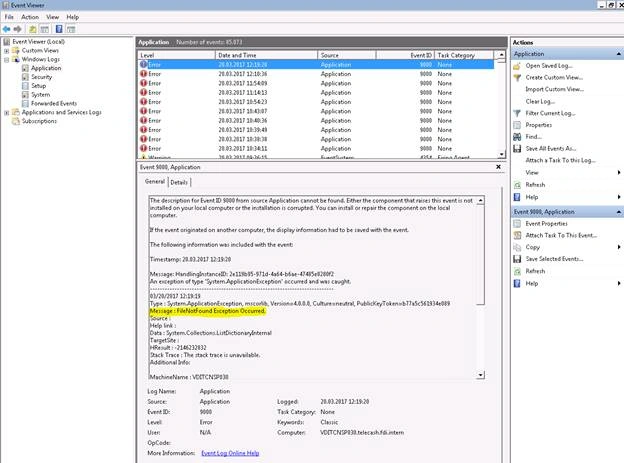
- <add name="Logging Exception Handler" type="Microsoft.Practices.EnterpriseLibrary.ExceptionHandling.Logging.LoggingExceptionHandler, Microsoft.Practices.EnterpriseLibrary.ExceptionHandling.Logging, Version=6.0.0.0, Culture=neutral, PublicKeyToken=31bf3856ad364e35" logCategory="General" eventId="9000" severity="Error" title="ExceptionHandlingBlock" formatterType="Microsoft.Practices.EnterpriseLibrary.ExceptionHandling.TextExceptionFormatter, Microsoft.Practices.EnterpriseLibrary.ExceptionHandling, Version=6.0.0.0, Culture=neutral, PublicKeyToken=31bf3856ad364e35" priority="5" />
- </exceptionHandlers>
- </add>
- <add name="DivideByZero Exception Handler" type="System.DivideByZeroException, mscorlib, Version=4.0.0.0, Culture=neutral, PublicKeyToken=b77a5c561934e089" postHandlingAction="ThrowNewException">
- <exceptionHandlers>
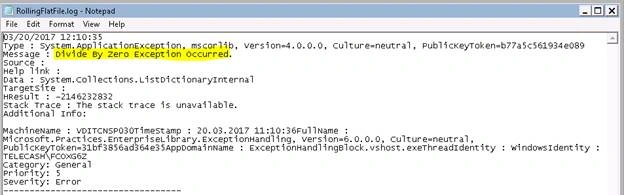
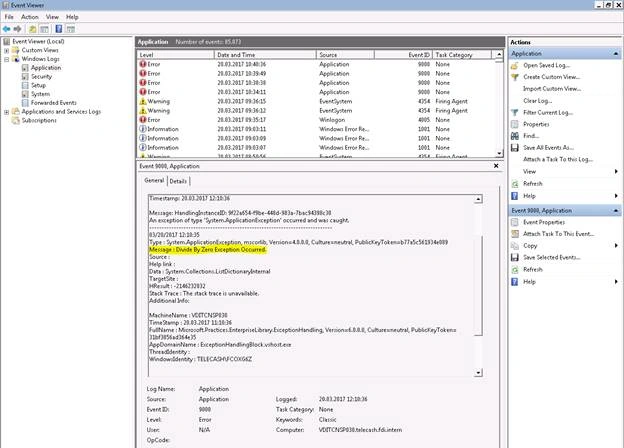
- <add name="DivideByZero Replace Handler" type="Microsoft.Practices.EnterpriseLibrary.ExceptionHandling.ReplaceHandler, Microsoft.Practices.EnterpriseLibrary.ExceptionHandling" exceptionMessage="Divide By Zero Exception Occurred." replaceExceptionType="System.ApplicationException, mscorlib, Version=4.0.0.0, Culture=neutral, PublicKeyToken=b77a5c561934e089" />
- <add name="Logging Exception Handler" type="Microsoft.Practices.EnterpriseLibrary.ExceptionHandling.Logging.LoggingExceptionHandler, Microsoft.Practices.EnterpriseLibrary.ExceptionHandling.Logging, Version=6.0.0.0, Culture=neutral, PublicKeyToken=31bf3856ad364e35" logCategory="General" eventId="9000" severity="Error" title="ExceptionHandlingBlock" formatterType="Microsoft.Practices.EnterpriseLibrary.ExceptionHandling.TextExceptionFormatter, Microsoft.Practices.EnterpriseLibrary.ExceptionHandling, Version=6.0.0.0, Culture=neutral, PublicKeyToken=31bf3856ad364e35" priority="5" />
- </exceptionHandlers>
- </add>
- <add name="FileNotFound Exception Handler" type="System.IO.FileNotFoundException, mscorlib, Version=4.0.0.0, Culture=neutral, PublicKeyToken=b77a5c561934e089" postHandlingAction="ThrowNewException">
- <exceptionHandlers>
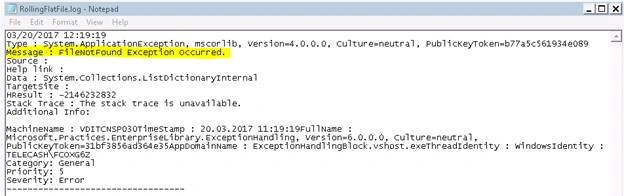
- <add name="FileNotFound Replace Handler" type="Microsoft.Practices.EnterpriseLibrary.ExceptionHandling.ReplaceHandler, Microsoft.Practices.EnterpriseLibrary.ExceptionHandling" exceptionMessage="FileNotFound Exception Occurred." replaceExceptionType="System.ApplicationException, mscorlib, Version=4.0.0.0, Culture=neutral, PublicKeyToken=b77a5c561934e089" />
- <add name="Logging Exception Handler" type="Microsoft.Practices.EnterpriseLibrary.ExceptionHandling.Logging.LoggingExceptionHandler, Microsoft.Practices.EnterpriseLibrary.ExceptionHandling.Logging, Version=6.0.0.0, Culture=neutral, PublicKeyToken=31bf3856ad364e35" logCategory="General" eventId="9000" severity="Error" title="ExceptionHandlingBlock" formatterType="Microsoft.Practices.EnterpriseLibrary.ExceptionHandling.TextExceptionFormatter, Microsoft.Practices.EnterpriseLibrary.ExceptionHandling, Version=6.0.0.0, Culture=neutral, PublicKeyToken=31bf3856ad364e35" priority="5" />
- </exceptionHandlers>
- </add>
- </exceptionTypes>
- </add>
- </exceptionPolicies>
- </exceptionHandling>
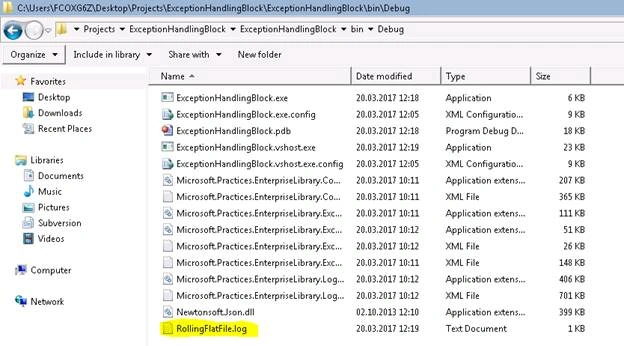
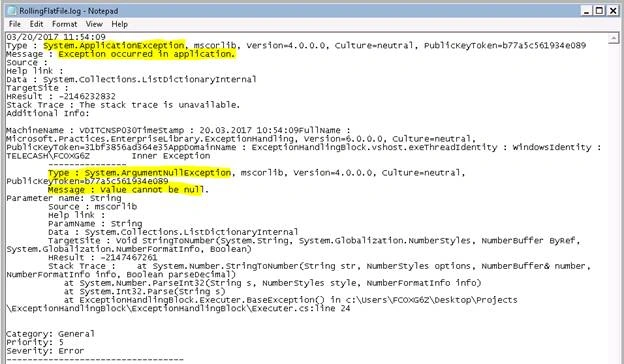
Khoo YongPosted Aug 14, 2018, 4:55 AM
Hi, i would like to ask, whenever there is logging, it always lock the file. and i couldnt transfer the file from server to my local. Is there a way to release the lock?
Saravanan GPosted Dec 11, 2017, 3:40 AM
Please provide your article link belongs to Log exception in Database using Enterprise Library
Jereme GuentherPosted Aug 30, 2017, 4:24 PM
Is Enterprise Library still being developed or maintained?
Ibrahim SiddiquePosted Mar 27, 2017, 6:16 AM
Nice and Helpful Article