

Overview
COBOL developers like other Developers have for years used various techniques to identify and handle issues when processing yields results that are unexpected during execution of their code. While the techniques vary in each shop there is a technique that is more widely used in the .NET environment that COBOL developers should look at and consider. The technique is referred to by a number of names or phrases such as 'throwing exceptions', 'raising exceptions' or simply 'exceptions'. While it can be a more standard way of identifying and handling errors that occur, exception processing is not without some overhead that developers must be aware of and take into consideration when deciding how to handle non-standard results from execution. Visual COBOL provides mechanisms to enable COBOL developers to take advantage of the same exception handlers that distributed developers have been doing for years.
Let's start by taking a look at a simple and pretty standard COBOL way of handling exceptions. We'll then see how that same example would be coding in a managed environment utilizing Visual COBOL.NET.
Standard COBOL Error Handling
In COBOL shops developers use whatever technique is most widely used and accepted in their environment. Most developers plan for and take action to identify what would be called standard errors. Standard errors refers to the type of issues that may be expected to be encountered such as missing data, invalid data, or improperly formatted data. Checking for this type of error is common and expected and developers know how to do this with their coding techniques. Even in the .NET arena standard checks for missing data are common and are not considered exceptional.
So what would be considered exceptional errors? One example would be a missing file that is supposed to be present. When the application was created it was part of the design specification that a file needed for processing would always be present. But what if it isn't? This would be an exceptional condition and one in which 'special' error handling must be created for.
Declaratives are generally used in shops to denote when exceptional errors have occurred and are also used to handle these exceptional errors. The technique can be as simple as the following.
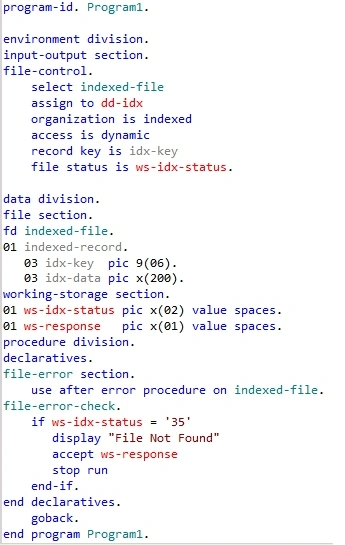
Notice the header 'Declaratives'. This is the area where you typically define an action that would occur for each exceptional error code encountered. Continuing our example from above, we expect a file to be present when the application starts. The code shows a check for a 'File Not Found' exception. Since we always expect a file to be present this would be an exceptional condition and processing cannot continue.
Now let's see how to do this in a managed .NET environment with Visual COBOL.
Throwing things around
In a .NET environment when unexpected processing occurs an 'exception is raised' or 'we throw an exception'. The terms are synonymous with error handling in the distributed world so you may want to get used to them. Throwing an exception in Visual COBOL is really straightforward and thanks as you'll see to intelli-sense is easy to code up.




Sr KarthigaPosted Feb 14, 2016, 12:23 AM
Good one
a beditedPosted Aug 20, 2010, 6:52 PMEdited Aug 20, 2010, 6:54 PM
Exceptions are very expensive and should be avoided... The example throwing an exception with a file-status is a bad example as it will have a performance impact when a safe recover is possible (lock status, network errors) and file not found... Where as.... A better coding pattern for this case is to return a enumeration that encapsulate the failing cause and perhaps generalised the errors to allow easier recovery. Exception's in .Net are not designed in via a code contract are thus not enforceable, so the consumer of the api has no idea (other than documentation) that an exception should be caught. So avoid them and design your APIs... for the normal, abnormal cases and use exception's for mis-use of the API, internal errors and include "xml" documentation on the method to say you are throwing an exception. If my words do not convince you please read... http://blogs.msdn.com/b/ricom/archive/2003/12/19/44697.aspx and google for more advice too...