

Introduction
SQL Server 2012 comes with an extension, EXECUTE. We can specify the WITH RESULT SETS option with an EXECUTE statement. With this new feature we can change the name and data type of the columns of the result set of a Stored Procedure. WITH RESULT SETS is a very useful feature when anyone wants to display the result of a Stored Procedure by changing the name and data type of a column of a result set.
Syntax
EXEC Store_Procedure_Name
WITH RESULT SETS
((
ColumnName DataType,
………
………
ColumnName DataType
))
Example
To understand the new feature, let us use an example of a Sale Order. Suppose I have table, SALESORDER, containing order id, customer code, order date, total amount and Tax amount columns. I have a Stored Procedure that returns all rows from a sales table.
CREATE TABLE SALESORDER
(
OrderId INT NOT NULL,
CustomerCode VARCHAR(20),
OrderDate DATE,
TotalAmount MONEY,
TAXAmount MONEY
)
INSERT INTO SALESORDER VALUES (1000,'A0002','2014-01-02',2300,23),
(1001,'A0002','2014-01-03',2350,23.5),
(1002,'A0003','2014-01-04',2650,26.50),
(1003,'A0004','2014-01-04',3300,33),
(1004,'A0006','2014-01-05',4300,43),
(1005,'A0002','2014-01-08',5300,53),
(1006,'A0005','2014-01-10',2800,28)
CREATE PROCEDURE GetSalesOrder
AS
BEGIN
SELECT OrderId,CustomerCode,OrderDate,TotalAmount FROM SALESORDER
END
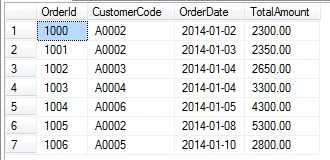
Output of the Stored Procedure without “WITH RESULT SETS”:
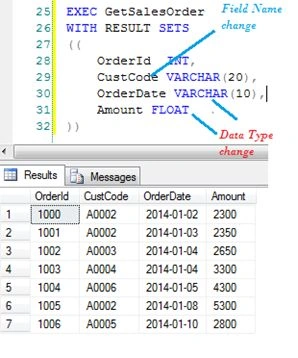
In the preceding example we want to return the column names OrderId, CustCode, OrderDate and Amount. And also I want to change the data type of the OrderDate and TotalAmount fields.
EXEC GetSalesOrder
WITH RESULT SETS
((
OrderId INT,
CustCode VARCHAR(20),
OrderDate VARCHAR(10),
Amount FLOAT
))
EXECUTE Statement WITH RESULT SETS UNDEFINED Option
"WITH RESULT SETS UNDEFINED" is the default option of the EXECUTE statement.



Comments
Join the conversation! Your thoughts help the community grow.