

In this article we are going to learn step by step how to execute stored procedure which you have already created in SQL Server in code first approach in entity framework.
STEP 1
Execute following query in SQL Server
- CREATE DATABASE ENTITYDB
- GO
- USE ENTITYDB
- GO
- CREATE TABLE tblDepartments
- (
- DepartmentID INT PRIMARY KEY IDENTITY(1,1),
- DepartmentName VARCHAR(20)
- )
- INSERT INTO tblDepartments VALUES
- ('IT'),('HR'),('ACCOUNT')
- GO
- CREATE TABLE tblEmployees
- (
- EmployeeID INT PRIMARY KEY IDENTITY(1,1),
- Name VARCHAR(50),
- Age INT,
- Gender VARCHAR(10),
- DepartmentID INT
- )
- GO
- INSERT INTO tblEmployees VALUES
- ('MARK',21,'MALE',1),
- ('JOHN',22,'MALE',1),
- ('MACK',23,'MALE',2),
- ('RIYA',20,'FEMALE',2),
- ('ABRAM',21,'MALE',3)
- GO
- CREATE PROCEDURE SP_GETEMPLOYEE
- AS
- BEGIN
- SELECT E.EMPLOYEEID,E.NAME,E.GENDER,E.AGE,D.DEPARTMENTNAME FROM TBLEMPLOYEES E JOIN TBLDEPARTMENTS D
- ON E.DEPARTMENTID=D.DEPARTMENTID
- END
- CREATE PROCEDURE SP_GETEMPLOYEEBYEMPLOYEEID 2
- (
- @EMPID INT
- )
- AS
- BEGIN
- SELECT E.NAME,E.AGE,E.GENDER,D.DEPARTMENTNAME FROM TBLEMPLOYEES E JOIN TBLDEPARTMENTS D
- ON E.DEPARTMENTID=D.DEPARTMENTID
- WHERE E.EMPLOYEEID=@EMPID
- END
Open visual studio and add new empty website, then add reference of System.Data.Entity
For adding this, here's the image.
Right click in references folder and open Nuget and download Entityframework dll and install it. After installation it gets automatically added in your references folder.
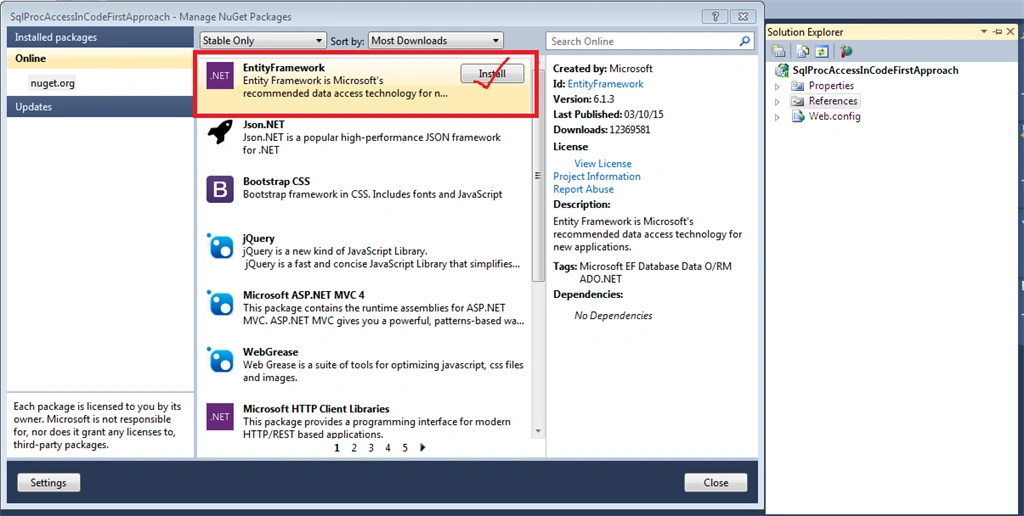
STEP 3
Now add the following two classes:
- EmployeeContext.cs
- Employee.cs
EmployeeContext.cs
- using System.Collections.Generic;
- using System.Linq;
- using System.Data.Entity;
- using System.Data.SqlClient;
- namespace SqlProcAccessInCodeFirstApproach
- {
- public class EmployeeContext : DbContext
- {
- public EmployeeContext()
- : base("DBCS")// DBCS name of connection string it available in Web.Config
- {
- }
- public List<Employee> GetAllEmployee()
- {
- List<Employee> Employees = new List<Employee>();
- Employee emp;
- using (EmployeeContext cx = new EmployeeContext())
- {
- var result = cx.Database.SqlQuery<Employee>("SP_GETEMPLOYEE", "");//Here you also write sql query.
- foreach (Employee e in result)
- {
- emp = new Employee();
- emp.EmployeeID = e.EmployeeID;
- emp.Name = e.Name;
- emp.Gender = e.Gender;
- emp.Age = e.Age;
- emp.DepartmentName = e.DepartmentName;
- Employees.Add(emp);
- }
- }
- return Employees;
- }
- public Employee GetEmployeeByID(int ID)
- {
- EmployeeContext cx = new EmployeeContext();
- SqlParameter param = new SqlParameter("@EMPID", ID);
- var result = cx.Database.SqlQuery<Employee>("SP_GETEMPLOYEEBYEMPLOYEEID @EMPID", param).SingleOrDefault();//Here you also write sql query.
- return result;
- }
- }
- }
- namespace SqlProcAccessInCodeFirstApproach
- {
- public class Employee
- {
- public int EmployeeID { get; set; }
- public string Name { get; set; }
- public string Gender { get; set; }
- public int Age { get; set; }
- public string DepartmentName { get; set; }
- }
- }
Add connection string in web.config file
- <connectionStrings>
- <add name="DBCS" connectionString="SERVER=piyush-pc;DATABASE=ENTITYDB;USER ID=sa;PASSWORD=pass.123" providerName="System.Data.SqlClient"/>
- </connectionStrings>
STEP 4
Add a new web page and give it a name.
Now write the following code within form tag in your aspx page:
WebForm1.aspx
- <div>
- <asp:GridView ID="GridView1" runat="server" AutoGenerateSelectButton="True" CellPadding="4"
- ForeColor="#333333" GridLines="None" OnSelectedIndexChanged="GridView1_SelectedIndexChanged">
- <AlternatingRowStyle BackColor="White" />
- <FooterStyle BackColor="#990000" Font-Bold="True" ForeColor="White" />
- <HeaderStyle BackColor="#990000" Font-Bold="True" ForeColor="White" />
- <PagerStyle BackColor="#FFCC66" ForeColor="#333333" HorizontalAlign="Center" />
- <RowStyle BackColor="#FFFBD6" ForeColor="#333333" />
- <SelectedRowStyle BackColor="#FFCC66" Font-Bold="True" ForeColor="Navy" />
- <SortedAscendingCellStyle BackColor="#FDF5AC" />
- <SortedAscendingHeaderStyle BackColor="#4D0000" />
- <SortedDescendingCellStyle BackColor="#FCF6C0" />
- <SortedDescendingHeaderStyle BackColor="#820000" />
- </asp:GridView>
- <br />
- <table border="1" id="tblShow" runat="server" visible="false">
- <tr>
- <td colspan="2">
- <b>
- <asp:Label ID="lblName" Text="" runat="server" /></b>
- </td>
- </tr>
- <tr>
- <td>
- Gender
- </td>
- <td>
- <asp:Label ID="lblGender" Text="" runat="server" />
- </td>
- </tr>
- <tr>
- <td>
- Age
- </td>
- <td>
- <asp:Label ID="lblAge" Text="" runat="server" />
- </td>
- </tr>
- <tr>
- <td>
- Department Name
- </td>
- <td>
- <asp:Label ID="lblDName" Text="" runat="server" />
- </td>
- </tr>
- </table>
- </div>
WebForm1.aspx.cs
- using System;
- namespace SqlProcAccessInCodeFirstApproach
- {
- public partial class WebForm1 : System.Web.UI.Page
- {
- EmployeeContext cx;
- protected void Page_Load(object sender, EventArgs e)
- {
- if (!IsPostBack)
- {
- BindGrid();
- }
- }
- void BindGrid()
- {
- using (cx = new EmployeeContext())
- {
- GridView1.DataSource = cx.GetAllEmployee();
- GridView1.DataBind();
- }
- }
- protected void GridView1_SelectedIndexChanged(object sender, EventArgs e)
- {
- int i = GridView1.SelectedIndex;
- int empId = Convert.ToInt32(GridView1.Rows[i].Cells[1].Text);
- using (cx = new EmployeeContext())
- {
- Employee emp = cx.GetEmployeeByID(empId);
- lblName.Text = emp.Name;
- lblGender.Text = emp.Gender;
- lblAge.Text = emp.Age.ToString();
- lblDName.Text = emp.DepartmentName;
- tblShow.Visible = true;
- }
- }
- }
- }
SubashPosted Sep 15, 2016, 4:46 AM
Very nice
karunapriya kPosted Sep 25, 2015, 3:49 AM
Hi.. How to add storedprocedure in Entity framework7 for multiple table field extraction without using Dataset only using class.
Santhakumar MunuswamyPosted Sep 17, 2015, 10:42 AM
Thanks for nice article:)
Ajeet MishraPosted Sep 14, 2015, 3:48 AM
nice
Raja TPosted Sep 14, 2015, 12:29 AM
Very Nice Thanks For sharing
Harshad PansuriyaPosted Sep 14, 2015, 12:26 AM
Nice one
Saineshwar BageriPosted Sep 13, 2015, 11:51 PM
Good One
Karthikeyan KPosted Sep 13, 2015, 12:51 PM
Good one...Thanks for sharing sir
Vaikesh K PPosted Sep 13, 2015, 9:22 AM
Nice one
Gopal C. BalaPosted Sep 13, 2015, 4:49 AM
good one indeed
Pankaj Kumar ChoudharyPosted Sep 13, 2015, 4:46 AM
Nice Article..........
Akash MalhotraPosted Sep 12, 2015, 4:30 PM
Nice article
Nilesh JadavPosted Sep 12, 2015, 9:43 AM
Great Post sir
Harshad PansuriyaPosted Sep 12, 2015, 8:42 AM
Nice one
RakeshPosted Sep 12, 2015, 8:14 AM
Good one :)