

Abstract
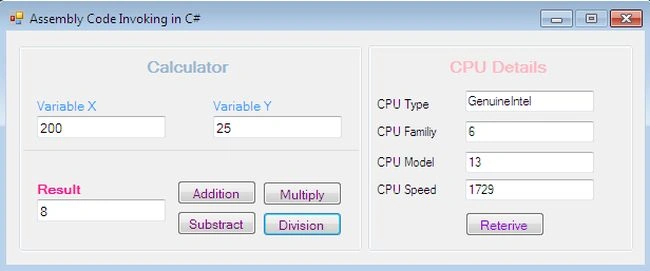
This article explains how inline assembly programming by linking or invoking CPU-dependent native assembly 32-bit code to C# managed code. The .NET Framework, in fact, doesn't support assembly code execution explicitly in a CLR compiler because it JITs the IL code to native code, there is no provision for assembly code in the .NET Framework. But the VC++ inline assembler can integrate any of C or C++ methods in its scope due to its convenient nature. Despite the complicated nature of this process, it is very useful in some scenarios where faster-optimized code matters because a larger calculation must be completed fast and C++ or C# code is relatively slow to process a complicated algorithm. Apart from program improvement, inline assembly code also aids in controlling hardware and reducing memory leaks in a better way rather than .NET or VC++ language. We shall show assembly code invoked by genuine C# code by presenting a GUI application that renders some math and CPU information gathering functionality by calling an ASM code library.
Prerequisite
The example scenario illustrated in the article requires a comprehensive working experience for manipulating both a managed and unmanaged DLL, moreover the knowledge of MASM programming code syntax because the DLL will contain methods defined in the form of Assembly language. Our workstation must be configured with this software as in the following:
- Visual C++
- Visual C#
- MASM (optional)
The mechanics
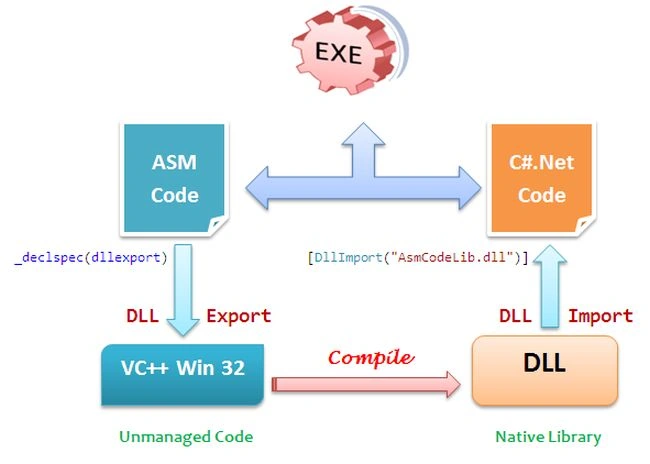
Invoking hardcore Assembly code into managed .NET code is a rather complicated task because the CLR typically doesn't execute ASM instructions. But as we know, C# can consume the methods of an unmanaged code that could be located in any VC++ or C++ DLL, and more interestingly, C++ or VC++ can execute or integrate Assembly code. So here is the hack, VC++ can become the medium between Assembly code and C# source code and we can invoke the ASM code in C# code indirectly. However, we first write some functionality for specific operations in the form of assembly code and export them by marking _declspec in VC++ code that produces an unmanaged DLL library that has the definition for all the methods, and finally, we import these methods into the C# code file to consume the built-in methods into the DLL as described in the following figure.
Inline ASM code
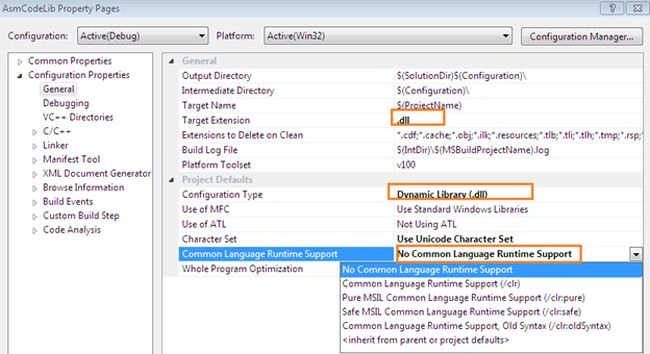
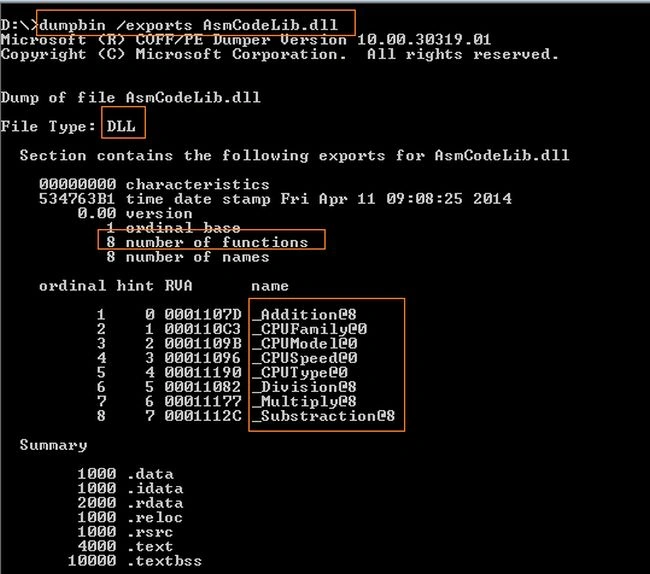
Here, we are integrating an Assembly code routine that later will be called in the C# program. This mechanism is doing some typical mathematics operations as well as calculates CPU accuracy by writing logic in ASM code. This section is illustrating the process of a Win32 VC++ DLL that has an inline Assembly code. The following code segment is a header file that contains the exported routine definition.
#include <windows.h>
extern "C" __declspec(dllexport) int __stdcall Addition(int a, int b);
extern "C" __declspec(dllexport) int __stdcall Substraction(int a, int b);
extern "C" __declspec(dllexport) int __stdcall Multiply(int a, int b);
extern "C" __declspec(dllexport) int __stdcall Division(int a, int b);
extern "C" __declspec(dllexport) int __stdcall CPUSpeed();
extern "C" __declspec(dllexport) char* __stdcall CPUType();
extern "C" __declspec(dllexport) int __stdcall CPUFamily();
extern "C" __declspec(dllexport) int __stdcall CPUModel();
#endif
Now let's come to one of the routines that add two integers using assembly code. This article doesn't intend to teach assembly programming or there is no need to dive deeper into the syntax, just use simple opcodes that add two numbers and store the results into an integer type variable using an _asm block that invokes the inline assembler and can appear in a C or C++ statement anywhere as in the following.
int Addition(int a, int b) {
    int result;
    __asm {
        mov eax, a
        add eax, b
        mov result, eax
    }
    return result;
}
The method CPUSpeed is coded for calculating the CPU actual speed using an inline assembly code instruction with VC++ as in the following.
extern "C" __declspec(dllexport) int __stdcall CPUSpeed() {
    LARGE_INTEGER ulFreq, ulTicks, ulValue, ulStartCounter, ulEAX_EDX, ulResult;
    QueryPerformanceFrequency(&ulFreq);
    QueryPerformanceCounter(&ulTicks);
    // calculate one second interval
    ulValue.QuadPart = ulTicks.QuadPart + ulFreq.QuadPart;
    __asm {
        rdtsc
        mov ulEAX_EDX.LowPart, EAX
        mov ulEAX_EDX.HighPart, EDX
    }
    ulStartCounter.QuadPart = ulEAX_EDX.QuadPart;
    do {
        QueryPerformanceCounter(&ulTicks);
    } while (ulTicks.QuadPart <= ulValue.QuadPart);
    __asm {
        rdtsc
        mov ulEAX_EDX.LowPart, EAX
        mov ulEAX_EDX.HighPart, EDX
    }
    // calculate result
    ulResult.QuadPart = ulEAX_EDX.QuadPart - ulStartCounter.QuadPart;
    return (int)ulResult.QuadPart / 1000000;
}
Sam HobbsPosted Nov 10, 2014, 3:47 PM
I think we have a choice of either a native DLL with inline assembler or a class library DLL that has unmanaged C++ in it. Which one of these are you using? To create a native DLL see my article "Native Windows Dynamic Link Libraries (DLLs)". Note that when creating a native DLL it is better to use conventions established by experienced Windows programmers. Visual Studio will help if you use it. My article shows how to do that. My article "Managed C++ Wrapper For Unmanaged Code" shows a way to create a class library DLL using C++. I think the main thing that this article provides is it shows how to add inline assembler code to unmanaged C++.
Sam HobbsPosted Nov 10, 2014, 2:46 PM
The Microsoft C compiler has always supported inline assembler, certainly before C++ existed and before the compiler was called "Visual". There is nothing magic about that. The reason .Net does not support assembler is that assembler is machine-dependent and .Net is (supposed to be) machine-independent (note the "in" in there); in other words, assembler is not portable but .Net is designed to be portable.