

Introduction
Requirement
Solution
We have created a workflow on contact entity which is set to run as On Demand and we can copy its GUID from the URL like the following.

- function ExecuteWorkflow()
- {
- //show indication to user
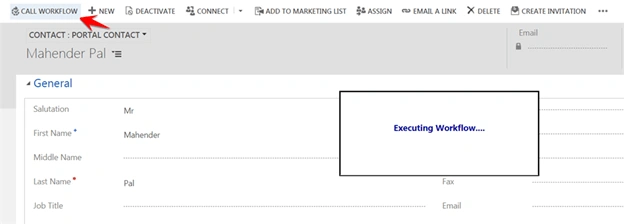
- Xrm.Utility.showProgressIndicator("Executing Workflow....");
- var serverURL = Xrm.Page.context.getClientUrl();
- var contactID=Xrm.Page.data.entity.getId().substring(1, 37);
- //workflow id that we captured above
- var workflowID="E7C36B0F-DCAB-4440-9A0A-FC499A4E2A84";
- var data = {
- "EntityId": contactID
- };
- var req = new XMLHttpRequest();
- req.open("POST", serverURL + "/api/data/v8.2/workflows("+workflowID+")/Microsoft.Dynamics.CRM.ExecuteWorkflow", true);
- req.setRequestHeader("Accept", "application/json");
- req.setRequestHeader("Content-Type", "application/json; charset=utf-8");
- req.setRequestHeader("OData-MaxVersion", "4.0");
- req.setRequestHeader("OData-Version", "4.0");
- req.onreadystatechange = function() {
- if (this.readyState == 4 /* complete */ ) {
- req.onreadystatechange = null;
- if (this.status == 200) {
- Xrm.Utility.closeProgressIndicator();
- } else {
- var error = JSON.parse(this.response).error;
- alert(error.message);
- Xrm.Utility.closeProgressIndicator();
- }
- }
- };
- req.send(JSON.stringify(data));
- }
In the above code we are using showProgressIndicator to display a notification to use, earlier there was no supported way to show these types of notifications and we used to write unsupported code to show notification messages. Next we are adding the parameter required for ExecuteWorkflow action, so we need to pass entity ID and we are using workflow ID in our Web API request. We need to hide notification messages using closeProgressIndicator.
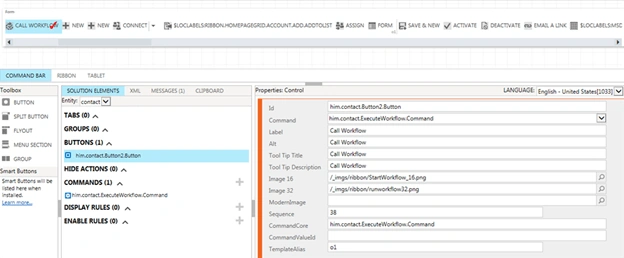
Now, we can add a button on contact entity. We can add button easily using Ribbon Workbench. This tool is also available on the XrmToolBox, you can check our earlier post for how to add button.
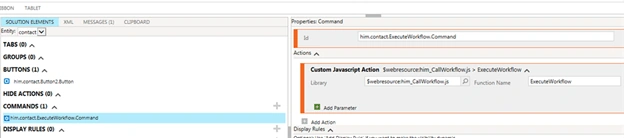
First, we will add a command that we will be using in our command button like the following, we need to select our JavaScript web resource that we have created above and the name of the method in the script resource.
Join the conversation! Your thoughts help the community grow.