

Expander Control provides an expandable container to host any content. You can show or hide this content by toggling a header.
Expander Control is from UWP Community Toolkit. The UWP Community Toolkit is a collection of helper functions, custom controls, and app services. It simplifies and demonstrates common developer tasks building UWP apps for Windows 10.
Reading this article, you can learn how to use Expander Control in Universal Windows Apps development with XAML and Visual C#.
The following important tools are required for developing UWP,
- Windows 10 (Recommended)
- Microsoft Visual Studio 2017
- Windows Anniversary Update (10.0.14393.0)
Step 1
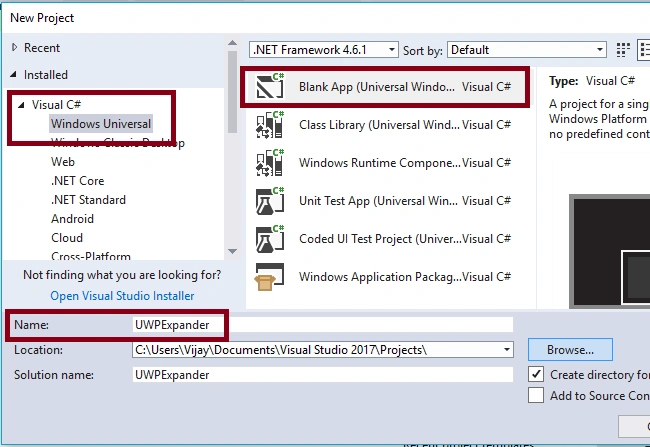
Open Visual studio 2017. Go to Start -> New Project-> Select Windows Universal (under Visual C#)-> Blank App(Universal Windows) -> Give a suitable name to your app (ex- UWPExpander)->OK.
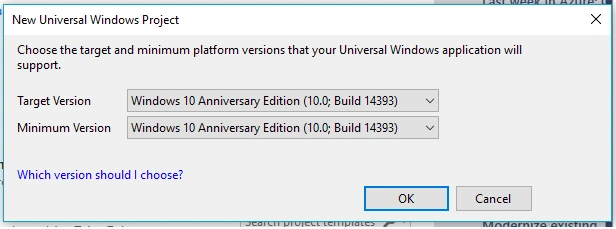
After choosing the target and minimum platform version that your Windows Universal Application will support (Windows Anniversary Update (10.0.14393.0)), the Project creates App.xaml and MainPage.xaml.
Step 2
First, update the reference, Microsoft.NETCore.UniversalWindowsPlatform, with the latest version of it using "Manage NuGet Packages" feature so as to adding UWPToolKit Control.
Step 3
Add the following controls in design window for Expander control view. Add the TextBlock Control and change the Name and Text property.
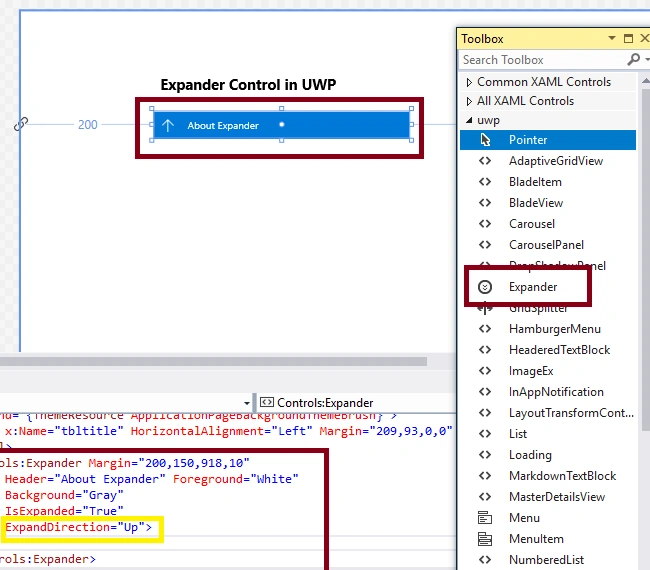
Add the Expander Controls and set the Header, HeaderTemplate, IsExpanded, ExpandDirection properties.
- <Controls:Expander Margin="200,150,918,10" Header="About Expander" Foreground="White" Background="Gray" IsExpanded="True" ExpandDirection="Up">
- <TextBlock TextWrapping="Wrap" Text="The Expander Control provides an expandable container to host any content. You can show or hide this content by toggling a Header." Height="81" Width="374" />
- </Controls:Expander>
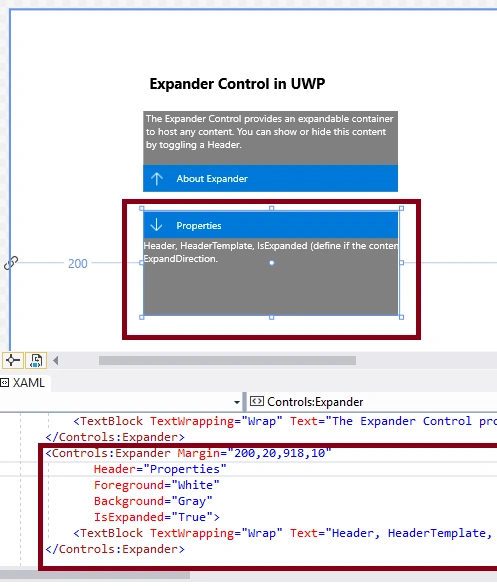
- <Controls:Expander Margin="200,20,918,10" Header="Properties" Foreground="White" Background="Gray" IsExpanded="True">
- <TextBlock TextWrapping="Wrap" Text="Header, HeaderTemplate, IsExpanded (define if the content is visible or not), ExpandDirection." Height="116" Width="572" />
- </Controls:Expander>
Note
Automatically, the following code will be generated in XAML code view, while we are done in the design view.
- <Page xmlns="http://schemas.microsoft.com/winfx/2006/xaml/presentation" xmlns:x="http://schemas.microsoft.com/winfx/2006/xaml" xmlns:local="using:UWPExpander" xmlns:d="http://schemas.microsoft.com/expression/blend/2008" xmlns:mc="http://schemas.openxmlformats.org/markup-compatibility/2006" xmlns:Controls="using:Microsoft.Toolkit.Uwp.UI.Controls" x:Class="UWPExpander.MainPage" mc:Ignorable="d">
- <Grid Background="{ThemeResource ApplicationPageBackgroundThemeBrush}">
- <TextBlock x:Name="tbltitle" HorizontalAlignment="Left" Margin="209,99,0,0" TextWrapping="Wrap" Text="Expander Control in UWP" VerticalAlignment="Top" FontSize="22" FontWeight="Bold" />
- <StackPanel>
- <Controls:Expander Margin="200,150,918,10" Header="About Expander" Foreground="White" Background="Gray" IsExpanded="True" ExpandDirection="Up">
- <TextBlock TextWrapping="Wrap" Text="The Expander Control provides an expandable container to host any content. You can show or hide this content by toggling a Header." Height="81" Width="374" /> </Controls:Expander>
- <Controls:Expander Margin="200,20,918,10" Header="Properties" Foreground="White" Background="Gray" IsExpanded="True">
- <TextBlock TextWrapping="Wrap" Text="Header, HeaderTemplate, IsExpanded (define if the content is visible or not), ExpandDirection." Height="116" Width="572" /> </Controls:Expander>
- </StackPanel>
- </Grid>
- </Page>
Step 4
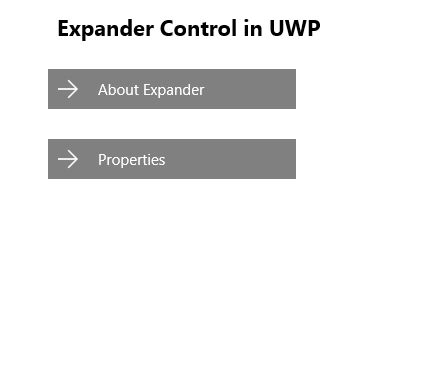
Deploy your app on the local machine. The output of the UWPExpander is given below.
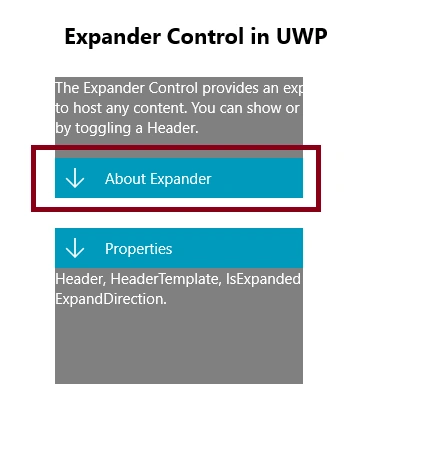
After clicking "Expand" -
Summary
Now, you have successfully tested Expander Control in XAML and UWP environment using Visual Studio 2017.
Uma RajaPosted Jan 27, 2020, 1:47 AM
How to create expand view inside content dialog using xaml and c# for UWp app?I didn't get any solution.
Ganeshkumar LingappanPosted May 31, 2018, 6:27 AM
Nice Article. If I want to add the Expander control from code-behind how to do that?