

Please go through the following articles to understand about Azure Functions.
In our previous article, Explore Storage Account of Azure Functions – File Share, we have learned how Azure Function uses File Share to store source code, its related configurations and log files.
In this article, we will learn how it uses Table Storage Service to store the logs and other information.
Let’s navigate to the Azure Function as shown below.
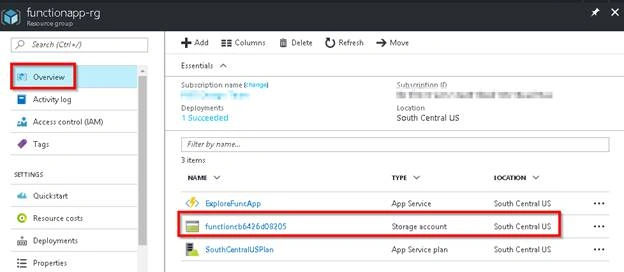
Click on the Storage Account name to navigate to the Storage Account as shown in the above screen capture.
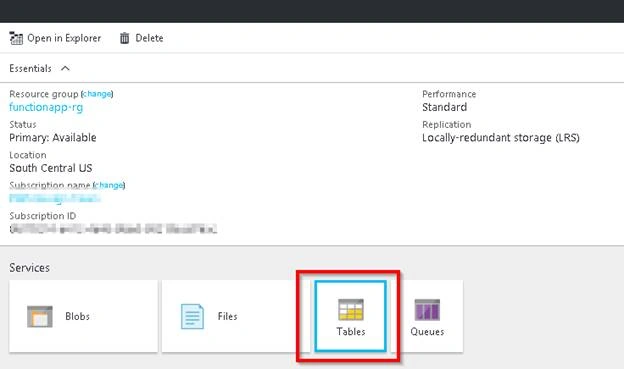
Now, click on the Table Storage Service as shown in the above screen capture to view the Table Service details as shown below.
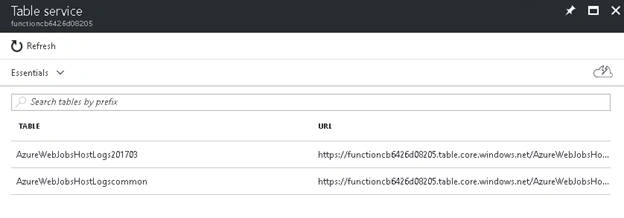
Currently, Azure Management Portal doesn’t provide any details about the Table Storage Service. Let’s connect to the Table Storage Service using Azure Storage Explorer as shown below.
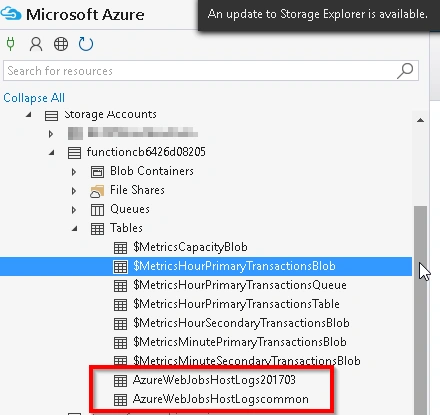
Let’s explore the above two Tables shown below.
- Azure Web Job Host Logs 201703
- This table stores the logs of all the Function executions. Below are few of the important columns that would be useful for troubleshooting. Looking at the name of the Table, it makes sense that Azure create this table each month and deletes the older logs.
- FunctionName – Name of the Azure Function that the log belongs to
- StartTime – Execution Start Time of the Azure Function
- EndTime – Execution End time of the Azure Function
- ArgumentsJson – JSON of the Arguments that Azure Function has received
- LogOutput – The actual Log that has been written by the Azure Function
- TriggerReason – Reason about how the Azure Function has been invoked
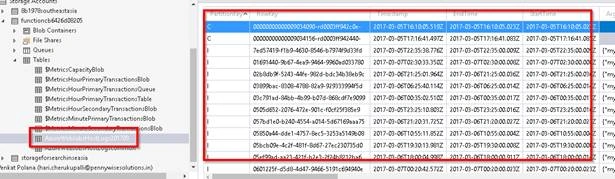
- This table stores the logs of all the Function executions. Below are few of the important columns that would be useful for troubleshooting. Looking at the name of the Table, it makes sense that Azure create this table each month and deletes the older logs.
- Azure Web Job Host Logs Common
- This table just stores the data about all the Azure Functions available in the Function App.
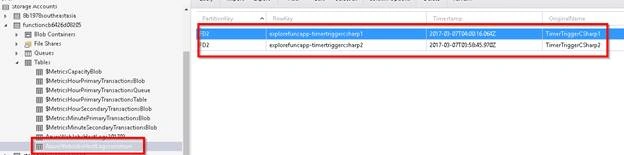
- This table just stores the data about all the Azure Functions available in the Function App.
Hope this information would help you in troubleshooting any of the issues that you encounter in your applications.
Happy Azure Functioning.
Join the conversation! Your thoughts help the community grow.