Introduction
When we write a program it is common to make mistakes. In JavaScript, these mistakes are treated as errors.
Example: If we create a function named onAccept() yet we forget to write the code in the opening and closing braces {} then as a result, the errors occur since the function onAccetpt() cannot execute in the web page.
The common errors in JavaScript programming are the following:
- Spelling and typing errors
- Missing brackets or quotation marks
- Mismatching quotation marks
- Using single equal sign instead of the double equal sign in comparison
- Referencing objects that do not exist
- Using reserved keywords for variable naming
- Using the wrong type of brackets
These are the main causes of those errors.
In JavaScript there are the following three types of errors:
- Syntax Error
- Runtime Error
- Logic Error
Let's understand them one by one.
Syntax Error
Syntax errors are those errors that occur when we violate the rules defined by JavaScript. These errors occur when a Web Page that has been created is loaded.
Example: We are writing a script to display the value of a variable but somewhere in the program you forgot the closing parentheses, then a syntax error will occur. The Syntax errors prevent the JavaScript code from functioning. A browser shows the error message with the specified line when it encounters a JavaScript code error.
Runtime Errors
Runtime errors inform the user that there is a problem with a script. Similar to syntax errors, runtime errors are also displayed in a browser. The nature of the error along with a line number is specified in an alert box, so you can easily search for the script. Runtime errors mostly occur due to improper use of commands.
For instance, you will review runtime errors if you reference a variable that has not been defined. The following code snippet shows an example of a runtime error:
- Sting = "C# Corner";
- document.write (sing);
In the given code, we have declared a string variable, sting, and assigned the value, "C# Corner", to it. Next, we displayed its value, but instead of writing "Sting", we wrote "sing", that is not declared. Therefore the second line of the preceding code snippet generates a runtime error.
Logic Errors
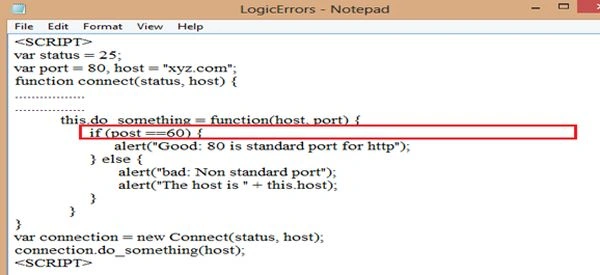
Another type of common errors is logic that occurs when your script code does something different than that suggested by logic. Errors occur when the code is written incorrectly and you, therefore, do not get expected results. These errors are commonly known as bugs. Let's consider the following code.
Example
So to remove a bug or error we have some techniques to do that.
Debugging is a word indicating the process of diagnosing and correcting programming errors.
Debugging is a process of finding and rectifying the bugs or defects of a computer program or a piece of electronic hardware. When we debug a program or hardware device, you need to start with a problem, isolate the source of the problem , and fix it. A debugged program is a program with all the bugs removed or that has no errors initially. A debugger is necessary for any programming language during development tools. This tool helps you to identify coding errors at various development stages.
In fact, some programming editors include an ability to check the code for errors as it is written.
JavaScript has two techniques for debugging:
- JSLint Checker
- Browser Sniffing
Let's explain both of those techniques.
Using JSLint Checker
JSLint is an on-line validator that is used to debug JavaScript code. It has two fields, one is a Text field to set the JavaScript code and another is the JSLint button. To debug a JavaScript program using JSLint, you need to set the JavaScript code in the text field of JSLint and press the JSLint button. If the code has any error then JSLint generates the error message with the line number where the error has occurred. Some guidelines that should be followed while using JSLint are as follows:
- Every statement must end with a semicolon (;) except the for, function, if, switch, try and while expressions.
- An Identifier, a String, a number and a suffix operator, such as ),],++ and – must not appear at the end of the line.
- The statements, if, for, and while, must have a block of code, and that code must be enclosed within the curly braces.
- Variables must be declared only once and must be declared before they are used.
Using Browser Sniffing
Browser Sniffing is a process of detecting the information related to a browser. This browser-related information includes the name, version, operating system and type of the browser, such as Internet Explorer and Netscape Navigator. Browser sniffing also detects the runtime environment of the browser in which a web page is executed. It restricts the code fragments of the language that might be JavaScript or any other language that either has the bugs or are not browser-specific.
Example: If you are using Internet Explorer as the browser then you must use only those features that Internet Explorer supports. If you use the features of Netscape Navigator in a fragment of code then Internet Explorer does not execute that code fragment. Browser sniffing is also used by a web server to determine the name and the version of a user's browser.
When the user sends the request to the server then the server determines the name and the version of the browser and produces the result depending on the user's browser. Browser sniffing uses the navigator object to detect the user's browser.
So read the preceding theory and do a little exercise with it.
We will talk about Exception Handling in the next article.


Join the conversation! Your thoughts help the community grow.