

Introduction
In the previous article, we witnessed adding Redis to the Docker container and learned more about connecting Redis container with ASP.NET Core web-api.
If you haven't read my previous article yet, I highly recommend you read it by clicking here.
DockerFile
Before going into details of creating a DockerFile, let's deep dive into the concept of DockerFile.
Docker can build images by reading instructions from a DockerFile. DockerFile is a text document that contains all the commands a user could call on the command line to assemble an image. Docker build executes the instruction from the DockerFile to create an automated build using command lines.
Create a new DockerFile by selecting "Add Docker Support" in VS
Usage
Update the DockerFile with the below instruction:
FROM mcr.microsoft.com/dotnet/core/aspnet:3.0-buster-slim AS base WORKDIR /app EXPOSE 80 EXPOSE 443 FROM mcr.microsoft.com/dotnet/core/sdk:3.0-buster AS build WORKDIR /src COPY *.csproj . RUN dotnet restore COPY . . RUN dotnet build -c Release -o /app/build FROM build AS publish RUN dotnet publish -c Release -o /app/publish FROM base AS final WORKDIR /app COPY --from=publish /app/publish . ENTRYPOINT ["dotnet", "RadisCacheDocker.dll"]
Let's understand this DockerFile command in a step-by-step manner.
FROM mcr.microsoft.com/dotnet/core/aspnet:3.0-buster-slim AS base
FROM
Sets the base image to use for subsequent instructions. FROM must be the first instruction in the DockerFile.
In the above line, we have been instructing Docker to download & install the ASP.NET core runtime image from the hub repository into the container. Here, we are using a run-time image rather than a SDK image due to a number of reasons.
- Run time images are smaller in size and can easily travel across networks from hub repository to your docker host.
- An application can be quickly deployed due to smaller binaries.
WORKDIR
It is used to define the working directory of the docker container. Commands such as ADD, COPY, RUN, CMD, and ENTRYPOINT can be executed in the specified working directory.
If the WORKDIR command is not written in DockerFile then in that scenario, the docker compiler will automatically create it for you. It can be concluded that WORKDIR is similar to MKDIR and cd.
In the above line, we are instructing Docker to create a working directory as an app, if the directory doesn't exist.
EXPOSE 80 EXPOSE 443
EXPOSE
It is used to inform Docker about the container listening on the specified network port.
We are exposing port 80(HTTP) and port 443(https) for our container.
FROM mcr.microsoft.com/dotnet/core/sdk:3.0-buster AS build
You might be wondering why we need SDK when we already have the run-time image. Correct? The answer is that we are using a multi-stage build.
Now the question arises, what is multi-stage build? The idea being, to “build” your project you need a different set of things. But to “run” your built code, you need a different set of things.
For instance, a .NET core application can be built using
microsoft/aspnetcore-build base image whereas, microsoft/aspnetcore can be used to run the application.COPY *.csproj .
Here we are copying our project to the current directory.
RUN dotnet restore
By using the RUN dotnet restore command, we are instructing NuGet to restore all the dependencies that are specified in the project.
COPY . . RUN dotnet build -c Release -o /app/build
The "COPY . ." copies the entire project recursively into the container for the build. The main reason behind the separation of two copy commands with dotnet restore and then the complete copy command with dotnet build is a Docker caching trick to speed up the builds. It is done this way to avoid the installation of project dependency upon every code change.
FROM build AS publish RUN dotnet publish -c Release -o /app/publish
Here, we are publishing the .net core application in the release mode.
COPY --from=publish /app/publish .
The above command is used to copy the contents of the output directory from the publish stage into the root directory of our run time stage.
ENTRYPOINT ["dotnet", "RadisCacheDocker.dll"]
ENTRYPOINT
It allows you to configure a container that runs as an executable. You can consider ENTRYPOINT to be similar to CMD as it allows you to specify the command with parameters.
Build the image
The Docker build command builds the Docker image from the DockerFile. Here's the command for Docker build
docker build -t rediscachedemo:v1 .
Note
You need to execute this command from the directory in which the DockerFile exists.
This will generate an image that will be stored on your local machine. You may see a list of all the images installed by running:
docker image ls
Running the image
docker run -p 32768:80 rediscachedemo:v1
Here, the application running on rediscachedemo:v1 image and publishing the container's port to host on port number 32768.
Running the application
After running an application, you will get an error stating "unable to connect on localhost:6379". The error seems to be reasonable because on one hand, Redis is running in different containers whereas, our application is in a different container. With this logic in place, our application cannot connect with Redis using localhost
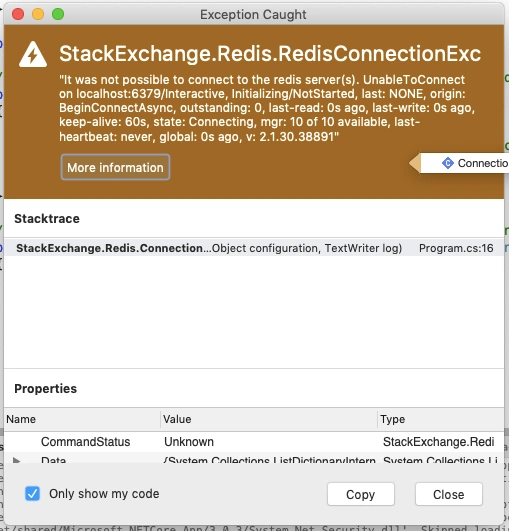
In order to make our application work, you need to specify the Gateway IP address of Redis in the connection multiplexer. You can get the Gateway details by running:
- docker ps
- //Get the container id from above command
- docker inspect <container id of redis>
You can find the details about Gateway in the NetworkSettings section.
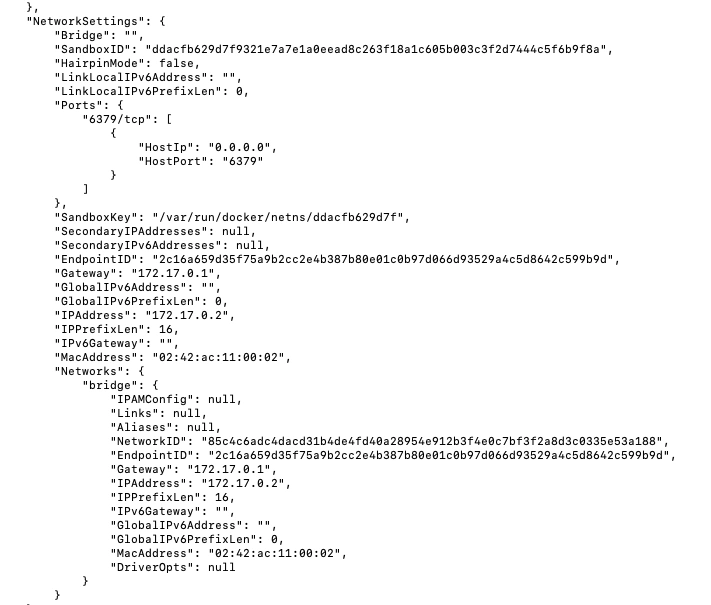
Now lets modify our code in the Startup.cs
- public void ConfigureServices(IServiceCollection services) {
- services.AddControllers();
- IConnectionMultiplexer redis = ConnectionMultiplexer.Connect("172.17.0.1");
- services.AddScoped(x => redis.GetDatabase());
- }
After modification, the code seems to be working perfectly!
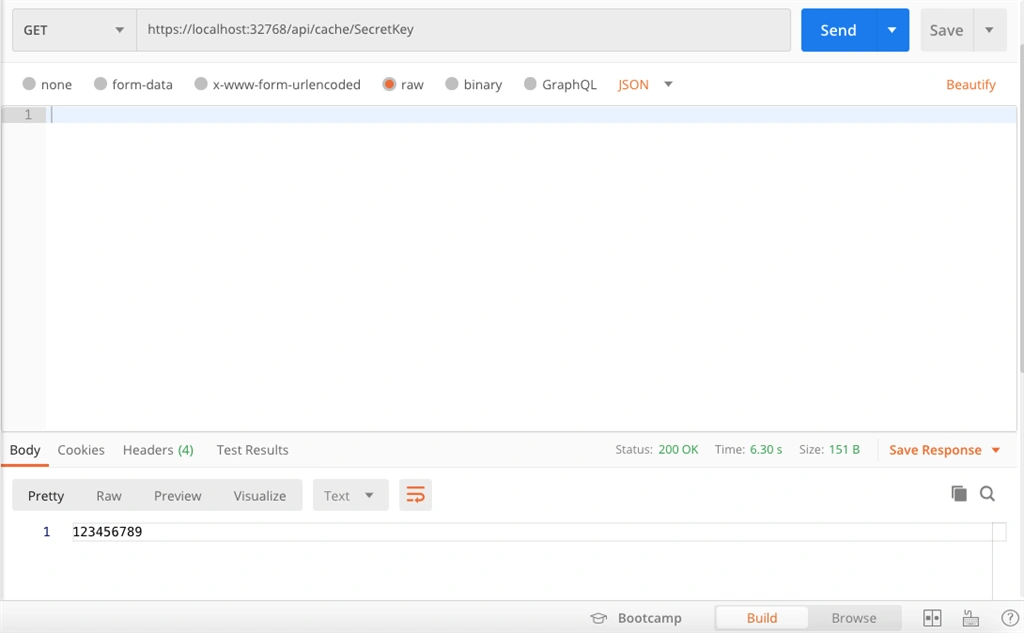
I hope you liked the article. In case you find the article interesting, then kindly like and share it!
TonyPosted Jun 3, 2025, 5:29 AM
Can i get the Project file of .net code