

Audio Tags and Elements in HTML5
Sound plays a very crucial role in our daily life. We just cant imagine a world without sounds. Not even in humans but sound
plays a vital role in animal's life too, think of the croaking sound of toads, the chirping of birds, barking of dogs, etc. When we have turned every real world
entity to interact with our digital world why should this property remain
undiscovered, here HTML5 comes to the rescue, It includes a variety of sound
formats and audio properties to be included in a static page that it seems more
lively than simply static one, in fact, these tags are as easy to handle as other
tags in HTML. Let's explore this tag in HTML5.
Using audio tag
Step 1 : Open any HTML editor (ex.
visual studio, Notepad, etc) and in the source code page (the page where you want to
write the HTML code) type the following lines.

To include multiple audio files use the following
lines
- <audio controls="controls" >
- <source src="song1.mp3" type="audio/mp3" />
- <source src="song2.wma" type="audio/wma" />
- <source src="song3.wav" type="audio/x-wav" />
- </audio>
Step 2 : Now before previewing the output in the browser you need to check whether the format that you include for multiple formats of audio files in your browser support all the tags. see the figure
below to know which format is supported by which browser.

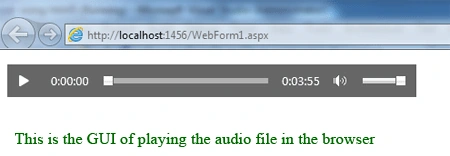
Step 3: I have IE7 so I'll preview the
output in this browser also if your browser doesn't support this format then the output will be a blank page otherwise the page looks like this:
Properties of the <audio></audio> tag
Preload property: This property
allows the user to extract the best experience from the browser. It specifies if and
how the user thinks that the audio should be loaded when the page loads.
This property is of three values
- none: This value is used when the user thinks that the browser should load the entire audio file when the page loads.
- metadata: The user thinks that the browser should load only metadata when the page loads.
- auto: The user thinks that the browser should NOT load the audio file when the page loads.
These property/attributes are used as below:
- <audio controls="controls" >
- <source src="song1.mp3" type="audio/mp3" preload="none" />
- </audio>
- <audio controls="controls" >
- <source src="song2.ogg" type="audio/ogg" preload="metadata" />
- </audio>
- <audio controls="controls" >
- <source src="song3.aac" type="audio/aac" preload= "auto" />
- </audio>


Stelia JacksonPosted Jan 24, 2012, 12:21 AM
nice article...