

In this article, we will learn how to export a data sheet in Excel using ASP.NET MVC. In this demo, we will use Epplus library that is used to export an Excel using the Open Office XML format. We will be using MongoDB here./div>
Steps required to export data in an Excel
Step 1
Open Visual Studio and create a new project. Name it as ExportExcel.
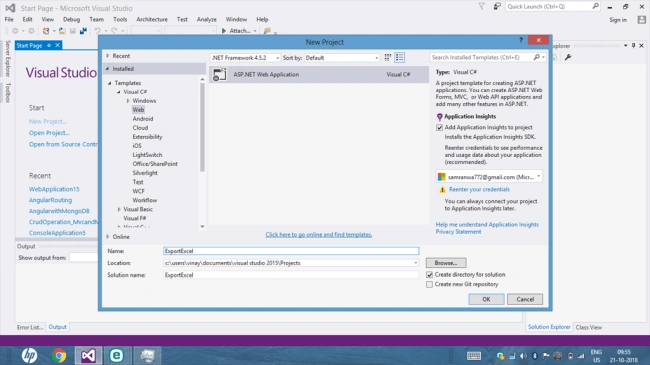
Choose the Template type as MVC.
Step 2
Add MongoDB Drivers for C# using NuGet Package Manager.
Add the required namespaces for MongoDB.
using MongoDB.Driver;
using MongoDB.Bson;
Step 3
Now, add a connection string in the web.config file and add the following line in the App Settings section of that file.
<add key="connectionString" value="mongodb://localhost"/>
Step 4
Add a class in Models folder and name it EmployeeDetails.
[BsonRepresentation(BsonType.ObjectId)]
public String Id { get; set; }
public string Name { get; set; }
public string Department { get; set; }
public string Address { get; set; }
public string City { get; set; }
public string Country { get; set; }
Step 5
Click on the Controllers folder and add a new empty controller. Name it as Student Controller.
Step 6
Add EPPlus library from NuGet Package Manager.
And, add the required namespace.
using OfficeOpenXml;
Now, add an actionmethod and name it as list. In this, add the following code.
public ActionResult List()
{
    string constr = ConfigurationManager.AppSettings["connectionString"];
    var Client = new MongoClient(constr);
    var db = Client.GetDatabase("Employee");
    var collection = db.GetCollection<EmployeeDetails>("EmployeeDetails").Find(new BsonDocument()).ToList();
    return View(collection);
}
Right-click on the Method and add a View.
Add a link button in the View and name it DownloadExcel.
<div>
    <a href="@Url.Action("DownloadExcel","Student")">Download Excel</a>
</div>
Complete View
@model IEnumerable<ExportExcel.Models.EmployeeDetails>

@{
    ViewBag.Title = "List";
}


<table class="table table-striped table-bordered">
    <tr>
        <th>
            @Html.DisplayNameFor(model => model.Name)
        </th>
        <th>
            @Html.DisplayNameFor(model => model.Department)
        </th>
        <th>
            @Html.DisplayNameFor(model => model.Address)
        </th>
        <th>
            @Html.DisplayNameFor(model => model.City)
        </th>
        <th>
            @Html.DisplayNameFor(model => model.Country)
        </th>

    </tr>

@foreach (var item in Model) {
    <tr>
        <td>
            @Html.DisplayFor(modelItem => item.Name)
        </td>
        <td>
            @Html.DisplayFor(modelItem => item.Department)
        </td>
        <td>
            @Html.DisplayFor(modelItem => item.Address)
        </td>
        <td>
            @Html.DisplayFor(modelItem => item.City)
        </td>
        <td>
            @Html.DisplayFor(modelItem => item.Country)
        </td>

    </tr>
}

</table>

<div>
    <a href="@Url.Action("DownloadExcel","Student")">Download Excel</a>
</div>
Now, create a Method in Controller and add the following code to Export the data in Excel.
public void DownloadExcel()
{
    string constr = ConfigurationManager.AppSettings["connectionString"];
    var Client = new MongoClient(constr);
    var db = Client.GetDatabase("Employee");
    var collection = db.GetCollection<EmployeeDetails>("EmployeeDetails").Find(new BsonDocument()).ToList();
    ExcelPackage Ep = new ExcelPackage();
    ExcelWorksheet Sheet = Ep.Workbook.Worksheets.Add("Report");
    Sheet.Cells["A1"].Value = "Name";
    Sheet.Cells["B1"].Value = "Department";
    Sheet.Cells["C1"].Value = "Address";
    Sheet.Cells["D1"].Value = "City";
    Sheet.Cells["E1"].Value = "Country";
    int row = 2;
    foreach (var item in collection)
    {

        Sheet.Cells[string.Format("A{0}", row)].Value = item.Name;
        Sheet.Cells[string.Format("B{0}", row)].Value = item.Department;
        Sheet.Cells[string.Format("C{0}", row)].Value = item.Address;
        Sheet.Cells[string.Format("D{0}", row)].Value = item.City;
        Sheet.Cells[string.Format("E{0}", row)].Value = item.Country;
        row++;
    }
    Sheet.Cells["A:AZ"].AutoFitColumns();
    Response.Clear();
    Response.ContentType = "application/vnd.openxmlformats-officedocument.spreadsheetml.sheet";
    Response.AddHeader("content-disposition", "attachment: filename=" + "Report.xlsx");
    Response.BinaryWrite(Ep.GetAsByteArray());
    Response.End();
}
Complete Controller code
using System;
using System.Collections.Generic;
using System.Linq;
using System.Web;
using System.Web.Mvc;
using MongoDB.Driver;
using MongoDB.Bson;
using System.Configuration;
using ExportExcel.Models;
using OfficeOpenXml;
using System.Drawing;

namespace ExportExcel.Controllers
{
    public class StudentController : Controller
    {
        public ActionResult List()
        {
            string constr = ConfigurationManager.AppSettings["connectionString"];
            var Client = new MongoClient(constr);
            var db = Client.GetDatabase("Employee");
            var collection = db.GetCollection<EmployeeDetails>("EmployeeDetails").Find(new BsonDocument()).ToList();
            return View(collection);
        }
        public void DownloadExcel()
        {
            string constr = ConfigurationManager.AppSettings["connectionString"];
            var Client = new MongoClient(constr);
            var db = Client.GetDatabase("Employee");
            var collection = db.GetCollection<EmployeeDetails>("EmployeeDetails").Find(new BsonDocument()).ToList();
            ExcelPackage Ep = new ExcelPackage();
            ExcelWorksheet Sheet = Ep.Workbook.Worksheets.Add("Report");
            Sheet.Cells["A1"].Value = "Name";
            Sheet.Cells["B1"].Value = "Department";
            Sheet.Cells["C1"].Value = "Address";
            Sheet.Cells["D1"].Value = "City";
            Sheet.Cells["E1"].Value = "Country";
            int row = 2;
            foreach (var item in collection)
            {
                Sheet.Cells[string.Format("A{0}", row)].Value = item.Name;
                Sheet.Cells[string.Format("B{0}", row)].Value = item.Department;
                Sheet.Cells[string.Format("C{0}", row)].Value = item.Address;
                Sheet.Cells[string.Format("D{0}", row)].Value = item.City;
                Sheet.Cells[string.Format("E{0}", row)].Value = item.Country;
                row++;
            }
            Sheet.Cells["A:AZ"].AutoFitColumns();
            Response.Clear();
            Response.ContentType = "application/vnd.openxmlformats-officedocument.spreadsheetml.sheet";
            Response.AddHeader("content-disposition", "attachment: filename=" + "Report.xlsx");
            Response.BinaryWrite(Ep.GetAsByteArray());
            Response.End();
        }
    }
}
Now, run the project and click on the "Download Excel" button.
The data is downloaded in Excel format.
Summary
In this article, we learned how to export the data in Excel using ASP.NET MVC.
昊 石Posted Dec 8, 2021, 7:19 AM
Very useful, suitable for my program
Vikki KumarPosted Jul 12, 2021, 5:23 AM
How to download source code?
Miranda JohnsonPosted Oct 22, 2020, 5:18 PM
Works great!! Only issue is formatting of dates and times. Do you know what I need to do there?
AnelePosted Oct 20, 2020, 6:34 AM
This is great thanks! However my GetDatabase() gets an error for the DownloadExcel method, anyway I can fix this?
ASHOK PARASURAMANPosted Aug 12, 2020, 11:37 AM
Hi Sanwar, how to create excel images (like charts) along with table of data. Can we convert/export directly from html to Excel ?
Ciro CofanoPosted Dec 23, 2019, 4:54 AM
It is possible to pass "Ep.GetAsByteArray()" result to memory stream in order to generate a Pdf File?
Steven PetersonPosted Dec 8, 2019, 5:27 AM
This is pretty simple, but sometimes it does not work, you can use "ZetExcel", it is easy to use and very handy.
vinay sandupatlaPosted Sep 29, 2019, 11:57 PM
Constr is problem
Codau FabianPosted Sep 24, 2019, 3:30 AM
And also, how could I let the user choose the location where the file to be saved?
Codau FabianPosted Sep 24, 2019, 3:28 AM
It works for me, but I have a question: how could I change the name of the generated file?
Guest UserPosted Apr 12, 2019, 2:46 PM
This is pretty simple but it's not working for me. It's downloading corrupted like file