
In our work, sometimes we need to save data from SQL Server into an Excel file, maybe most people immediately think of Microsoft.Office.Introp.Excel Object, but it has the disadvantage that you need to install Microsoft Excel or Office on the machine. In this article we will see how to save data into the Excel and convert the Excel to HTML in a pretty easy method to use two free libraries, which doesn't need to install Microsoft Excel or Office.
To demonstrate how to save data from SQL to Excel file, I have created a sample SQL table and here is how it looks like.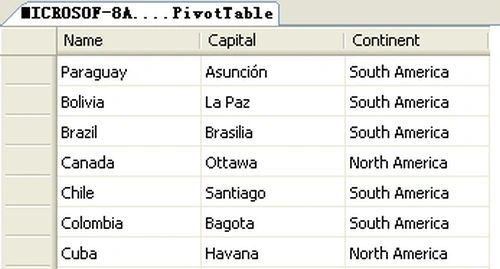
Now, the next step is to read the SQL data into a Datatable.
- private static DataTable exportedData()
- {
- DataTable dt = new DataTable();
- using (SqlConnection connection = new SqlConnection("Data Source=MICROSOF- 8A1237\\SQLEXPRESS;Initial Catalog=test;Integrated Security=SSPI;"))
- {
- using (SqlCommand command = new SqlCommand("select * from PivotTable"))
- {
- using (SqlDataAdapter dataAdapter = new SqlDataAdapter(command.CommandText, connection))
- {
- dataAdapter.Fill(dt);
- }
- }
- }
- return dt;
- }
- using OfficeOpenXml;
- DataTable dt = exportedData();
- ExcelPackage elPackage = new ExcelPackage();
- ExcelWorksheet worksheet = elPackage.Workbook.Worksheets.Add("SqlData");
- worksheet.Cells["A1"].LoadFromDataTable(dt, true);
Next is to convert the Excel file to HTML, Epplus doesn't support the feature, so you need to use the another component: Spire.xls, which seems to be a community sponsored version of Epplus.
The following is the namespace to be used:
- using Spire.Xls;
- Workbook book = new Workbook();
- book.LoadFromStream(ms,ExcelVersion.Version2010);
- Worksheet sheet = book.Worksheets["SqlData"];
- sheet.SaveToHtml("result.html");
The following is the entire code.
- class Program
- {
- static void Main(string[] args)
- {
- DataTable dt = exportedData();
- ExcelPackage elPackage = new ExcelPackage();
- ExcelWorksheet worksheet = elPackage.Workbook.Worksheets.Add("SqlData");
- worksheet.Cells["A1"].LoadFromDataTable(dt, true);
- using (MemoryStream ms = new MemoryStream())
- {
- elPackage.SaveAs(ms);
- Workbook book = new Workbook();
- book.LoadFromStream(ms, ExcelVersion.Version2010);
- Worksheet sheet = book.Worksheets["SqlData"];
- sheet.SaveToHtml("result.html");
- }
- System.Diagnostics.Process.Start("result.html");
- }
- private static DataTable exportedData()
- {
- DataTable dt = new DataTable();
- using (SqlConnection connection = new SqlConnection("Data Source=MICROSOF- 8A1237\\SQLEXPRESS;Initial Catalog=test;Integrated Sec urity=SSPI;"))
- {
- using (SqlCommand command = new SqlCommand("select * from PivotTable"))
- {
- using (SqlDataAdapter dataAdapter = new SqlDataAdapter(command.CommandText, connection))
- {
- dataAdapter.Fill(dt);
- }
- }
- }
- return dt;
- }
- }
Devika MPosted Jul 16, 2020, 9:13 AM
Nice explanation. But spire is now a paid library.
vijay NelsonPosted Nov 20, 2014, 11:38 PM
very nice
Vithal WadjePosted Sep 15, 2014, 2:47 PM
very cool,thanks