

We are going to use EPPLus library in this article. It is an open source library and very easy to use for developers.
EPPlus supports many properties like cell ranges, cell styling (border, color, fill, font, number, alignments), charts, pictures, shapes, comments, tables, protection, encryption, pivot tables, data validation, conditional formatting, formula calculation etc.
We have to follow some simple steps for using EPPlus library in C#.
Step 1
We have to install EPPlus through manage NuGet packages, as shown below.
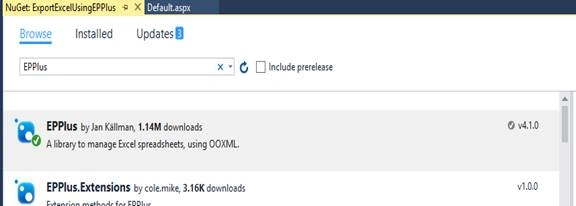
We can install it, using Package Manager console with the line given below.
Install-Package EPPlus
Step 2
Now, add the line given below in .ASPX page.
- <asp:Button ID="ExportExcel" runat="server" Text="Export Excel" OnClick="ExportExcel_Click" />
Step 3
Now, add the two namespaces given below on the top of .CS page.
- using OfficeOpenXml;
- using OfficeOpenXml.Style;
- using System.IO;
Step 4
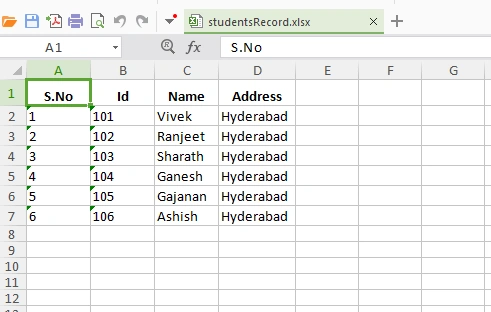
Create a method for exporting Excel file by clicking Export button and writing the logic.
- protected void ExportExcel_Click(object sender, EventArgs e)
- {
- var students = new []
- {
- new {
- Id = "101", Name = "Vivek", Address = "Hyderabad"
- },
- new {
- Id = "102", Name = "Ranjeet", Address = "Hyderabad"
- },
- new {
- Id = "103", Name = "Sharath", Address = "Hyderabad"
- },
- new {
- Id = "104", Name = "Ganesh", Address = "Hyderabad"
- },
- new {
- Id = "105", Name = "Gajanan", Address = "Hyderabad"
- },
- new {
- Id = "106", Name = "Ashish", Address = "Hyderabad"
- }
- };
- ExcelPackage excel = new ExcelPackage();
- var workSheet = excel.Workbook.Worksheets.Add("Sheet1");
- workSheet.TabColor = System.Drawing.Color.Black;
- workSheet.DefaultRowHeight = 12;
- //Header of table
- //
- workSheet.Row(1).Height = 20;
- workSheet.Row(1).Style.HorizontalAlignment = ExcelHorizontalAlignment.Center;
- workSheet.Row(1).Style.Font.Bold = true;
- workSheet.Cells[1, 1].Value = "S.No";
- workSheet.Cells[1, 2].Value = "Id";
- workSheet.Cells[1, 3].Value = "Name";
- workSheet.Cells[1, 4].Value = "Address";
- //Body of table
- //
- int recordIndex = 2;
- foreach(var student in students) {
- workSheet.Cells[recordIndex, 1].Value = (recordIndex - 1).ToString();
- workSheet.Cells[recordIndex, 2].Value = student.Id;
- workSheet.Cells[recordIndex, 3].Value = student.Name;
- workSheet.Cells[recordIndex, 4].Value = student.Address;
- recordIndex++;
- }
- workSheet.Column(1).AutoFit();
- workSheet.Column(2).AutoFit();
- workSheet.Column(3).AutoFit();
- workSheet.Column(4).AutoFit();
- string excelName = "studentsRecord";
- using(var memoryStream = new MemoryStream()) {
- Response.ContentType = "application/vnd.openxmlformats-officedocument.spreadsheetml.sheet";
- Response.AddHeader("content-disposition", "attachment; filename=" + excelName + ".xlsx");
- excel.SaveAs(memoryStream);
- memoryStream.WriteTo(Response.OutputStream);
- Response.Flush();
- Response.End();
- }
- }
Fozia KhanPosted Apr 20, 2020, 12:50 PM
Nice Article, thanks for sharing but I am getting error "The name 'Response' does not exist in current context". Could anybody help me in this, am I doing some silly mistake. I have already added the namespaces.
Allison PaivaPosted Feb 7, 2019, 4:54 AM
Can anyone please provide the code for exporting data from Excel to SQL Server
JackPosted Nov 27, 2017, 9:01 AM
Nice Article, Keep Sharing.....
shpat ademiPosted Aug 31, 2017, 1:36 AM
Thanks. Nice article. How can we increase index of cell dynamically. For exampel: int recordIndex = 2; foreach(var student in students) { int cellIndex = 1; workSheet.Cells[recordIndex, index].Value = (recordIndex - 1).ToString(); index ++; workSheet.Cells[recordIndex, 2].Value = student.Id; index++; }
Michel DemersPosted Jun 14, 2017, 4:02 PM
Would you know how we can manage the acute accent and grave accent? I tried with the Response.ContentEncoding stuff with no success