

Introduction
In this article and code sample, I would like to share how to export a DataTable to a Comma Separated File (CSV) format using a C# extension method. We will also learn how to use an extension method to make code more manageable.
What is a .csv file
A Comma Separated Value (CSV) file contains data with all the columns in the file separated by a comma. Another use of a CSV file is to directly open the file in Excel and then the data will be auto-filled into Excel cells.
The following is a snapshot of a sample CSV file.
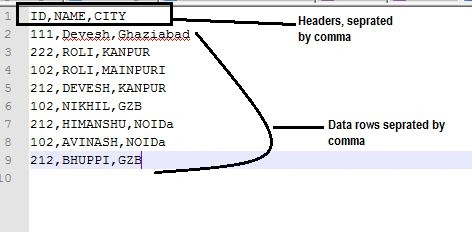
Here is the process of creating a DataTable and exporting its data to a .csv file.
Step 1. Create a DataTable
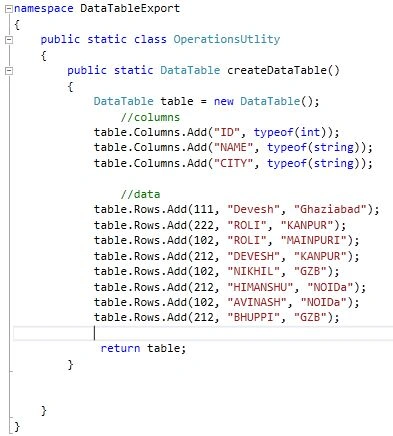
We added a class containing a method that returns a DataTable. The DataTable is created dynamically. In your case, your DataTable may be created via DataSet that fetches data from a database. If you're new to ADO.NET and DataTable, first read this: DataTable in C# Code.
public static class OperationsUtility
{
    public static DataTable CreateDataTable()
    {
        DataTable table = new DataTable();

        // Define columns
        table.Columns.Add("ID", typeof(int));
        table.Columns.Add("NAME", typeof(string));
        table.Columns.Add("CITY", typeof(string));

        // Add data rows
        table.Rows.Add(111, "Devesh", "Ghaziabad");
        table.Rows.Add(222, "ROLI", "KANPUR");
        table.Rows.Add(102, "ROLI", "MAINPURI");
        table.Rows.Add(212, "DEVESH", "KANPUR");
        table.Rows.Add(102, "NIKHIL", "GZB");
        table.Rows.Add(212, "HIMANSHU", "NOIDa");
        table.Rows.Add(102, "AVINASH", "NOIDa");
        table.Rows.Add(212, "BHUPPI", "GZB");

        return table;
    }
}
Code snapshot
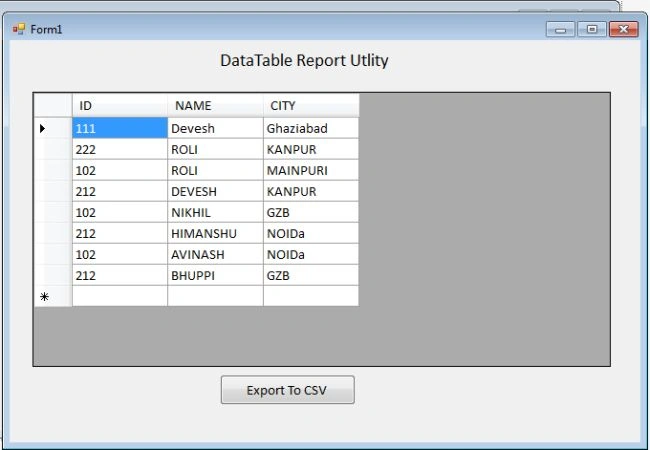
Step 2. Create UI to display DataTable
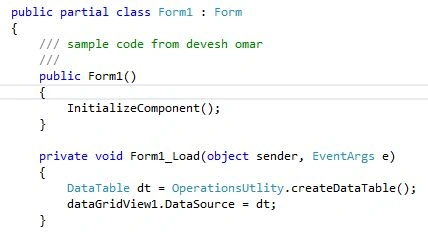
Here we created a simple DataGridView to bind to the DataTable.
Code
Step 3. Create an Extension Method that converts the DataTable to CSV
- Create a static class as per the code below.
public static class CSVUtlity { } - Add an Extension method as in the following.
public static void ToCSV(this DataTable dtDataTable, string strFilePath){ } - After adding the Extension method the ToCSV method is now appearing in the list below.
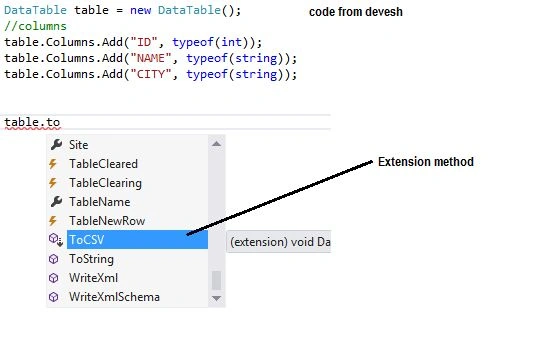
- The following is the code to convert the DataTable to CSV.
public static void ToCSV(this DataTable dtDataTable, string strFilePath) {
    StreamWriter sw = new StreamWriter(strFilePath, false);
    //headers
    for (int i = 0; i < dtDataTable.Columns.Count; i++) {
        sw.Write(dtDataTable.Columns[i]);
        if (i < dtDataTable.Columns.Count - 1) {
            sw.Write(",");
        }
    }
    sw.Write(sw.NewLine);
    foreach(DataRow dr in dtDataTable.Rows) {
        for (int i = 0; i < dtDataTable.Columns.Count; i++) {
            if (!Convert.IsDBNull(dr[i])) {
                string value = dr[i].ToString();
                if (value.Contains(',')) {
                    value = String.Format("\"{0}\"", value);
                    sw.Write(value);
                } else {
                    sw.Write(dr[i].ToString());
                }
            }
            if (i < dtDataTable.Columns.Count - 1) {
                sw.Write(",");
            }
        }
        sw.Write(sw.NewLine);
    }
    sw.Close();
}
Step 4. Export to CSV on button click
private void btnCSV_Click(object sender, EventArgs e) {
    DataTable dt = OperationsUtlity.createDataTable();
    string filename = OpenSavefileDialog();
    dt.ToCSV(filename);
}
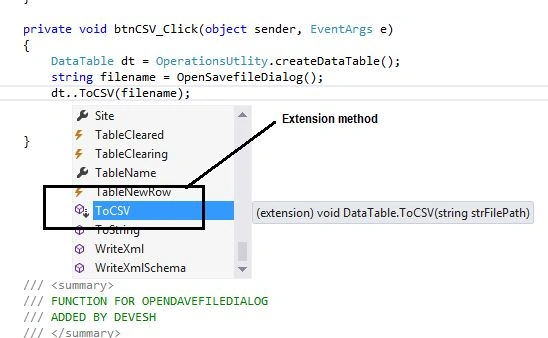
Step 5. Call ToCSV method
dt.ToCSV() will call the ToCSV method defined in the CSVutlity class.

Step 6. Build and run the project
Now build and run the project. Click on the button to export data. The output file will be test.csv.

When you open the CSV file in Notepad, you will see this
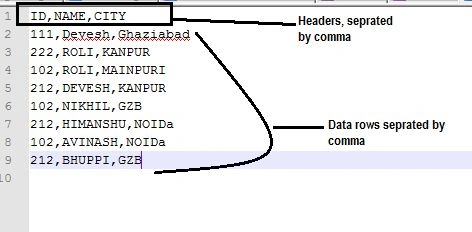
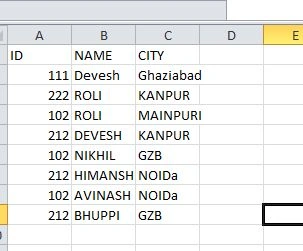
By default, this file opens in Excel. Double-click to open this file in Excel. This is how the file looks like.
Conclusion
We have learned how to use a C# extension method and learned how to export a DataTable to a CSV file.
References and more
Learn here about extension methods.
Ying LamPosted Nov 17, 2023, 6:39 AM
Great. a generic csv creation function. no need to define all possible fields
NourElDein ElKhatibPosted Apr 7, 2022, 12:55 AM
You saved me...
Pankajkumar PatelPosted Aug 20, 2019, 11:38 PM
Nice article
Mike EdwardsPosted Nov 15, 2018, 9:15 AM
Works perfectly for my needs. Many thanks
Jay TurpinPosted Feb 9, 2016, 10:47 AM
value = string.Format("\"{0}\"", value.Replace("\"", "\"\""));
Jay TurpinPosted Feb 9, 2016, 10:47 AM
sigh - dumb comment editor
Jay TurpinPosted Feb 9, 2016, 10:47 AM
Add this code to handle double quotation marks:
Anand KadekarPosted Jun 24, 2015, 8:29 AM
How about exporting 50K records with 40 columns each?
Nikhil ShindePosted Jun 23, 2015, 3:15 AM
Really helpfull
Alistair MillingtonPosted Dec 23, 2014, 7:01 AM
How do you get it to export an existing table that already exists, as a data grid or just directly from the datasource?
Devesh OmarPosted Dec 8, 2014, 9:55 AM
yes we can do same also
Patricia AkpanPosted Nov 30, 2014, 12:32 PM
its a nice one. what about importing csv into datatable?
PPosted Oct 29, 2014, 3:07 PM
Very Nice way to pull in the ~column headers~ !!!
Anupam SinghPosted Jul 16, 2014, 6:17 AM
nice tip..
Gopi ChandPosted Jul 11, 2014, 6:06 AM
GOOD ONE...