

Introduction
I would like to share a way by which we can export a DataTable to HTML format.
This code can be used for reporting purposes where sometimes the client needs output data in HTML format.
First we will bind the DataTable to a DataGridView.
A. Binding DataGridView using DataTable
- Create a DataTable and define columns as in the following:
DataTable table = new DataTable(); table.Columns.Add("ID", typeof(int)); table.Columns.Add("NAME", typeof(string)); table.Columns.Add("CITY", typeof(string)); - Add rows as in the following:
table.Rows.Add(111, "Devesh", "Ghaziabad"); table.Rows.Add(222, "ROLI", "KANPUR"); table.Rows.Add(102, "ROLI", "MAINPURI"); table.Rows.Add(212, "DEVESH", "KANPUR"); - Binding DataGridView as in the following:
dataGridView1.DataSource=table; - Running the code, the following will be the screen.
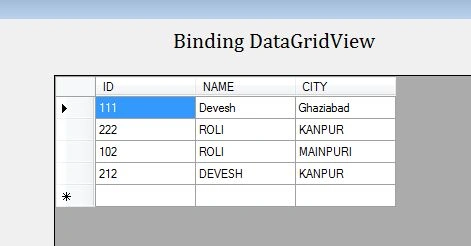
B. Exporting DataTable to HTML
I have written generic code that creates HTML text for every DataTable.
You can use this code directly in your project for reporting purposes.
Code below:
protected string ExportDatatableToHtml(DataTable dt)
{
StringBuilder strHTMLBuilder = new StringBuilder();
strHTMLBuilder.Append("<html >");
strHTMLBuilder.Append("<head>");
strHTMLBuilder.Append("</head>");
strHTMLBuilder.Append("<body>");
strHTMLBuilder.Append("<table border='1px' cellpadding='1' cellspacing='1' bgcolor='lightyellow' style='font-family:Garamond; font-size:smaller'>");
strHTMLBuilder.Append("<tr >");
foreach (DataColumn myColumn in dt.Columns)
{
strHTMLBuilder.Append("<td >");
strHTMLBuilder.Append(myColumn.ColumnName);
strHTMLBuilder.Append("</td>");
}
strHTMLBuilder.Append("</tr>");
foreach (DataRow myRow in dt.Rows)
{
strHTMLBuilder.Append("<tr >");
foreach (DataColumn myColumn in dt.Columns)
{
strHTMLBuilder.Append("<td >");
strHTMLBuilder.Append(myRow[myColumn.ColumnName].ToString());
strHTMLBuilder.Append("</td>");
}
strHTMLBuilder.Append("</tr>");
}
//Close tags.
strHTMLBuilder.Append("</table>");
strHTMLBuilder.Append("</body>");
strHTMLBuilder.Append("</html>");
string Htmltext = strHTMLBuilder.ToString();
return Htmltext;
}
c. Understanding the code
- We created a generic function that uses a DataTable as a parameter.
- We are using stringbuilder to create dynamic HTML text.
- Here the output contains an equal number of rows and column as we have in the DataGridView.
- Creating columns in HTML.
foreach (DataColumn myColumn in dt.Columns)
{
strHTMLBuilder.Append("<td >");
strHTMLBuilder.Append(myColumn.ColumnName);
strHTMLBuilder.Append("</td>");

}
v. Copy Data. The following code creates an equal number of rows as in the DataTable and copies the data to HTML rows.
foreach (DataRow myRow in dt.Rows)
{

strHTMLBuilder.Append("<tr >");
foreach (DataColumn myColumn in dt.Columns)
{
strHTMLBuilder.Append("<td >");
strHTMLBuilder.Append(myRow[myColumn.ColumnName].ToString());
strHTMLBuilder.Append("</td>");

}
strHTMLBuilder.Append("</tr>");
}
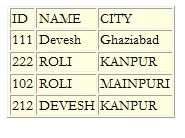
d. After executing the code above we would get the following HTML
<html >
<head>
</head>
<body>
<table border='1px' cellpadding='1' cellspacing='1' bgcolor='lightyellow' style='font-family:Garamond; font-size:smaller'>
<tr >
<td >ID</td>
<td >NAME</td>
<td >CITY</td>
</tr><tr >
<td >111</td><td >Devesh</td>
<td >Ghaziabad</td></tr>
<tr ><td >222</td><td >ROLI</td>
<td >KANPUR</td></tr><tr >
<td >102</td><td >ROLI</td>
<td >MAINPURI</td></tr><tr >
<td >212</td><td >DEVESH</td>
<td >KANPUR</td></tr></table>
</body>
</html>
e. Creating HTML file
string HtmlBody = ExportDatatableToHtml(table)
System.IO.File.WriteAllText(@"c:\abc.HTML", HtmlBody);
f. Output
Conclusion
We have learned how to create HTML from a DataTable.
Bhavik PatelPosted Jun 10, 2014, 10:25 PM
Helpful resource. Great article.
Joginder BangerPosted Jun 10, 2014, 2:11 PM
Good sir....I learn lot of thing how to create a table and how to create a html tag in code behind....thanks 4 posting & give a valuable time\