

Introduction
Download source code here : HTML Table Export
Background
This article explains how to export a HTML table using jQuery. It covers exporting to the following formats:
- Excel
- Image
- CSV
- PPT
- Word
- TXT
- XML
Why
In my project, we are doing 80% of our work in the client side. So I decided to implement the export feature in the client side itself. The same can be done using server-side code also but I prefer the client-side one.
What you must know
Using the code
Before you start, you need to download the necessary files from: TableExport.jquery.plugin.
Once you have download the files, you need to include those in your project. Here I am using a MVC4 web application.
- <script src="~/Contents/jquery-1.9.1.js"></script>
- <script src="~/Contents/tableExport.js"></script> @*Main file which does export feature *@
- <script src="~/Contents/jquery.base64.js"></script> @*Main file which does convert the content to base64 *@
- <script src="~/Contents/html2canvas.js"></script> @*Main file which does export to image feature *@
- <script src="~/Contents/jspdf/libs/base64.js"></script> @*Main file which does convert the content to base64 for pdf *@
- <script src="~/Contents/jspdf/libs/sprintf.js"></script> @*Main file which does export feature for pdf *@
- <script src="~/Contents/jspdf/jspdf.js"></script> @*Main file which does export feature for pdf *@
- <table id="activity" >
- <thead>
- <tr>
- <th>Name</th>
- <th>Activity on Code Project (%)</th>
- <th>Activity on C# Corner (%)</th>
- <th>Activity on Asp Forum (%)</th>
- </tr>
- </thead>
- <tbody>
- <tr>
- <td>Sibeesh</td>
- <td>100</td>
- <td>98</td>
- <td>80</td>
- </tr>
- <tr>
- <td>Ajay</td>
- <td>90</td>
- <td>0</td>
- <td>50</td>
- </tr>
- <tr>
- <td>Ansary</td>
- <td>100</td>
- <td>20</td>
- <td>10</td>
- </tr>
- <tr>
- <td>Aghil</td>
- <td>0</td>
- <td>30</td>
- <td>90</td>
- </tr>
- <tr>
- <td>Arya</td>
- <td>0</td>
- <td>0</td>
- <td>95</td>
- </tr>
- </tbody>
- </table>
- <table>
- <tr id="footerExport">
- <td id="exportexcel"><img src="~/icons/xls.png" title="Export to Excel" /></td>
- <td id="exportpdf"><img src="~/icons/pdf.png" title="Export to PDF" /></td>
- <td id="exportimage"><img src="~/icons/png.png" title="Export to PNG" /></td>
- <td id="exportcsv"><img src="~/icons/csv.png" title="Export to CSV" /></td>
- <td id="exportword"><img src="~/icons/word.png" title="Export to Word" /></td>
- <td id="exporttxt"><img src="~/icons/txt.png" title="Export to TXT" /></td>
- <td id="exportxml"><img src="~/icons/xml.png" title="Export to XML" /></td>
- <td id="exportppt"><img src="~/icons/ppt.png" title="Export to PPT" /></td>
- </tr>
- </table>
- <style>
- #activity {
- text-align:center;border:1px solid #ccc;
- }
- #activity td{
- text-align:center;border:1px solid #ccc;
- }
- #footerExport td{
- cursor:pointer;
- text-align:center;border:1px solid #ccc;
- border:none;
- }
- </style>
- <script>
- $(document).ready(function () {
- $('#exportexcel').bind('click', function (e) {
- $('#activity').tableExport({ type: 'excel', escape: 'false' });
- });
- $('#exportpdf').bind('click', function (e) {
- $('#activity').tableExport({ type: 'pdf', escape: 'false' });
- });
- $('#exportimage').bind('click', function (e) {
- $('#activity').tableExport({ type: 'png', escape: 'false' });
- });
- $('#exportcsv').bind('click', function (e) {
- $('#activity').tableExport({ type: 'csv', escape: 'false' });
- });
- $('#exportppt').bind('click', function (e) {
- $('#activity').tableExport({ type: 'powerpoint', escape: 'false' });
- });
- $('#exportxml').bind('click', function (e) {
- $('#activity').tableExport({ type: 'xml', escape: 'false' });
- });
- $('#exportword').bind('click', function (e) {
- $('#activity').tableExport({ type: 'doc', escape: 'false' });
- });
- $('#exporttxt').bind('click', function (e) {
- $('#activity').tableExport({ type: 'txt', escape: 'false' });
- });
- });
- </script>
Explanation
Now its time go deeper into that plugin. In the downloaded files you can see a file called tableExport.js. just open that file, you can see some conditions for specific formats. And the default property for exporting as follows.
- var defaults = {
- separator: ',',
- ignoreColumn: [],
- tableName:'yourTableName',
- type:'csv',
- pdfFontSize:7,
- pdfLeftMargin:20,
- escape:'true',
- htmlContent:'false',
- consoleLog:'false'
- };
- var varpdfFontSize= '7';
- $('#activity').tableExport({ type: 'excel', escape: 'false',pdfFontSize:varpdfFontSize});
Now in that file you can see an if else if condition that is satisfied for multiple formats. Let me explain for Excel formatting alone.
- var excel="<table>";
- // Header
- $(el).find('thead').find('tr').each(function() {
- excel += "<tr>";
- $(this).filter(':visible').find('th').each(function(index,data) {
- if ($(this).css('display') != 'none'){
- if(defaults.ignoreColumn.indexOf(index) == -1){
- excel += "<td>" + parseString($(this))+ "</td>";
- }
- }
- });
- excel += '</tr>';
- });
- // Row Vs Column
- var rowCount=1;
- $(el).find('tbody').find('tr').each(function() {
- excel += "<tr>";
- var colCount=0;
- $(this).filter(':visible').find('td').each(function(index,data) {
- if ($(this).css('display') != 'none'){
- if(defaults.ignoreColumn.indexOf(index) == -1){
- excel += "<td>"+parseString($(this))+"</td>";
- }
- }
- colCount++;
- });
- rowCount++;
- excel += '</tr>';
- });
- excel += '</table>'
- if(defaults.consoleLog == 'true'){
- console.log(excel);
- }
- var excelFile = "<html xmlns:o='urn:schemas-microsoft-com:office:office' xmlns:x='urn:schemas-microsoft-com:office:"+defaults.type+"' xmlns='http://www.w3.org/TR/REC-html40'>";
- excelFile += "<head>";
- excelFile += "<!--[if gte mso 9]>";
- excelFile += "<xml>";
- excelFile += "<x:ExcelWorkbook>";
- excelFile += "<x:ExcelWorksheets>";
- excelFile += "<x:ExcelWorksheet>";
- excelFile += "<x:Name>";
- excelFile += "{worksheet}";
- excelFile += "</x:Name>";
- excelFile += "<x:WorksheetOptions>";
- excelFile += "<x:DisplayGridlines/>";
- excelFile += "</x:WorksheetOptions>";
- excelFile += "</x:ExcelWorksheet>";
- excelFile += "</x:ExcelWorksheets>";
- excelFile += "</x:ExcelWorkbook>";
- excelFile += "</xml>";
- excelFile += "<![endif]-->";
- excelFile += "</head>";
- excelFile += "<body>";
- excelFile += excel;
- excelFile += "</body>";
- excelFile += "</html>";
- var base64data = "base64," + $.base64.encode(excelFile);
- window.open('data:application/vnd.ms-'+defaults.type+';filename=exportData.doc;' + base64data);
- Find the UI element (in this case it is our HTML table).
- Loop through the rows of the thread for the header information.
- Apply a filter to avoid the UI elements that has a display as none (filter(':visible')).
- If the UI is visible, append it to the variable (excel += "<td>" + parseString($(this))+ "</td>";)
The same procedure is done for the row vs column values also. The only difference is, here we are looping through the tbody instead of thread.
- After the data is manipulated, data is formulated in the Excel format.
Output
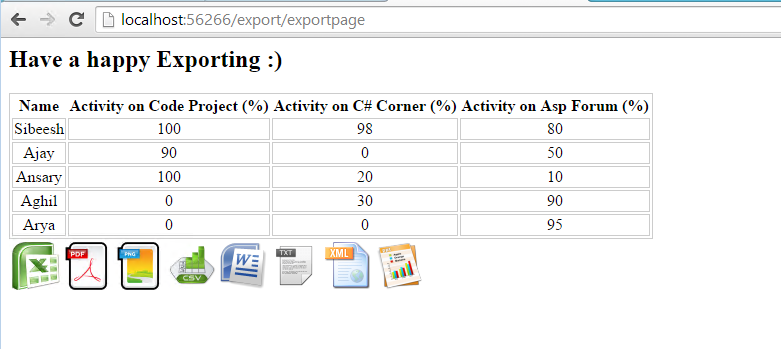
Points of Interest
JQuesry, CSS, HTML, Export
History
- 1st version: 18-11-2014
- 2nd Version : 24-11-2014
Changes done
- Added Images to UI elements
- Added some export feature
Please be noted that I have taken the images from plugin author's website (http://ngiriraj.com/pages/htmltable_export/demo.php) . You can find out more from that website.
Conclusion
Your turn. What do you think?
Kindest Regards
Sibeesh Venu
Irma CarballoPosted Jul 21, 2017, 8:51 PM
Hi! It worked like a charm; however, I'm using jQuery DataTables and I have pagination on my result, Table export is only exporting the first page out of 10 from the actual result, is there a way to export the entire list and not just page 1? Thank you!
Sibeesh VenuPosted Feb 9, 2017, 12:04 AM
D Donthu Hi, Can you please share what error you are getting and also please check your browser console too.
D DonthuPosted Feb 8, 2017, 5:08 AM
I am got some error in above code
Sibeesh VenuPosted Oct 12, 2016, 6:31 AM
Sinraj V Thanks
Sibeesh VenuPosted Oct 12, 2016, 6:31 AM
Prasanna Murali Thanks
Sinraj VPosted Oct 12, 2016, 4:59 AM
Thanks to share
Prasanna MuraliPosted Jul 5, 2016, 12:11 PM
Nice one...
Sibeesh VenuPosted Jul 5, 2016, 7:38 AM
Aqib Shehzad Thanks
Muhammad Aqib ShehzadPosted Jul 5, 2016, 6:56 AM
Very nice share
Sibeesh VenuPosted Jul 5, 2016, 5:35 AM
Upendra Pratap Shahi Thanks
Sibeesh VenuPosted Jul 5, 2016, 5:35 AM
kalu singh rao Thanks
Sibeesh VenuPosted Jul 5, 2016, 5:35 AM
Sr Karthiga Thank you
Sibeesh VenuPosted Jul 5, 2016, 5:35 AM
Victor Ruiz Can you please translate to English?
Sibeesh VenuPosted Jul 5, 2016, 5:35 AM
Vivek Kumar Thank you
Upendra Pratap ShahiPosted Jul 5, 2016, 5:03 AM
Nice one sir...
kalu singh raoPosted Jul 5, 2016, 4:37 AM
Nice...
Sr KarthigaPosted Feb 23, 2016, 7:45 PM
good one
Sr KarthigaPosted Feb 23, 2016, 7:45 PM
Nice explanation
Victor RuizPosted Feb 22, 2016, 11:02 PM
se puede exportar a pdf con un estilo css?
Vivek KumarPosted Feb 4, 2016, 2:33 PM
Nice article
Sibeesh VenuPosted Nov 18, 2015, 3:41 AM
Harshad Pansuriya Thank you
Harshad PansuriyaPosted Nov 18, 2015, 2:26 AM
Nice one
Ashok KeshriPosted Oct 23, 2015, 3:30 AM
csv file not open in csv format
Rupali ShindePosted Oct 23, 2015, 12:08 AM
same q, is there way to generate chart from data for excel ??
Mary SlocumPosted Jul 3, 2015, 8:20 PM
Is there any way to generate a chart from data for Excel using jQuery? Basically, I would like the data in a table in Excel along with a chart using the data beside it.
ishwarPosted May 29, 2015, 5:41 AM
How change file to be downloaed.by default it Show "Download"
Sibeesh VenuPosted Jan 8, 2015, 6:53 AM
vinoth kumar Hi , Have you checked the css style of those columns?
vinoth kumarPosted Jan 8, 2015, 2:27 AM
hi i have 10 columns but in my pdf only 4 columns is visible..
Sibeesh VenuPosted Jan 7, 2015, 8:38 AM
poorna gowri Hi I have not faced that issue yet. Can you please open that in excel and verify whether it is there also?
Sibeesh VenuPosted Jan 7, 2015, 8:28 AM
poorna gowri Hi , Have you checked the css style of those columns? Please verify whether its display is none or not.
poorna gowriPosted Jan 7, 2015, 6:17 AM
If I open this files in notepad or wordpad it showing %2C displayed instead of comma and %u20B9 displayed for rupees symbol and %20 for space. My output is collapsed. I think its regarding encoding. How to solve this?
poorna gowriPosted Jan 7, 2015, 6:13 AM
I tried that. working awesome. But when exporting as pdf only 4 columns are displayed. My table has 6 columns. I want to retrieve all columns. Can Anyone help pls?
Sibeesh VenuPosted Jan 7, 2015, 6:10 AM
vamsi pandu Actually this approach is for generating pdf from a HTML table , as in the title. Is your image inside that HTML table?
vamsi panduPosted Jan 7, 2015, 4:42 AM
in your approach images are nt exporting to pdf,can you explain how to get images also in pdf file
Sibeesh VenuPosted Dec 31, 2014, 2:36 AM
Sumit Jolly I will do it as you said. Once again thank you so much.
Sibeesh VenuPosted Dec 30, 2014, 6:46 AM
Sumit Jolly Thanks a lot for your valuable suggestion.
Guest UserPosted Dec 30, 2014, 5:23 AM
And, you can save it as say 1.xls file and open in Excel. So, Excel will shout for bad file but it'll open eventually.
Guest UserPosted Dec 30, 2014, 5:23 AM
For ex- <html><body> <table> <th>1</th> <th>2</th> <tr><td>12</td> <td>22</td></tr> </table> </body> </html>
Guest UserPosted Dec 30, 2014, 5:23 AM
This is good Sibeesh Venu! I applied "a-hack" long time back before OpenXML rose to popularity index, i.e., to export data as html and keep extension as ".xls". Now. dont use this because its a hack.
Sibeesh VenuPosted Dec 3, 2014, 2:29 AM
gopichand n Will look on it.
gopichand nPosted Dec 3, 2014, 1:35 AM
ngiriraj.com is working fine but borders and styles what i applied is not working when i download pdf....please help me ...i have a question posted for this in asp forums please look it once.. http://forums.asp.net/t/2022373.aspx?How+to+Export+HTML+Table+to+PNG+JPEG+BMP+or+PDF
Sibeesh VenuPosted Nov 24, 2014, 10:03 AM
Mukesh Kumar Tiwari Thank you :)
Mukesh Kumar TiwariPosted Nov 24, 2014, 9:10 AM
very nice..
Sibeesh VenuPosted Nov 24, 2014, 7:06 AM
Manish Kumar Choudhary Thank you :)
Sibeesh VenuPosted Nov 24, 2014, 7:06 AM
Joginder Banger Thank you :) . You can call me sibi :)
Manish Kumar ChoudharyPosted Nov 24, 2014, 7:02 AM
Gud once Sibi..
Joginder BangerPosted Nov 24, 2014, 6:52 AM
Gud job..sir