Introduction
A Grid View is a graphical control element that presents a Tabular View of data. A typical Grid View also supports some or all of the following: Clicking a column header to change the sort order of the grid. Dragging column headers to change their size and their order.
The GridView control displays the values of a data source in a table. Each column represents a field, while each row represents a record.
Description
This article shows you how to export GridView records in Excel and PDF.
Before that, read my previus article carefully.
http://www.c-sharpcorner.com/article/crud-using-stored-procedure-in-asp-net-gridview-real-time/
Only a small modification is added in this article for exporting image buttons. So, there is no need to describe same things as I described in my previous article.
Steps to be Followed
Step1
I have created one ASP.NET web application named "GridViewDemo". Then, add an ASP.NET web page named "GridViewDemo.aspx". Then add images in Images folder (check attached file).
Code ref for GridViewDemo.aspx,
Code Description
Here, I have added two image buttons to perform export to Excel and PDF.
- <tr runat="server" style="height: 3px">
- <td align="center" colspan="2" style="background-color:yellowgreen;width: 100%;">
- <span style="font-family: Arial Black;color:red; font-size:larger;font-style: oblique">Export EXCEL</span>
- <asp:ImageButton ID="ibtnExcel" runat="server" AlternateText="Click here to Export to Excel" BorderColor="black" ImageAlign="Middle" ImageUrl="~/Images/Excel.gif" Style="height: 30px" ToolTip="Click here to Export to Excel" OnClick="ibtnExcel_Click"/>
- <span style="font-family: Arial Black;color:red; font-size:larger;font-style: oblique">Export PDF</span>
- <asp:ImageButton ID="ibtnPdf" runat="server" AlternateText="Click here to Export to Pdf" BorderColor="black" ImageAlign="Middle" ImageUrl="~/Images/Pdf.png" Style="height: 20px" ToolTip="Click here to Export to Pdf" OnClick="ibtnPdf_Click" />
-
- </td>
- </tr>
I have mentioned image path as -
- ImageUrl="~/Images/Excel.gif"
- ImageUrl="~/Images/Pdf.png"
I have added tooltip for both image buttons -
- ToolTip="Click here to Export to Excel"
- ToolTip="Click here to Export to Pdf"
Step2
Code ref for GridViewDemo.aspx.cs
- using System;
- using System.Collections.Generic;
- using System.Configuration;
- using System.Data;
- using System.Data.SqlClient;
- using System.Drawing;
- using System.IO;
- using System.Linq;
- using System.Web;
- using System.Web.UI;
- using System.Web.UI.WebControls;
-
-
- using System.Text;
- using iTextSharp.text.pdf;
- using iTextSharp.text.html;
- using iTextSharp.text.html.simpleparser;
- using System.Web.UI.HtmlControls;
-
- namespace GridViewDemo
- {
- public partial class GridViewDemo : System.Web.UI.Page
- {
- private string strConnectionString = ConfigurationManager.ConnectionStrings["myconnection"].ConnectionString;
- private SqlCommand _sqlCommand;
- private SqlDataAdapter _sqlDataAdapter;
- DataSet _dtSet;
- protected void Page_Load(object sender, EventArgs e)
- {
- if (!IsPostBack)
- {
- BindEmployeeData();
-
- }
- btnUpdate.Visible = false;
- btnAddEmployee.Visible = true;
- }
- private static void ShowAlertMessage(string error)
- {
- System.Web.UI.Page page = System.Web.HttpContext.Current.Handler as System.Web.UI.Page;
- if (page != null)
- {
- error = error.Replace("'", "\'");
- System.Web.UI.ScriptManager.RegisterStartupScript(page, page.GetType(), "err_msg", "alert('" + error + "');", true);
- }
- }
- public void CreateConnection()
- {
- SqlConnection _sqlConnection = new SqlConnection(strConnectionString);
- _sqlCommand = new SqlCommand();
- _sqlCommand.Connection = _sqlConnection;
- }
- public void OpenConnection()
- {
- _sqlCommand.Connection.Open();
- }
- public void CloseConnection()
- {
- _sqlCommand.Connection.Close();
- }
- public void DisposeConnection()
- {
- _sqlCommand.Connection.Dispose();
- }
- public void BindEmployeeData()
- {
- try
- {
- CreateConnection();
- OpenConnection();
- _sqlCommand.CommandText = "Sp_GridCrud";
- _sqlCommand.CommandType = CommandType.StoredProcedure;
- _sqlCommand.Parameters.AddWithValue("@Event", "Select");
- _sqlDataAdapter = new SqlDataAdapter(_sqlCommand);
- _dtSet = new DataSet();
- _sqlDataAdapter.Fill(_dtSet);
- grvEmployee.DataSource = _dtSet;
- grvEmployee.DataBind();
- }
- catch (Exception ex)
- {
- Response.Redirect("The Error is " + ex);
- }
- finally
- {
- CloseConnection();
- DisposeConnection();
- }
- }
-
- protected void btnAddEmployee_Click(object sender, EventArgs e)
- {
- try
- {
- CreateConnection();
- OpenConnection();
- _sqlCommand.CommandText = "Sp_GridCrud";
- _sqlCommand.CommandType = CommandType.StoredProcedure;
- _sqlCommand.Parameters.AddWithValue("@Event", "Add");
- _sqlCommand.Parameters.AddWithValue("@FirstName", Convert.ToString(txtFirstName.Text.Trim()));
- _sqlCommand.Parameters.AddWithValue("@LastName", Convert.ToString(txtLastName.Text.Trim()));
- _sqlCommand.Parameters.AddWithValue("@PhoneNumber", Convert.ToString(txtPhoneNumber.Text.Trim()));
- _sqlCommand.Parameters.AddWithValue("@EmailAddress", Convert.ToString(txtEmailAddress.Text.Trim()));
- _sqlCommand.Parameters.AddWithValue("@Salary", Convert.ToDecimal(txtSalary.Text));
- int result = Convert.ToInt32(_sqlCommand.ExecuteNonQuery());
- if (result > 0)
- {
-
- ShowAlertMessage("Record Is Inserted Successfully");
- BindEmployeeData();
- ClearControls();
- }
- else
- {
-
- ShowAlertMessage("Failed");
- }
- }
- catch (Exception ex)
- {
-
- ShowAlertMessage("Check your input data");
-
- }
- finally
- {
- CloseConnection();
- DisposeConnection();
- }
- }
-
- public void ClearControls()
- {
- txtFirstName.Text = "";
- txtLastName.Text = "";
- txtPhoneNumber.Text = "";
- txtEmailAddress.Text = "";
- txtSalary.Text = "";
- }
-
- protected void grvEmployee_RowEditing(object sender, GridViewEditEventArgs e)
- {
- btnAddEmployee.Visible = false;
- btnUpdate.Visible = true;
-
- int RowIndex = e.NewEditIndex;
- Label empid = (Label)grvEmployee.Rows[RowIndex].FindControl("lblEmpId");
- Session["id"] = empid.Text;
-
- txtFirstName.Text = ((Label)grvEmployee.Rows[RowIndex].FindControl("lblFirstName")).Text.ToString();
- txtLastName.Text = ((Label)grvEmployee.Rows[RowIndex].FindControl("lblLastName")).Text.ToString();
- txtPhoneNumber.Text = ((Label)grvEmployee.Rows[RowIndex].FindControl("lblPhoneNumber")).Text.ToString();
- txtEmailAddress.Text = ((Label)grvEmployee.Rows[RowIndex].FindControl("lblEmailAddress")).Text.ToString();
- txtSalary.Text = ((Label)grvEmployee.Rows[RowIndex].FindControl("lblSalary")).Text.ToString();
-
- }
-
- protected void grvEmployee_RowDeleting(object sender, GridViewDeleteEventArgs e)
- {
- try
- {
- CreateConnection();
- OpenConnection();
- Label id = (Label)grvEmployee.Rows[e.RowIndex].FindControl("lblEmpId");
- _sqlCommand.CommandText = "Sp_GridCrud";
- _sqlCommand.Parameters.AddWithValue("@Event", "Delete");
- _sqlCommand.Parameters.AddWithValue("@EmpId", Convert.ToInt32(id.Text));
- _sqlCommand.CommandType = CommandType.StoredProcedure;
- int result = Convert.ToInt32(_sqlCommand.ExecuteNonQuery());
- if (result > 0)
- {
-
- ShowAlertMessage("Record Is Deleted Successfully");
- grvEmployee.EditIndex = -1;
- BindEmployeeData();
- }
- else
- {
- lblMessage.Text = "Failed";
- lblMessage.ForeColor = System.Drawing.Color.Red;
- BindEmployeeData();
- }
- }
- catch (Exception ex)
- {
-
- ShowAlertMessage("Check your input data");
- }
- finally
- {
- CloseConnection();
- DisposeConnection();
- }
- }
-
- protected void grvEmployee_RowCancelingEdit(object sender, GridViewCancelEditEventArgs e)
- {
- grvEmployee.EditIndex = -1;
- BindEmployeeData();
- }
-
- protected void grvEmployee_PageIndexChanging(object sender, GridViewPageEventArgs e)
- {
- grvEmployee.PageIndex = e.NewPageIndex;
- BindEmployeeData();
- }
-
- protected void btnReset_Click(object sender, EventArgs e)
- {
- ClearControls();
- }
-
- protected void btnUpdate_Click(object sender, EventArgs e)
- {
- try
- {
-
- CreateConnection();
- OpenConnection();
-
- _sqlCommand.CommandText = "Sp_GridCrud";
- _sqlCommand.CommandType = CommandType.StoredProcedure;
- _sqlCommand.Parameters.AddWithValue("@Event", "Update");
- _sqlCommand.Parameters.AddWithValue("@FirstName", Convert.ToString(txtFirstName.Text.Trim()));
- _sqlCommand.Parameters.AddWithValue("@LastName", Convert.ToString(txtLastName.Text.Trim()));
- _sqlCommand.Parameters.AddWithValue("@PhoneNumber", Convert.ToString(txtPhoneNumber.Text.Trim()));
- _sqlCommand.Parameters.AddWithValue("@EmailAddress", Convert.ToString(txtEmailAddress.Text.Trim()));
- _sqlCommand.Parameters.AddWithValue("@Salary", Convert.ToDecimal(txtSalary.Text));
- _sqlCommand.Parameters.AddWithValue("@EmpId", Convert.ToDecimal(Session["id"]));
-
- int result = Convert.ToInt32(_sqlCommand.ExecuteNonQuery());
- if (result > 0)
- {
- ShowAlertMessage("Record Is Updated Successfully");
- grvEmployee.EditIndex = -1;
- BindEmployeeData();
- ClearControls();
- }
- else
- {
- ShowAlertMessage("Failed");
- }
- }
-
- catch (Exception ex)
- {
- ShowAlertMessage("Check your input data");
- }
- finally
- {
- CloseConnection();
- DisposeConnection();
- }
- }
-
- protected void ibtnExcel_Click(object sender, ImageClickEventArgs e)
- {
- try
- {
- GridView grvEmployee = new GridView();
- CreateConnection();
- OpenConnection();
- _sqlCommand.CommandText = "Sp_GridCrud";
- _sqlCommand.CommandType = CommandType.StoredProcedure;
- _sqlCommand.Parameters.AddWithValue("@Event", "Select");
- _sqlDataAdapter = new SqlDataAdapter(_sqlCommand);
- _dtSet = new DataSet();
- _sqlDataAdapter.Fill(_dtSet);
- grvEmployee.DataSource = _dtSet;
- grvEmployee.DataBind();
-
- HttpContext.Current.Response.ClearContent();
- HttpContext.Current.Response.AddHeader("content-disposition", "attachment; filename=SatyaRecords.xls");
- HttpContext.Current.Response.ContentType = "application/excel";
- StringWriter sw = new StringWriter();
- HtmlTextWriter htw = new HtmlTextWriter(sw);
-
- grvEmployee.HeaderRow.BackColor = Color.DarkSlateGray;
- grvEmployee.HeaderStyle.ForeColor = Color.White;
- grvEmployee.AlternatingRowStyle.BackColor = Color.FromArgb(227, 234, 235);
- grvEmployee.RenderControl(htw);
-
- HttpContext.Current.Response.Write(sw.ToString());
- HttpContext.Current.Response.Flush();
- HttpContext.Current.Response.End();
-
- }
- catch (Exception ex)
- {
- HttpContext.Current.Response.Flush();
- HttpContext.Current.Response.End();
- }
- }
-
- protected void ibtnPdf_Click(object sender, ImageClickEventArgs e)
- {
- try
- {
- GridView grvEmployee = new GridView();
- CreateConnection();
- OpenConnection();
- _sqlCommand.CommandText = "Sp_GridCrud";
- _sqlCommand.CommandType = CommandType.StoredProcedure;
- _sqlCommand.Parameters.AddWithValue("@Event", "Select");
- _sqlDataAdapter = new SqlDataAdapter(_sqlCommand);
- _dtSet = new DataSet();
- _sqlDataAdapter.Fill(_dtSet);
- grvEmployee.DataSource = _dtSet;
- grvEmployee.DataBind();
-
- Response.ContentType = "application/pdf";
- Response.AddHeader("content-disposition", "attachment;filename=SatyaRecords.pdf");
- Response.Cache.SetCacheability(HttpCacheability.NoCache);
- StringWriter swr = new StringWriter();
- HtmlTextWriter htmlwr = new HtmlTextWriter(swr);
-
- grvEmployee.AllowPaging = false;
- grvEmployee.HeaderRow.BackColor = Color.DarkSlateGray;
- grvEmployee.AlternatingRowStyle.BackColor = Color.FromArgb(227, 234, 235);
- grvEmployee.HeaderRow.Style.Add("font-family", "Arial, Helvetica, sans-serif;");
- grvEmployee.HeaderRow.Style.Add("font-size", "8.20px");
- grvEmployee.HeaderRow.Style.Add("color", "White");
- grvEmployee.Style.Add("font-family", "Arial, Helvetica, sans-serif;");
- grvEmployee.Style.Add("font-size", "8px");
- for (int i = 0; i < grvEmployee.Rows.Count; i++)
- {
- grvEmployee.Rows[i].HorizontalAlign = HorizontalAlign.Left;
-
- }
- grvEmployee.RenderControl(htmlwr);
- StringReader srr = new StringReader(swr.ToString());
-
- iTextSharp.text.Document pdfdoc = new iTextSharp.text.Document(iTextSharp.text.PageSize.A4.Rotate(), 10f, 10f, 10f, 10f);
- HTMLWorker htmlparser = new HTMLWorker(pdfdoc);
- PdfWriter.GetInstance(pdfdoc, Response.OutputStream);
- pdfdoc.Open();
- htmlparser.Parse(srr);
- pdfdoc.Close();
- Response.Write(pdfdoc);
- Response.End();
- }
- catch (Exception ex)
- {
-
- }
- }
- }
- }
Code Description
I have added some namespaces for PDF export.
- using System.Text;
- using iTextSharp.text.pdf;
- using iTextSharp.text.html;
- using iTextSharp.text.html.simpleparser;
- using System.Web.UI.HtmlControls;
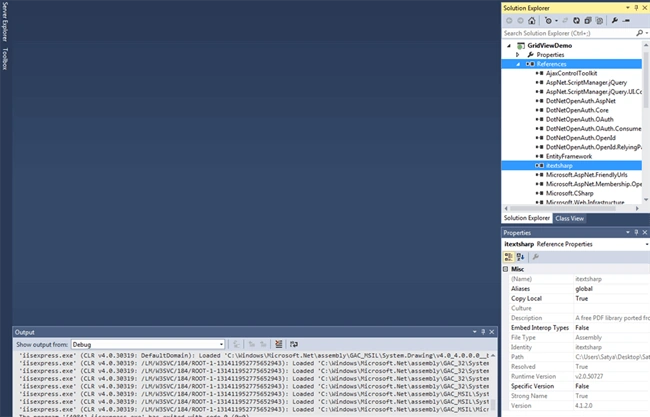
For that, I have added one DLL file named "itextsharp.dll" . A free PDF library is ported from Java iText.
Then, in button click event of Excel export, I have added the following code.
- protected void ibtnExcel_Click(object sender, ImageClickEventArgs e)
- {
- try
- {
- GridView grvEmployee = new GridView();
- CreateConnection();
- OpenConnection();
- _sqlCommand.CommandText = "Sp_GridCrud";
- _sqlCommand.CommandType = CommandType.StoredProcedure;
- _sqlCommand.Parameters.AddWithValue("@Event", "Select");
- _sqlDataAdapter = new SqlDataAdapter(_sqlCommand);
- _dtSet = new DataSet();
- _sqlDataAdapter.Fill(_dtSet);
- grvEmployee.DataSource = _dtSet;
- grvEmployee.DataBind();
-
- HttpContext.Current.Response.ClearContent();
- HttpContext.Current.Response.AddHeader("content-disposition", "attachment; filename=SatyaRecords.xls");
- HttpContext.Current.Response.ContentType = "application/excel";
- StringWriter sw = new StringWriter();
- HtmlTextWriter htw = new HtmlTextWriter(sw);
-
- grvEmployee.HeaderRow.BackColor = Color.DarkSlateGray;
- grvEmployee.HeaderStyle.ForeColor = Color.White;
- grvEmployee.AlternatingRowStyle.BackColor = Color.FromArgb(227, 234, 235);
- grvEmployee.RenderControl(htw);
-
- HttpContext.Current.Response.Write(sw.ToString());
- HttpContext.Current.Response.Flush();
- HttpContext.Current.Response.End();
-
- }
- catch (Exception ex)
- {
- HttpContext.Current.Response.Flush();
- HttpContext.Current.Response.End();
- }
- }
Here, I have created a dynamic object for GridView and put stored procedure and appropriate ADO.NET related objects to fetch data.
- GridView grvEmployee = new GridView();
- CreateConnection();
- OpenConnection();
- _sqlCommand.CommandText = "Sp_GridCrud";
- _sqlCommand.CommandType = CommandType.StoredProcedure;
- _sqlCommand.Parameters.AddWithValue("@Event", "Select");
- _sqlDataAdapter = new SqlDataAdapter(_sqlCommand);
- _dtSet = new DataSet();
- _sqlDataAdapter.Fill(_dtSet);
- grvEmployee.DataSource = _dtSet;
- grvEmployee.DataBind();
Then, I have added some style to GridView.
- grvEmployee.HeaderRow.BackColor = Color.DarkSlateGray;
- grvEmployee.HeaderStyle.ForeColor = Color.White;
- grvEmployee.AlternatingRowStyle.BackColor = Color.FromArgb(227, 234, 235);
- grvEmployee.RenderControl(htw);
Then, I added code for export to Excel with specified Excel sheet name.
- HttpContext.Current.Response.ClearContent();
- HttpContext.Current.Response.AddHeader("content-disposition", "attachment; filename=SatyaRecords.xls");
- HttpContext.Current.Response.ContentType = "application/excel";
- StringWriter sw = new StringWriter();
- HtmlTextWriter htw = new HtmlTextWriter(sw);
-
- HttpContext.Current.Response.Write(sw.ToString());
- HttpContext.Current.Response.Flush();
- HttpContext.Current.Response.End();
Note - Response.Flush forces all currently buffered output to be sent to the client. The Flush method can be called multiple times during the request processing.
Response.End sends all the currently buffered output to the client, stops execution of the page, and raises the EndRequest event.
You should try using this code if you are not doing any processing on the page after Response.Write and want to stop processing the page.
- context.HttpContext.Response.Clear();
- context.HttpContext.Response.Write(htmlString);
- context.HttpContext.Response.Flush();
- context.HttpContext.Response.End();
In the PDF button click event, I have added code for Export data to PDF format.
- protected void ibtnPdf_Click(object sender, ImageClickEventArgs e)
- {
- try
- {
- GridView grvEmployee = new GridView();
- CreateConnection();
- OpenConnection();
- _sqlCommand.CommandText = "Sp_GridCrud";
- _sqlCommand.CommandType = CommandType.StoredProcedure;
- _sqlCommand.Parameters.AddWithValue("@Event", "Select");
- _sqlDataAdapter = new SqlDataAdapter(_sqlCommand);
- _dtSet = new DataSet();
- _sqlDataAdapter.Fill(_dtSet);
- grvEmployee.DataSource = _dtSet;
- grvEmployee.DataBind();
-
- Response.ContentType = "application/pdf";
- Response.AddHeader("content-disposition", "attachment;filename=SatyaRecords.pdf");
- Response.Cache.SetCacheability(HttpCacheability.NoCache);
- StringWriter swr = new StringWriter();
- HtmlTextWriter htmlwr = new HtmlTextWriter(swr);
-
- grvEmployee.AllowPaging = false;
- grvEmployee.HeaderRow.BackColor = Color.DarkSlateGray;
- grvEmployee.AlternatingRowStyle.BackColor = Color.FromArgb(227, 234, 235);
- grvEmployee.HeaderRow.Style.Add("font-family", "Arial, Helvetica, sans-serif;");
- grvEmployee.HeaderRow.Style.Add("font-size", "8.20px");
- grvEmployee.HeaderRow.Style.Add("color", "White");
- grvEmployee.Style.Add("font-family", "Arial, Helvetica, sans-serif;");
- grvEmployee.Style.Add("font-size", "8px");
- for (int i = 0; i < grvEmployee.Rows.Count; i++)
- {
- grvEmployee.Rows[i].HorizontalAlign = HorizontalAlign.Left;
-
- }
- grvEmployee.RenderControl(htmlwr);
- StringReader srr = new StringReader(swr.ToString());
-
- iTextSharp.text.Document pdfdoc = new iTextSharp.text.Document(iTextSharp.text.PageSize.A4.Rotate(), 10f, 10f, 10f, 10f);
- HTMLWorker htmlparser = new HTMLWorker(pdfdoc);
- PdfWriter.GetInstance(pdfdoc, Response.OutputStream);
- pdfdoc.Open();
- htmlparser.Parse(srr);
- pdfdoc.Close();
- Response.Write(pdfdoc);
- Response.End();
- }
- catch (Exception ex)
- {
-
- }
- }
Here, I have created a dynamic object for GridView and put stored procedure and appropriate ADO.NET related objects to fetch data.
- GridView grvEmployee = new GridView();
- CreateConnection();
- OpenConnection();
- _sqlCommand.CommandText = "Sp_GridCrud";
- _sqlCommand.CommandType = CommandType.StoredProcedure;
- _sqlCommand.Parameters.AddWithValue("@Event", "Select");
- _sqlDataAdapter = new SqlDataAdapter(_sqlCommand);
- _dtSet = new DataSet();
- _sqlDataAdapter.Fill(_dtSet);
- grvEmployee.DataSource = _dtSet;
- grvEmployee.DataBind();
Then, I added some style to GridView.
- grvEmployee.AllowPaging = false;
- grvEmployee.HeaderRow.BackColor = Color.DarkSlateGray;
- grvEmployee.AlternatingRowStyle.BackColor = Color.FromArgb(227, 234, 235);
- grvEmployee.HeaderRow.Style.Add("font-family", "Arial, Helvetica, sans-serif;");
- grvEmployee.HeaderRow.Style.Add("font-size", "8.20px");
- grvEmployee.HeaderRow.Style.Add("color", "White");
- grvEmployee.Style.Add("font-family", "Arial, Helvetica, sans-serif;");
- grvEmployee.Style.Add("font-size", "8px");
- for (int i = 0; i < grvEmployee.Rows.Count; i++)
- {
- grvEmployee.Rows[i].HorizontalAlign = HorizontalAlign.Left;
-
- }
Then, I added code for Export to PDF with specified PDF name.
- Response.ContentType = "application/pdf";
- Response.AddHeader("content-disposition", "attachment;filename=SatyaRecords.pdf");
- Response.Cache.SetCacheability(HttpCacheability.NoCache);
- StringWriter swr = new StringWriter();
- HtmlTextWriter htmlwr = new HtmlTextWriter(swr);
-
- for (int i = 0; i < grvEmployee.Rows.Count; i++)
- {
- grvEmployee.Rows[i].HorizontalAlign = HorizontalAlign.Left;
-
- }
- grvEmployee.RenderControl(htmlwr);
- StringReader srr = new StringReader(swr.ToString());
-
- iTextSharp.text.Document pdfdoc = new iTextSharp.text.Document(iTextSharp.text.PageSize.A4.Rotate(), 10f, 10f, 10f, 10f);
- HTMLWorker htmlparser = new HTMLWorker(pdfdoc);
- PdfWriter.GetInstance(pdfdoc, Response.OutputStream);
- pdfdoc.Open();
- htmlparser.Parse(srr);
- pdfdoc.Close();
- Response.Write(pdfdoc);
- Response.End();

OUTPUT
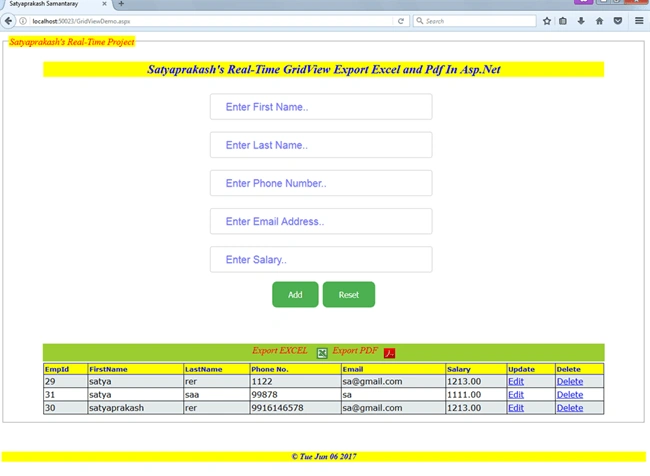


I have added only this part to the existing one as mentioned in my previous article.
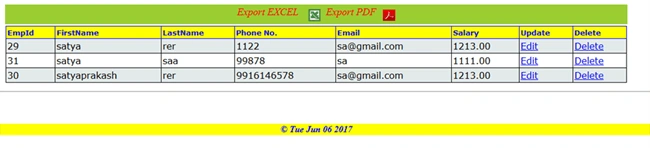
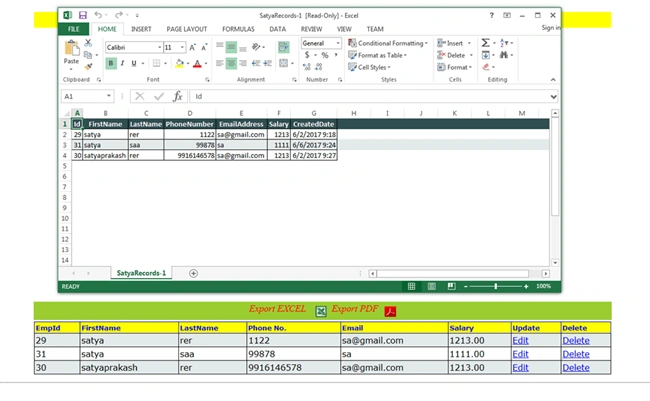
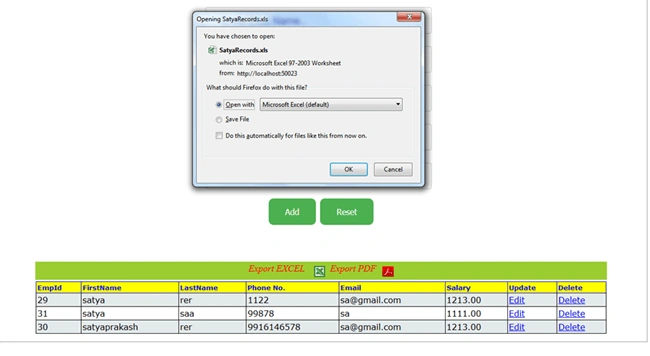
Then, Export to Excel.
Compare Excel sheet data with GridView.
Then, export to PDF.
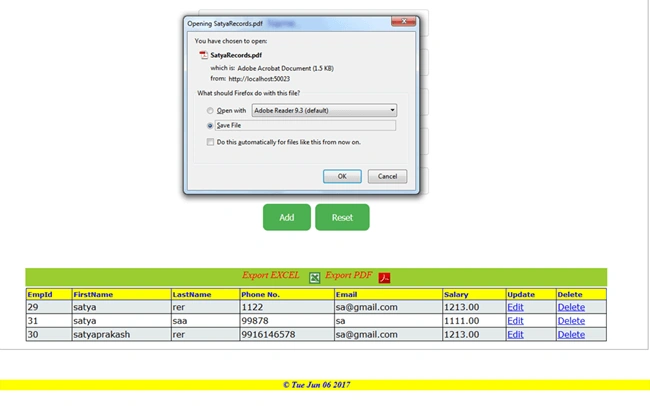
Compare PDF data with GridView.
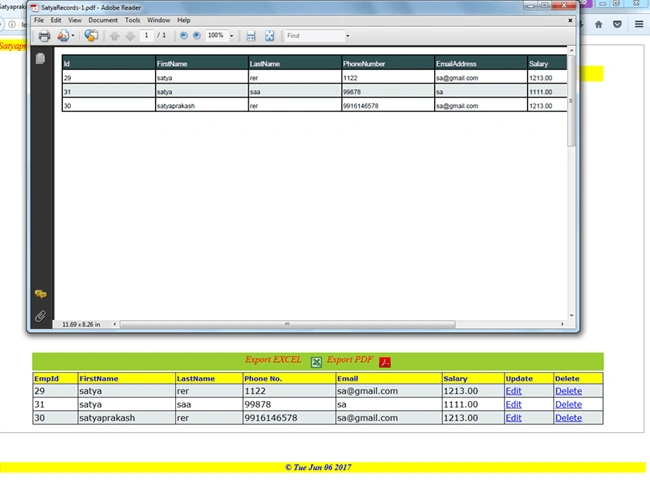 GIF images for better understanding
Summary
- What is GridView in ASP.NET.
- Single stored procedure to Export PDF and Excel.
- Image buttons added.
- Styles to be added in Excel and PDF after GridView Export.


Join the conversation! Your thoughts help the community grow.