Introduction
In this article, I will show you how to export an Excel file in the Web API. Here we create an Excel file and then attach this file.
The following is the procedure for creating the application.
Step 1
Create a Web API application.
- Start Visual Studio 2012.
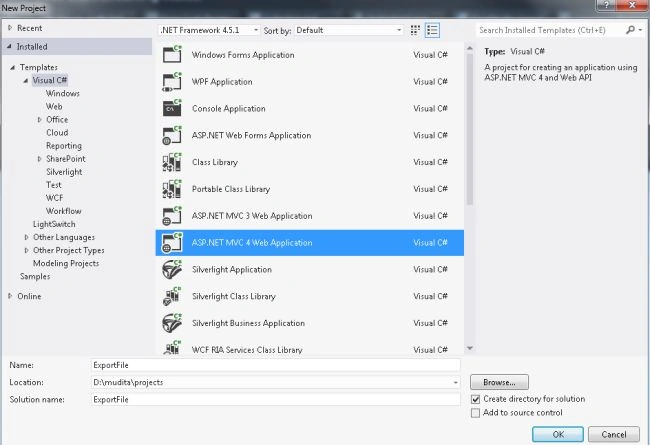
- From the Start window select "New Project".
- From the new project window select "Installed" -> "Visual C#" -> "Web".
- Select "ASP.NET MVC4 Web Application" and click the "OK" button.
- From the "MVC4 Project" window select "Web API".

- Click on the "OK" button.
Step 2
Add the Model Class "Record.cs" in the model folder.
- In the "Solution Explorer".
- Right-click on the "Model folder".
- Select "Add" -> "class".
- From the Add item window select "Installed" -> "Visual C#".
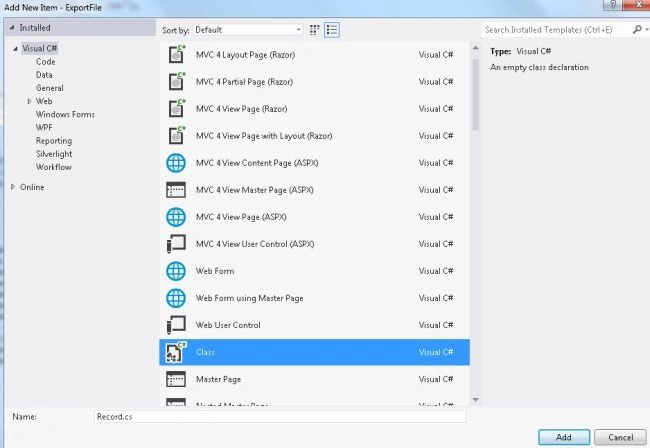
- Select "Class" and then click on "Add" button.
Add the following code:
- using System;
- using System.Collections.Generic;
- using System.Linq;
- using System.Web;
- namespace ExportFile.Models
- {
- public class Record
- {
- public string FName { get; set; }
- public string LName { get; set; }
- public string Address { get; set; }
- }
- }
Step 3
In the "HomeController" write some code to export the Excel file. This Excel file exists:
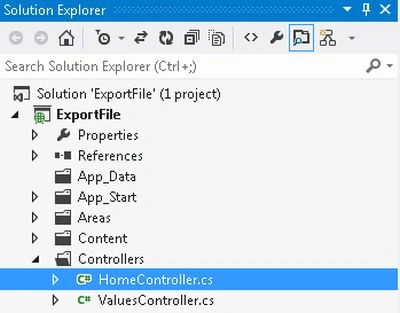
- In the "Solution Explorer".
- Expand the "Controller" folder.
- Select "HomeController".
Add the following code:
- using System;
- using System.Collections.Generic;
- using System.Linq;
- using System.Web;
- using System.Web.Mvc;
- using ExportFile.Models;
- using System.Text;
- namespace ExportFile.Controllers
- {
- public class HomeController : Controller
- {
- public ActionResult Index()
- {
- return View();
- }
- [HttpPost]
- public ActionResult Index(int id = 0)
- {
- List<Record> obj = new List<Record>();
- obj = RecordInfo();
- StringBuilder str = new StringBuilder();
- str.Append("<table border=`" + "1px" + "`b>");
- str.Append("<tr>");
- str.Append("<td><b><font face=Arial Narrow size=3>FName</font></b></td>");
- str.Append("<td><b><font face=Arial Narrow size=3>LName</font></b></td>");
- str.Append("<td><b><font face=Arial Narrow size=3>Address</font></b></td>");
- str.Append("</tr>");
- foreach (Record val in obj)
- {
- str.Append("<tr>");
- str.Append("<td><font face=Arial Narrow size=" + "14px" + ">" + val.FName.ToString() +"</font></td>");
- str.Append("<td><font face=Arial Narrow size=" + "14px" + ">" + val.LName.ToString() + "</font></td>");
- str.Append("<td><font face=Arial Narrow size=" + "14px" + ">" + val.Address.ToString() + "</font></td>");
- str.Append("</tr>");
- }
- str.Append("</table>");
- HttpContext.Response.AddHeader("content-disposition", "attachment; filename=Information" + DateTime.Now.Year.ToString() + ".xls");
- this.Response.ContentType = "application/vnd.ms-excel";
- byte[] temp = System.Text.Encoding.UTF8.GetBytes(str.ToString());
- return File(temp, "application/vnd.ms-excel");
- }
- public List<Record> RecordInfo()
- {
- List<Record> recordobj = new List<Record>();
- recordobj.Add(new Record { FName = "Smith", LName = "Singh", Address = "Knpur" });
- recordobj.Add(new Record { FName = "John", LName = "Kumar", Address = "Lucknow" });
- recordobj.Add(new Record { FName = "Vikram", LName = "Kapoor", Address = "Delhi" });
- recordobj.Add(new Record { FName = "Tanya", LName = "Shrma", Address = "Banaras" });
- recordobj.Add(new Record { FName = "Malini", LName = "Ahuja", Address = "Gujrat" });
- recordobj.Add(new Record { FName = "Varun", LName = "Katiyar", Address = "Rajasthan" });
- recordobj.Add(new Record { FName = "Arun ", LName = "Singh", Address = "Jaipur" });
- recordobj.Add(new Record { FName = "Ram", LName = "Kapoor", Address = "Panjab" });
- recordobj.Add(new Record { FName = "Vishakha", LName = "Singh", Address = "Banglor" });
- recordobj.Add(new Record { FName = "Tarun", LName = "Singh", Address = "Kannauj" });
- recordobj.Add(new Record { FName = "Mayank", LName = "Dubey", Address = "Farrukhabad" });
- return recordobj;
- }
- }
- }
In the code above we use the "str.Append" that is used for adding the string.
- HttpContext.Response.AddHeader("content-disposition", "attachment; filename=Information" + DateTime.Now.Year.ToString() + ".xls");
This line of code define that attaching the Excel file. In it provide the filename, Date and time and the extension of the file.
The "Response.ContentType="application/vnd.ms-excel"" tells to the browser that this is actually an Excel file.
Step 4
Now write some HTML code in the "index.cshtml" file. This file exists:
Add the following code:
- @{
- ViewBag.Title = "Index";
- }
- @using(Html.BeginForm("Index","Home"))
- {
- <h2>Export the Excel file in web API Application</h2><br />
- <input type="submit" value="Export" title="Export An Excel File" />
- }
Step 5
Execute the application by press"F5" and the output looks like this:
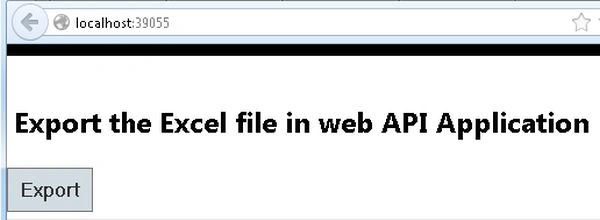
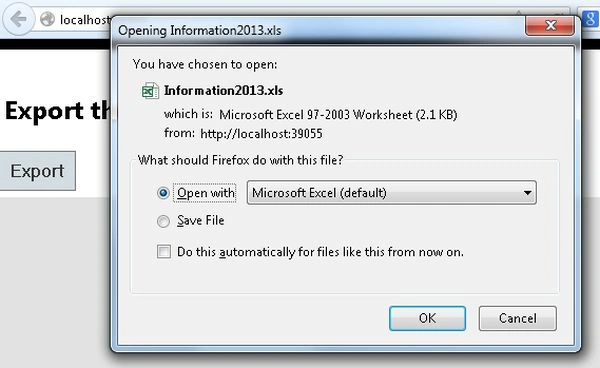
Click on the "Export" button. Then select the "Open With" radio button and click the "OK" button.
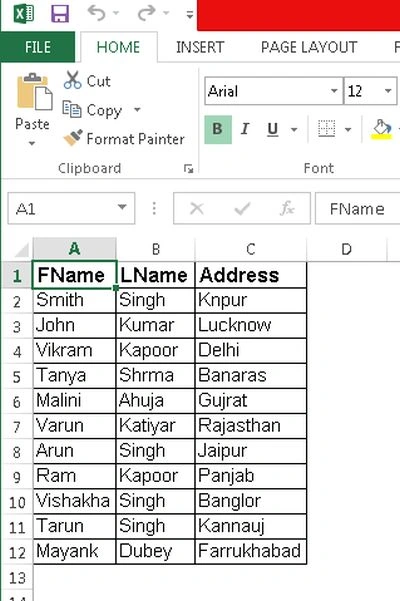
Now open the "Informatiom.xls" file.



sunil patelPosted Nov 13, 2018, 2:30 AM
Implementation in MVC controller and web api mentioned in title.Why it is so?
Abhinav OrugantiPosted Jul 20, 2018, 4:29 AM
Fake info...it is not Web Api
Mukesh MuthiyanPosted Jan 4, 2018, 7:30 AM
How can I unit test this code?
Nandani MishraPosted Feb 3, 2017, 2:04 AM
Plz suggest me how to use file
Nandani MishraPosted Feb 3, 2017, 2:04 AM
I m using api httpresponse message api but i dont know what is file
Nandani MishraPosted Feb 3, 2017, 2:03 AM
What is return file this is class or not
Ravi PatelPosted Oct 30, 2015, 10:13 AM
nice but you are using MVC not WEB API, Change your Title
shiva saiPosted Feb 10, 2014, 2:00 AM
From the above code i am unable to get the File (Throws error) at line return File(temp, "application/vnd.ms-excel");. Please some one let me know what else the other namespace i should give.