

This article is going to be helpful for those who often deal with grids and exporting the data. Before we proceed, I would like to mention a few things.
- I am using IList object to bind it to the DataGrid ItemsSource.
- While exporting DataGrid to Excel, I am using an extension method, which converts IList object to DataTable. (Extension method reference)
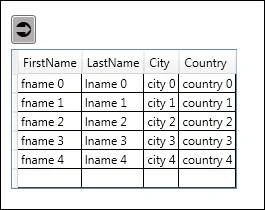
As shown below, I created a collection of the Person class having four properties (for the starters).
- public class Person
- {
- public string FirstName {
- get;
- set;
- }
- public string LastName {
- get;
- set;
- }
- public string City {
- get;
- set;
- }
- public string Country {
- get;
- set;
- }
- }
- IList < Person > lstPersons = new List < Person > ();
- for (int i = 0; i < 5; i++) {
- lstPersons.Add(new Person {
- FirstName = "fname " + i, LastName = "lname " + i, City = "city " + i, Country = "country " + i
- });
- }
- dgExcel.ItemsSource = lstPersons; //dgExcel is the datagrid.
- public static DataTable ToDataTable < T > (this IList < T > data)
- {
- PropertyDescriptorCollection properties = TypeDescriptor.GetProperties(typeof(T));
- DataTable dt = new DataTable();
- foreach(PropertyDescriptor prop in properties) {
- dt.Columns.Add(prop.Name, Nullable.GetUnderlyingType(prop.PropertyType) ? ? prop.PropertyType);
- }
- foreach(T item in data) {
- DataRow row = dt.NewRow();
- foreach(PropertyDescriptor pdt in properties) {
- row[pdt.Name] = pdt.GetValue(item) ? ? DBNull.Value;
- }
- dt.Rows.Add(row);
- }
- return dt;
- }
Defining the class level variables, as I am dealing with WPF and saving Excel on the button click, I am going for the global variables.
- Microsoft.Office.Interop.Excel.Application excel;
- Microsoft.Office.Interop.Excel.Workbook workBook;
- Microsoft.Office.Interop.Excel.Worksheet workSheet;
- Microsoft.Office.Interop.Excel.Range cellRange;
(Take a look at highlighted line, don’t forget to specify the full name of the class, including the namespace, else, you will have to deal with ambiguity for DataRow Class.)
- private void GenerateExcel(DataTable DtIN)
- {
- try {
- excel = new Microsoft.Office.Interop.Excel.Application();
- excel.DisplayAlerts = false;
- excel.Visible = false;
- workBook = excel.Workbooks.Add(Type.Missing);
- workSheet = (Microsoft.Office.Interop.Excel.Worksheet) workBook.ActiveSheet;
- workSheet.Name = "LearningExcel";
- System.Data.DataTable tempDt = DtIN;
- dgExcel.ItemsSource = tempDt.DefaultView;
- workSheet.Cells.Font.Size = 11;
- int rowcount = 1;
- for (int i = 1; i <= tempDt.Columns.Count; i++) //taking care of Headers.
- {
- workSheet.Cells[1, i] = tempDt.Columns[i - 1].ColumnName;
- }
- foreach(System.Data.DataRow row in tempDt.Rows) //taking care of each Row
- {
- rowcount += 1;
- for (int i = 0; i < tempDt.Columns.Count; i++) //taking care of each column
- {
- workSheet.Cells[rowcount, i + 1] = row[i].ToString();
- }
- }
- cellRange = workSheet.Range[workSheet.Cells[1, 1], workSheet.Cells[rowcount, tempDt.Columns.Count]];
- cellRange.EntireColumn.AutoFit();
- } catch (Exception) {
- throw;
- }
- }
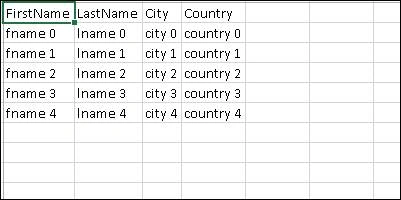
- GenerateExcel(lstPersons.ToDataTable());
Please note that, the SaveAs method takes the file path as a string and the path is not the filename only. It is the full path, including the filename. You can specify the path, as I did or it will choose the current folder and will create Excel file in the same.
- private void btnLocation_Click(object sender, RoutedEventArgs e)
- {
- workBook.SaveAs(System.IO.Path.Combine(@ "Drive:\Folder(s)\","
- Excel book Name "));
- workBook.Close(); excel.Quit();
- }
FYI: There is plenty of scope for improvement in the code, mentioned above. Feel free to do so. If there is any better way, please leave your comments for the same.
Please leave your suggestion(s)/question(s) in the comments. I will be happy to help.
Metin ErmanPosted Jan 22, 2019, 1:43 PM
It's working but really slow...will work on optimizing this for performance and report back
Dharmendra Kumar PanditPosted Apr 29, 2018, 5:03 AM
Thank u . Its working fine.........
Humayun Kabir MamunPosted Aug 17, 2016, 2:49 AM
Nice...