

Introduction
I would like to share a utility that can be used to export a DataTable to an Excel file using C#. There are different ways to export a DataTable to an Excel file. In this article, we will learn how to export a DataTable to Excel using Interop.
Code and Steps
We will learn the following in this article.
- Creating Excel file using C#
- Writing data to cells
- Formatting data to cells
- Working with Excel range
Step 1. Add Interop References
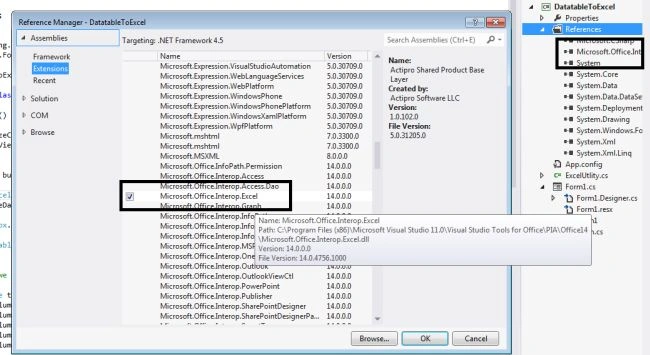
First, we need to add a reference for Microsoft.office.interop.Excel as in the following.
Step 2. Create a DataTable dynamically
Use the following code to add a DataTable with data. If you're new to ADO.NET and DataTable, read Mastering DataTable In C#
static DataTable GetTable()
{
    // Create a DataTable with four columns
    DataTable table = new DataTable();
    table.Columns.Add("ID", typeof(int));
    table.Columns.Add("Name", typeof(string));
    table.Columns.Add("Sex", typeof(string));
    table.Columns.Add("CreatedDate", typeof(string));
    table.Columns.Add("City", typeof(string));

    // Add five DataRows
    table.Rows.Add(25, "Devesh Omar", "M", DateTime.Now, "Noida");
    table.Rows.Add(50, "Nikhil Vats", "M", DateTime.Now, "Noida");
    table.Rows.Add(10, "Heena Sharma", "F", DateTime.Now, "Delhi");
    table.Rows.Add(21, "Nancy Sharma", "F", DateTime.Now, "Delhi");
    table.Rows.Add(100, "Avinash", "M", DateTime.Now, "Delhi");
    table.Rows.Add(25, "Devesh gupta", "M", DateTime.Now, "Delhi");
    table.Rows.Add(50, "Nikhil gupta", "M", DateTime.Now, "Noida");
    table.Rows.Add(10, "HS gupta", "F", DateTime.Now, "Delhi");
    table.Rows.Add(21, "VS gupta", "F", DateTime.Now, "Delhi");
    table.Rows.Add(100, "RJ gupta", "M", DateTime.Now, "Delhi");

    return table;
}
Step 3. The class file for generating Excel
We created a separate class file for generating the Excel (Excelutlity.cs).
Step 4. Creation of Excel objects
Define the following variables.
Microsoft.Office.Interop.Excel.Application excel;
Microsoft.Office.Interop.Excel.Workbook excelworkBook;
Microsoft.Office.Interop.Excel.Worksheet excelSheet;
Microsoft.Office.Interop.Excel.Range excelCellrange;
I have attached a sample code for more details.
Step 5. Initialization of Excel objects
// Start Excel and get Application object.
excel = new Microsoft.Office.Interop.Excel.Application();

// Make Excel invisible and disable alerts.
excel.Visible = false;
excel.DisplayAlerts = false;

// Create a new Workbook.
excelworkBook = excel.Workbooks.Add(Type.Missing);

// Create a Worksheet.
excelSheet = (Microsoft.Office.Interop.Excel.Worksheet)excelworkBook.ActiveSheet;
excelSheet.Name = "Test work sheet";
Step 6. Writing to Excel file
excelSheet.Cells[1, 1] = “Sample test data”;
excelSheet.Cells[1, 2] = "Date : " + DateTime.Now.ToShortDateString();
Step 7. Working with range and formatting Excel cells
// now we resize the columns
excelCellrange = excelSheet.Range[excelSheet.Cells[1, 1], excelSheet.Cells[rowcount, dataTable.Columns.Count]];
excelCellrange.EntireColumn.AutoFit();
Microsoft.Office.Interop.Excel.Borders border = excelCellrange.Borders;
border.LineStyle = Microsoft.Office.Interop.Excel.XlLineStyle.xlContinuous;
border.Weight = 2d;
Step 8. Coloring cells
We will use the following function to format and color Excel cells:
public void FormattingExcelCells(Microsoft.Office.Interop.Excel.Range range, string HTMLcolorCode, System.Drawing.Color fontColor, bool IsFontbool)
{
    range.Interior.Color = System.Drawing.ColorTranslator.FromHtml(HTMLcolorCode);
    range.Font.Color = System.Drawing.ColorTranslator.ToOle(fontColor);

    if (IsFontbool == true)
    {
        range.Font.Bold = IsFontbool;
    }
}
Step 9. Build and run the application
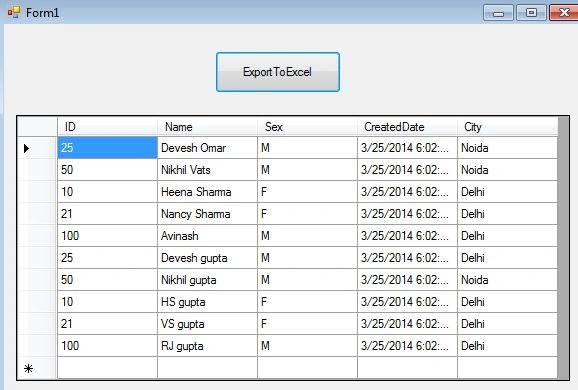
We are binding a DataGrid at the load of a Form.
Output
After clicking on Export to Excel, we will have our Excel file as per the following screen. You need to modify the file path in the attached code.

Conclusion
The attached application can be used in projects for the reporting purposes.
Dang Dinh PhongPosted Dec 25, 2020, 2:37 AM
The session was lost when i call excelworkBook.Close(); and excel.Quit(); please tell me why? I export on web.
Jack BregPosted Jun 29, 2020, 9:10 AM
Wonderful article. I can suggest you to use zetexcel.com. I found it very useful. They develop high performance applications to Create, Edit, Convert or Print Excel spreadsheet file formats without requiring Microsoft Excel.
aaraa maaaPosted Mar 19, 2020, 1:47 PM
How can i prompt for Save dialogue instead of Saving in a path?
Nitin JainPosted Dec 16, 2019, 11:29 AM
This is awesome
Johnson ManickamPosted May 28, 2019, 6:19 AM
https://github.com/SyncfusionExamples/export-data-to-excel-in-c-sharp
Dharmendra Kumar PanditPosted Feb 6, 2019, 3:42 AM
Thank you very much for this article.
Mujeeb MohammedPosted Sep 19, 2018, 1:15 PM
How can I make the first line merge all the cells and appear as a single cell?
Yogi SPosted Sep 18, 2018, 6:41 AM
Hi Devesh , this helped alot , thank u so much !!
Abhishek SinghPosted Mar 16, 2018, 5:37 AM
Hi It works fine for me but is there any way I can get the excel as a downloadable file. This approach silently adds a file in the desired location. Users won't realize till they reach that directory. Requirement is when users clicks on Export, a file should be returned instead of SaveAs() operation that is being performed.
Fanan HassanPosted Jan 9, 2018, 7:17 AM
Hello could you please help me on getting the same thing for database1dataset ( not static table) as in your example. i am new just learning C#.
Devesh OmarPosted Mar 11, 2017, 3:59 AM
Http://compilefactory.blogspot.in/2017/03/exporting-datatable-to-excel-in-c-using.html
Cip BeldiPosted Jan 26, 2017, 6:55 AM
Office.Interop.Excel is slow because it uses COM technology in background. For a large datatable, you should consider this alternative http://www.easyxls.com/manual/FAQ/export-datatable-to-excel.html
Ngo Thanh NguyenPosted Dec 17, 2016, 11:16 AM
Thank for your post. But I have a question that if datatable has a column which content img tag. So can we export image to excel file. Thanks
Huynh Quoc KhoiPosted Oct 10, 2016, 3:16 PM
Very good, thanks
Ghanshyam TarsariyaPosted Oct 1, 2016, 2:13 PM
Thank you. God bless you.
SubashPosted Sep 6, 2016, 2:30 AM
Good one
Upendra Pratap ShahiPosted May 14, 2015, 1:36 AM
nice...
CHARLEN CALEROPosted Feb 12, 2015, 5:18 PM
very good
mukesh salariaPosted Jan 10, 2015, 3:30 AM
here the best way to achieve this. http://www.learnsharecorner.com/export-to-excel-using-c-sharp/
muhammedPosted Oct 29, 2014, 9:14 AM
how set condition ?
Ken HPosted Oct 13, 2014, 12:56 AM
how to used it in asp.net?Thank.
Babli DeyPosted Sep 13, 2014, 4:25 AM
how to prompt the user to save the file as per his choice of location ?
แพทแว๊ต ไทยแลนด์Posted Sep 2, 2014, 3:55 AM
One or more types required to compile a dynamic expression cannot be found. Are you missing references to Microsoft.CSharp.dll and System.Core.dll?
Dreen PuluPosted Aug 30, 2014, 7:38 AM
thanks
soheilPosted Jul 24, 2014, 4:38 AM
thank u so much..
Vignesh GvPosted Jul 11, 2014, 2:24 AM
Thank u very much..
jalal jafariPosted Jun 11, 2014, 5:42 AM
very very tanks and ?????? ?? ?? ????? ??????