

Introduction
I would like to share a utility that can be used to export a Generic List to an Excel file using C#.
We have multiple approaches to do this.
In ASP.NET we can do this by changing the Content Type to xls but in C# we might have other approaches.
Through this article we will learn how to export a Generic List<T> to Excel using Interop.
Code and Steps
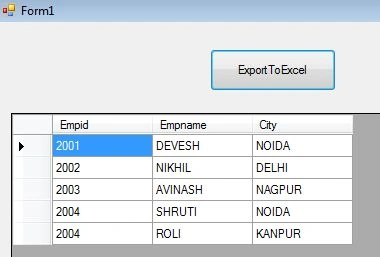
Here in this application we will use a Sample data table and then will learn how to export data to an Excel file.
We will learn the following things in this article:
- Creating Excel file using C#
- Writing data to cells
- Formatting data to cells
- Working with Excel range
1. Adding References
First we need to added a reference of Microsoft.office.interop.Excel

2. Adding Sample class to Project.
public class Emp
{
    public int Empid { get; set; }
    public string Empname {get; set;}
    public string City {get; set;}
}
3. Adding Function that returns a List of employees
static List<Emp> GetEmpList()
{
    List<Emp> list = new List<Emp>();
    Emp e = new Emp();
    e.Empid=2001;
    e.Empname="DEVESH";
    e.City="NOIDA";
    list.Add(e);
    e = new Emp();
    e.Empid=2002;
    e.Empname="NIKHIL";
    e.City="DELHI";
    list.Add(e);
    e = new Emp();
    e.Empid=2003;
    e.Empname="AVINASH";
    e.City="NAGPUR";
    list.Add(e);
    e = new Emp();
    e.Empid=2004;
    e.Empname="SHRUTI";
    e.City="NOIDA";
    list.Add(e);
    e = new Emp();
    e.Empid = 2004;
    e.Empname = "ROLI";
    e.City = "KANPUR";
    list.Add(e);
    return list;
}
4. Converting Generic List to Datatable
In this code we are first converting the List to a datatable then we will export the datatable to an Excel file.
public DataTable ConvertToDataTable<T>(IList<T> data)
{
    PropertyDescriptorCollection properties = TypeDescriptor.GetProperties(typeof(T));
    DataTable table = new DataTable();
    foreach (PropertyDescriptor prop in properties)
        table.Columns.Add(prop.Name, Nullable.GetUnderlyingType(prop.PropertyType) ?? prop.PropertyType);
    foreach (T item in data)
    {
        DataRow row = table.NewRow();
        foreach (PropertyDescriptor prop in properties)
            row[prop.Name] = prop.GetValue(item) ?? DBNull.Value;
        table.Rows.Add(row);
    }
    return table;
}

Varun NayakPosted Aug 6, 2019, 12:34 PM
What if i want to add multiple tables in different Excel Pages (different Sheet ) within same Excel File
Deep Siddharth VermaPosted Feb 9, 2016, 4:54 AM
thanks it helped me. ;)
Jonathon MontalvoPosted Jan 20, 2016, 5:22 PM
if anyone is interested... you can also export the DataTable to xml using DataTable.WriteXML( )
SGRao KPosted Nov 19, 2015, 12:04 AM
is it must and should convert the list to data table
George FindulovPosted Jun 10, 2015, 8:34 AM
How about exporting complex properties?
Ferit ArslanPosted Feb 18, 2015, 5:12 AM
error -> Retrieving the COM class factory for component with CLSID {00024500-0000-0000-C000-000000000046} failed due to the following error: 80040154 Class not registered (Exception from HRESULT: 0x80040154 (REGDB_E_CLASSNOTREG)).
Gary VickPosted Aug 10, 2014, 3:57 AM
YOU ARE AWESOME! GREAT CODING!
Devesh OmarPosted May 14, 2014, 3:43 AM
Thanks Lakshmanan :)
Lakshmanan Sethu SankaranarayanPosted May 10, 2014, 3:46 AM
Thanks for this. nice article