

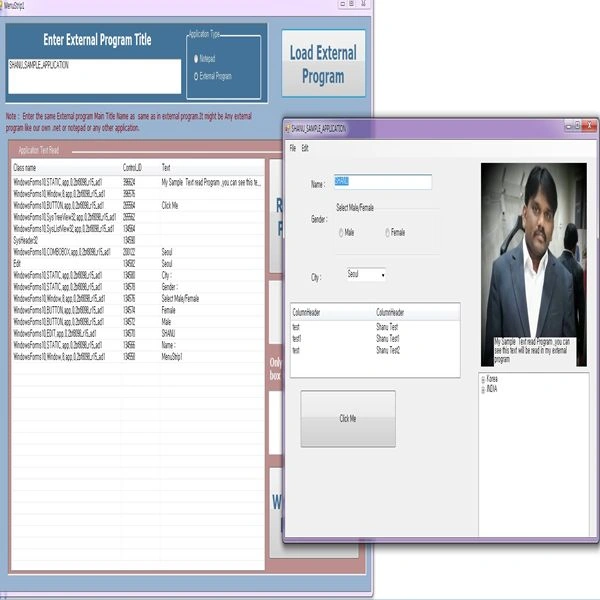
Introduction
The main purpose of this article is to explain how to create a simple program that will be used to read and edit the external program text, without modifying the external program(Another Application or Another Program) source code. Today, I will explain:
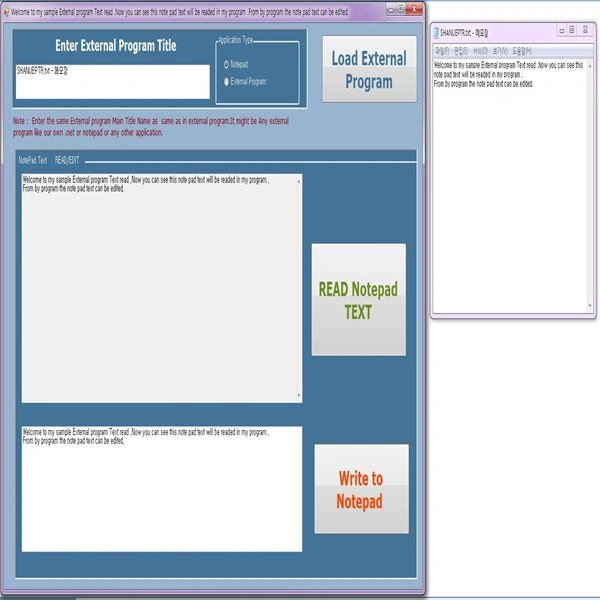
- How to read / edit Notepad Text from our program
- How to read external program text from our program
In my Zip file, I have an attached sample program with the solution name "SHANU_EPTR_V1.0" developed using VB.NET to read the external program and Notepad text.
I have attached a "SHANUEPTR.txt" text file that can be used during the reading of the text file.
I have attached a "SampleProgramtoRead.exe" inside the "SampleProgramtoRead" folder that can be used as an external sample application to read text in our main program.
To read the external program, we need to use Windows WM_GETTEXT and WM_SETTEXT.
Reference website:
- https://msdn.microsoft.com/en-us/library/windows/desktop/ms633500(v=vs.85).aspx

- https://msdn.microsoft.com/en-us/library/windows/desktop/ms632644(v=vs.85).aspx
- https://msdn.microsoft.com/en-us/library/aa922085.aspx
https://social.msdn.microsoft.com/Forums/vstudio/en-US/02a67f3a-4a26-4d9a-9c67-0fdff1428a66/how-do-i-use-wmgettext-in-vbnet-to-get-text-from-another-applications-window?forum=vbgeneral
https://kellyschronicles.wordpress.com/2008/06/23/get-window-handles-associated-with-process-in-vb-net/
By Kelly's Chronicleshttps://msdn.microsoft.com/en-us/library/windows/desktop/ms632644(v=vs.85).aspx
his Get Window Handles Associated With Process in vb.net function helps me lot to complete the project.WM_GETTEXT
The WM_GETTEXT nessage reads the external program text.
For example:
- SendMessage(ChildHandle, WM_GETTEXT, 200, Hndl)
Here, we use a Windows SendMessage to get the text for the external program text.
ChildHandle is the control id. Each external program control will have a unique id that we need to provide to the appropriate control id in order to get the text from that control.
WM_GETTEXT to read the external program text.
Hndl is the buffer memory size of the control.
WM_SETTEXT
The WM_SETTEXT is used to write to the external program text.
For example:
SendMessageSTRING(Handle, WM_SETTEXT, TexttoWritetoNotepad.Length, TexttoWritetoNotepad)
Here, we use Windows SendMessageSTRING to set the text for the external program text.
Handle is the control id. Each external program control will have a unique id that we need to provide for the appropriate control id to set the text for that control.
WM_SETTEXT to read the external program text.
TexttoWritetoNotepad String that writes to the external program.
Background
The main purpose was to develop a simple and easy to use .NET program that reads and edits external program text. For a long time, I have been looking for a program to read the external program text. But today, I got some time to work on it and as a result you can see my article now. I am planing to add more features to this program.
Using the code
The main purpose is to make the program very simple and easy to use; all the functions have been well commented in the project. I have attached my sample program in this article for more details. Here, we will see the procedure to read/edit External Program text.
Windows API call
- 'Imports
- Imports System.Data
- Imports System.Runtime.InteropServices
- Imports System.Text
- Imports System.Collections.Generic
- Declare Auto Function SendMessage Lib "user32.dll" (ByVal hWnd As IntPtr, ByVal msg As Integer, _
- ByVal wParam As IntPtr, ByVal lParam As IntPtr) As IntPtr
- <dllimport("user32.dll", charset:="CharSet.Auto)" setlasterror:="True,"> _
- Public Shared Function FindWindowEx(ByVal parentHandle As IntPtr, _
- ByVal childAfter As IntPtr, _
- ByVal lclassName As String, _
- ByVal windowTitle As String) As IntPtr
- End Function
- Declare Auto Function UpdateWindow Lib "user32.dll" (ByVal hWnd As Int32) As Int32
- Declare Auto Function redrawwindow Lib "user32.dll" (ByVal hWnd As Int32) As Int32
- Declare Auto Function FindWindow Lib "user32.dll" (ByVal lpClassName As String, ByVal lpWindowName As String) As IntPtr
- Public Const WM_SETTEXT = &HC
- Public Declare Function SendMessageSTRING Lib "user32.dll" Alias "SendMessageA" (ByVal hwnd As Int32, _
- ByVal wMsg As Int32, ByVal wParam As Int32, ByVal lParam As String) As Int32
- ' Private Declare Function FindWindow Lib "user32.dll" Alias _
- '"FindWindowA" (ByVal lpClassName As String, ByVal lpWindowName As String) As Int32
- Private Declare Function FindWindowEx Lib "user32.dll" Alias _
- "FindWindowExA" (ByVal hWnd1 As Int32, ByVal hWnd2 As Int32, ByVal lpsz1 As String, _
- ByVal lpsz2 As String) As Int32
- </dllimport("user32.dll",>
Ramu PinniPosted Sep 20, 2015, 3:49 AM
super...
Orlandxexx QuisbertPosted Mar 9, 2015, 3:44 PM
Sorry if I was not explicit. Well I tried to do is to read / write a cell of a datagridview from an external application. As shown in your example external application read text.
Syed ShanuPosted Mar 2, 2015, 5:22 PM
Thank you foe your comment.sorry i dont understand your questiion.
Orlandxexx QuisbertPosted Mar 2, 2015, 4:26 PM
You're a genius, I have a curiosity can be done with a datagridview read and write to an external application.
Syed ShanuPosted Jul 10, 2014, 8:25 PM
Hi,The program and EXE is running fine.I have developed using .Net 4.0 VS 2010.make sure about Framework in your computer.
Nageswara rao NPosted Jul 10, 2014, 8:16 AM
.exe fail to open