
1.Open visual studio and create a new website.
2.Drag some text boxes , labels , button and Add a data grid view on the page.
3.Use the code on Default.aspx page.
<asp:Label
ID="Label1"
runat="server"
Width="60px"
Text="Name"></asp:Label>
<asp:TextBox
ID="TextBox1"
CellPadding="4"
CellSpacing="2"
runat="server"
AutoCompleteType="Disabled"></asp:TextBox>
<br
/>
<br
/>
<asp:Label
ID="Label2"
runat="server"
Width="60px"
Text="Address"></asp:Label>
<asp:TextBox
ID="TextBox2"
CellPadding="4"
CellSpacing="2"
runat="server"
AutoCompleteType="Disabled"></asp:TextBox>
<br
/>
<br
/>
<asp:Label
ID="Label3"
runat="server"
Width="60px"
Text="Age"></asp:Label>
<asp:TextBox
ID="TextBox3"
CellPadding="4"
CellSpacing="2"
runat="server"
AutoCompleteType="Disabled"></asp:TextBox>
<br
/>
<br
/>
<asp:Label
ID="Label4"
runat="server"
Width="60px"
Text="Phone_no"></asp:Label>
<asp:TextBox
ID="TextBox4"
CellPadding="4"
CellSpacing="2"
runat="server"
AutoCompleteType="Disabled"
</asp:TextBox>
<br
/>
<br
/>
<asp:Button
ID="Button1"
runat="server"
CellPadding="4"
CellSpacing="2"
onclick="Button1_Click"
Text="Insert"
style="height:
26px" />
<asp:Button
ID="Button2"
runat="server"
onclick="Button2_Click"
Text="Delete"
/>
<br
/>
<br
/>
<br
/>
<asp:GridView
ID="GridView1"
runat="server"
BackColor="#CCCCCC"
BorderColor="#999999"
BorderStyle="Solid"
BorderWidth="3px"
CellPadding="4"
CellSpacing="2"
ForeColor="Black">
<RowStyle
BackColor="White"
/>
<FooterStyle
BackColor="#CCCCCC"
/>
<PagerStyle
BackColor="#CCCCCC"
ForeColor="Black"
HorizontalAlign="Left"
/>
<SelectedRowStyle
BackColor="#000099"
Font-Bold="True"
ForeColor="White"
/>
<HeaderStyle
BackColor="Black"
Font-Bold="True"
ForeColor="White"
/>
</asp:GridView>
<asp:SqlDataSource
ID="SqlDataSource1"
runat="server"></asp:SqlDataSource>
4.Use the following code on default.aspx.cs page.
The below code is also
include the database connectivity
public
partial class
_Default : System.Web.UI.Page
{
OleDbConnection con;
OleDbCommand cmd=new
OleDbCommand();
OleDbCommand cmd1;
string str, str1;
DataSet ds = new
DataSet();
OleDbDataAdapter da;
protected void
Page_Load(object sender,
EventArgs e)
{
BindData();
con =
new
OleDbConnection("Provider =MSDAORA.1;User ID
=system; Password =sys123;database=orcl");
con.Open ();
}
protected void
Button1_Click(object sender,
EventArgs e)
{
str =
"insert into emp1 values('" + TextBox1.Text
+ "','" + TextBox2.Text +
"','" + TextBox3.Text +
"','" +
TextBox4.Text +
"')";
cmd =
new OleDbCommand(str,
con);
cmd.ExecuteNonQuery();
}
protected void
Button2_Click(object sender,
EventArgs e)
{
str1 =
"Delete from emp1 where Name ='" +
TextBox1.Text + "'";
cmd1 =
new OleDbCommand(str1,
con);
cmd1.ExecuteNonQuery();
}
private void
BindData()
{
con =
new
OleDbConnection("Provider =MSDAORA.1;User ID
=system; Password =sys123;database=orcl");
str =
"Select * from emp1";
cmd.CommandText =
str;
cmd.Connection =
con;
da =
new
OleDbDataAdapter(cmd);
con.Open();
da.Fill(ds);
cmd.ExecuteNonQuery();
if (ds.Tables[0].Rows.Count > 0)
{
GridView1.DataSource = ds.Tables[0];
GridView1.DataBind();
}
}
}
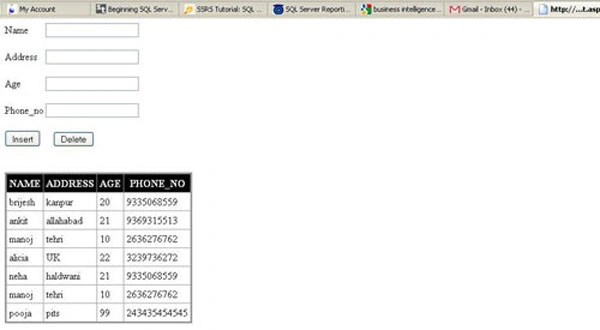
OUTPUT OF THE APPLICATION
Dennis KoenigPosted May 20, 2011, 3:40 PM
The Download File ist offline :-(