

Introduction
In today's digital era, businesses deal with an enormous amount of paperwork, ranging from invoices and receipts to forms and surveys. Manual data entry can be time-consuming, error-prone, and resource-intensive. However, Azure Form Recognizer, a powerful AI-based service by Microsoft, offers a solution to streamline and automate this process. In this article, we'll explore how you can leverage the capabilities of Azure Form Recognizer using Python, enabling you to extract valuable information from forms effortlessly.
What is Azure Form Recognizer?
Azure Form Recognizer is a cloud-based service that utilizes machine learning algorithms to automatically extract key-value pairs, tables, and text from documents. It employs optical character recognition (OCR) technology, allowing businesses to digitize and process large volumes of forms efficiently. The service can handle various document types, including invoices, receipts, business cards, and more, making it a versatile tool for document processing.
Setting up Azure Form Recognizer resource
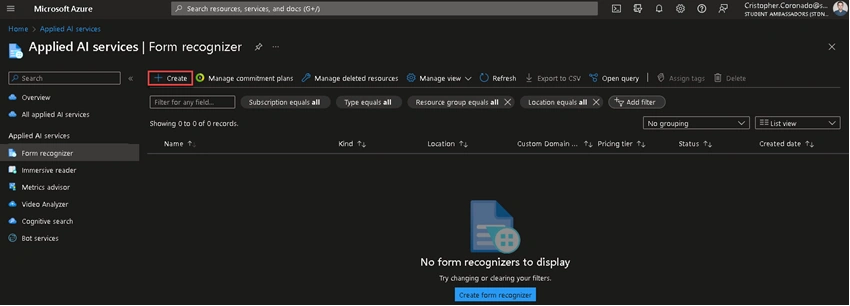
Go to Azure Portal and search Form Recognizer, then click on Create.
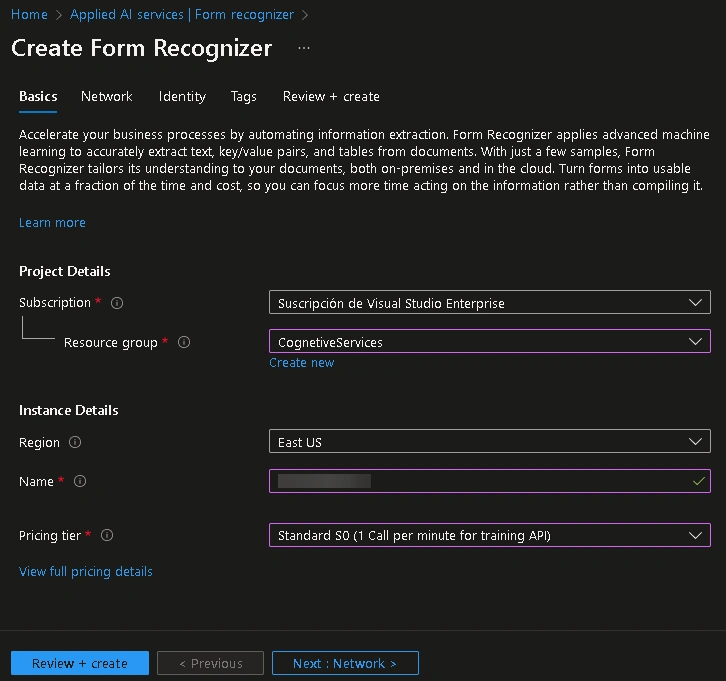
Choose the subscription, resource group, region, pricing tier, and type the resource name. Then, click on Review + create.
Once the resource is created, go to Keys and Endpoint to copy your credentials.
Getting Started with Azure Form Recognizer on Python
You need to install the Azure AI Form Recognizer SDK. You can do this by running the following command in your Python environment:
pip install azure-ai-formrecognizer
Next, import the required libraries and authenticate with your Azure account.
from azure.core.credentials import AzureKeyCredential
from azure.ai.formrecognizer import DocumentAnalysisClient
import numpy as np
import pandas as pd

ENDPOINT = "<YOUR_ENDPOINT>"
APIKEY = "<YOUR_API_KEY>"

document_analysis_client = DocumentAnalysisClient(ENDPOINT, credential=AzureKeyCredential(APIKEY))
We'll use the document_analysis_client to extract information from different types of documents using the following prebuilt models:
- Invoices
- Receipts
- Business cards
- Identity documents
Visit this page to know about all the models that Azure Form Recognizer offers.
We'll create the following utility methods:
def is_class(o):
  return hasattr(o, '__dict__')


def get_valid_rounded_value(val):
  return round(val * 100, 2) if val else None
Let's start testing the Prebuilt Models. We'll create two more methods, one to analyze the documents and the another one to print a table with the extracted information:
def get_poller_result(path: str, model_id: str):
  with open(path, "rb") as f:
    poller = document_analysis_client.begin_analyze_document(
        model_id, document=f, locale="en-US",
      )

    return poller.result()


def print_generic_table(items, is_business_card: bool = False):
  if not is_business_card:
    array: list = []
    for name, field in items:
      if name == 'MachineReadableZone':
        continue

      if field.value is not None and not is_class(field.value) and not type(field.value) is list:
        array.append([name, field.value, get_valid_rounded_value(field.confidence)])

    if len(array) > 0:
      np_array = np.array(array)
      df = pd.DataFrame(np_array, columns = ['Field', 'Value', '% Confidence'])
      display(df)
  else:
    array: list = []
    for name, field in items:
      if field.value is not None and type(field.value) is list:
        array: list = []
        for idx, sub_item in enumerate(field.value):
          if sub_item.value is not None and not is_class(sub_item.value) and not type(sub_item.value) is list:
           if name == 'ContactNames':
            for sub_field in ['FirstName', 'LastName']:
              if sub_item.value[sub_field]:
                sub_item_details = sub_item.value[sub_field]
                array.append(['{} {}'.format(sub_field, idx + 1), sub_item_details.value, get_valid_rounded_value(sub_item_details.confidence)])
           else:
            array.append(['{} {}'.format(name, idx + 1), sub_item.value, get_valid_rounded_value(sub_item.confidence)])
          elif name == 'Addresses':
            array.append(['{} {}'.format(name, idx + 1), sub_item.content, get_valid_rounded_value(sub_item.confidence)])

        if len(array) > 0:
          display(name)
          np_array = np.array(array)
          df = pd.DataFrame(np_array, columns = ['Field', 'Value', '% Confidence'])
          display(df)
Invoices
It analyzes and extracts key fields and line items from sales invoices, utility bills, and purchase orders. Invoices can be of various formats and quality including phone-captured images, scanned documents, and digital PDFs. The API analyzes invoice text; extracts key information such as customer name, billing address, due date, and amount due; and returns a structured JSON data representation.
To know about the supported languages, fields extraction and more, visit this page.
Lest's test the Invoice model. We can pass an image or PDF with one or more invoices.
invoices = get_poller_result("invoices/invoice_sample.png", "prebuilt-invoice")

def print_products_table(items, document_type: str):
  array: list = []
  for idx, item in enumerate(items):
    if document_type == 'invoice':
      fields = ["ProductCode", "Description", "Quantity", "Unit", "UnitPrice", "Tax", "Amount"]
    elif document_type == 'receipt':
      fields = ["ProductCode", "Description", "Quantity", "QuantityUnit", "Price", "TotalPrice"]

    current_row = []
    for field in fields:
      current_item = item.value.get(field)
      if current_item:
        current_row.append(current_item.value)
      else:
        current_row.append(None)

    array.append(current_row)

  np_array = np.array(array)
  df = pd.DataFrame(np_array, columns = fields)
  display(df)


def print_invoices_details(invoices):
  for idx, invoice in enumerate(invoices.documents):
    display("-------- Recognizing invoice #{} --------".format(idx + 1))
    items = invoice.fields.items()
    print_generic_table(items)

    display("Invoice products:")
    invoice_products = invoice.fields.get("Items").value
    print_products_table(invoice_products, 'invoice')
We created the print_products_table method to print the products for invoices and receipts.
Call the print_invoices_details method and pass the invoices.
print_invoices_details(invoices)
-------- Recognizing invoice #1 --------
| Field | Value | % Confidence |
| BillingAddressRecipient | Microsoft Finance | 93.5 |
| CustomerAddressRecipient | Microsoft Corp | 93.2 |
| CustomerId | CID-12345 | 94.3 |
| CustomerName | MICROSOFT CORPORATION | 89.6 |
| DueDate | 2019-12-15 | 97.1 |
| InvoiceDate | 2019-11-15 | 97.1 |
| InvoiceId | INV-100 | 96.4 |
| PurchaseOrder | PO-3333 | 94.3 |
| RemittanceAddressRecipient | Contoso Billing | 93.4 |
| ServiceAddressRecipient | Microsoft Services | 93.2 |
| ServiceEndDate | 2019-11-14 | 95.4 |
| ServiceStartDate | 2019-10-14 | 95.8 |
| ShippingAddressRecipient | Microsoft Delivery | 93.2 |
| VendorAddressRecipient | Contoso Headquarters | 93.2 |
| VendorName | CONTOSO LTD. | 93.0 |
Invoice products:
| ProductCode | Description | Quantity | Unit | UnitPrice | Tax | Amount |
| A123 | Consulting Services | 2.0 | hours | $30.0 | $6.0 | $60.0 |
| B456 | Document Fee | 3.0 | None | $10.0 | $3.0 | $30.0 |
| C789 | Printing Fee | 10.0 | pages | $1.0 | $1.0 | $10.0 |
Receipts
It analyzes and extracts key information from sales receipts. Receipts can be of various formats and quality including printed and handwritten receipts. The API extracts key information such as merchant name, merchant phone number, transaction date, tax, and transaction total and returns structured JSON data.
To know about the supported languages, fields extraction and more, visit this page.
Lest's test the Receipt model.
receipts = get_poller_result("receipts/receipt_sample.png", "prebuilt-receipt")

def print_receipts_details(receipts):
  for idx, receipt in enumerate(receipts.documents):
    print("-------- Recognizing receipt #{} --------".format(idx + 1))
    items = receipt.fields.items()
    print_generic_table(items)

    display("Receipt products:")
    receipt_products = receipt.fields.get("Items").value
    print_products_table(receipt_products, 'receipt')
Call the print_receipts_details method and pass the receipts.
print_receipts_details(receipts)
-------- Recognizing receipt #1 --------
| Field | Value | % Confidence |
| MerchantName | Contoso | 98.5 |
| MerchantPhoneNumber | +11234567890 | 98.9 |
| Subtotal | 1098.99 | 99.0 |
| Total | 1203.39 | 95.9 |
| TotalTax | 104.4 | 99.0 |
| TransactionDate | 2019-06-10 | 98.9 |
| TransactionTime | 13:59:00 | 99.5 |
Receipt products:
| ProductCode | Description | Quantity | QuantityUnit | Price | TotalPrice |
| None | Surface Pro 6 | 1.0 | None | None | 999.0 |
| None | SurfacePen | 1.0 | None | None | 99.99 |
Business cards
It analyzes and extracts data from business card images. The API analyzes printed business cards; extracts key information such as first name, last name, company name, email address, and phone number; and returns a structured JSON data representation.
To know about the supported languages, fields extraction and more, visit this page.
Lest's test the Business card model.
business_cards = get_poller_result("business_cards/bizcard.jpg", "prebuilt-businessCard")

def print_business_cards_details(business_cards):
  for idx, business_card in enumerate(business_cards.documents):
    print("-------- Analyzing business card #{} --------".format(idx + 1))
    items = business_card.fields.items()
    print_generic_table(items, True)
Call the print_business_cards_details method and pass the business cards.
print_business_cards_details(business_cards)
-------- Analyzing business card #1 --------
Addresses
| Field | Value | % Confidence |
| Addresses 1 | 4001 1st Ave NE Redmond, WA 98052 | 96.9 |
CompanyNames
| Field | Value | % Confidence |
| CompanyNames 1 | CONTOSO | 40.0 |
ContactNames
| Field | Value | % Confidence |
| FirstName 1 | Chris | 98.9 |
| LastName 1 | Smith | 99.0 |
Departments
| Field | Value | % Confidence |
| Departments 1 | Cloud & AI Department | 97.3 |
Emails
| Field | Value | % Confidence |
| Emails 1 | [email protected] | 98.9 |
Faxes
| Field | Value | % Confidence |
| Faxes 1 | +19873126745 | 98.8 |
JobTitles
| Field | Value | % Confidence |
| JobTitles 1 | Senior Researcher | 98.8 |
MobilePhones
| Field | Value | % Confidence |
| MobilePhones 1 | +19871234567 | 98.8 |
Websites
| Field | Value | % Confidence |
| Websites 1 | https://www.contoso.com/ | 98.9 |
WorkPhones
| Field | Value | % Confidence |
| WorkPhones 1 | +19872135674 | 98.5 |
Identity documents
It analyzes and extracts key information from identity documents. The API analyzes identity documents (including the following) and returns a structured JSON data representation:
- US Drivers Licenses (all 50 states and District of Columbia)
- International passport biographical pages
- US state IDs
- Social Security cards
- Permanent resident cards
To know about the supported languages, fields extraction and more, visit this page.
Lest's test the ID document model.
id_documents = get_poller_result("identity_documents/various_id_cards.pdf", "prebuilt-idDocument")

def print_id_documents_details(id_documents):
  for idx, id_document in enumerate(id_documents.documents):
    print("-------- Recognizing ID document #{} --------".format(idx + 1))
    items = id_document.fields.items()
    print_generic_table(items)
Call the print_id_documents_details method and pass the id documents.
print_id_documents_details(id_documents)
-------- Recognizing ID document #1 --------
| Field | Value | % Confidence |
| DateOfExpiration | 2031-08-01 | 98.2 |
| FirstName | Willeke Liselotte | None |
-------- Recognizing ID document #2 --------
| Field | Value | % Confidence |
| DateOfExpiration | 2023-06-11 | 99.0 |
| DocumentNumber | GDC000001 | 99.0 |
| FirstName | ÅSAMUND SPECIMEN | None |
| LastName | ØSTENBYEN | None |
-------- Recognizing ID document #3 --------
| Field | Value | % Confidence |
| DateOfBirth | 1981-01-01 | 99.0 |
| DateOfExpiration | 2019-11-29 | 99.0 |
| DateOfIssue | 2009-11-30 | 99.0 |
| DocumentNumber | C03005988 | 99.0 |
| FirstName | HAPPY | 99.5 |
| LastName | TRAVELER | 99.5 |
| Nationality | USA | 99.0 |
| PlaceOfBirth | NEW YORK. U.S.A. | 99.0 |
| Sex | M | 99.0 |
-------- Recognizing ID document #4 --------
| Field | Value | % Confidence |
| DateOfBirth | 2023-05-18 | 80.6 |
| DateOfExpiration | 2023-03-24 | 85.2 |
| DocumentNumber | 0018-5978 | 86.6 |
| FirstName | LATIKA YASMIN | 81.2 |
| LastName | SPECIMEN | 88.0 |
-------- Recognizing ID document #5 --------
| Field | Value | % Confidence |
| CountryRegion | USA | 49.2 |
| DateOfBirth | 1961-02-15 | 99.0 |
| DateOfExpiration | 2027-05-20 | 99.0 |
| DateOfIssue | 2017-05-21 | 99.0 |
| DocumentNumber | 685471230 | 99.0 |
| DocumentType | P | 99.0 |
| FirstName | JHON | 99.5 |
| IssuingAuthority | United States\nDepartment of State | 99.0 |
| LastName | DOE | 99.5 |
| PlaceOfBirth | Florida | 99.0 |
| Sex | M | 99.0 |
-------- Recognizing ID document #6 --------
| Field | Value | % Confidence |
| CountryRegion | AUS | 99.0 |
| DateOfBirth | 1984-06-07 | 99.0 |
| DateOfExpiration | 2019-03-21 | 99.0 |
| DateOfIssue | 2014-03-01 | 99.0 |
| DocumentNumber | PA0940443 | 99.0 |
| DocumentType | P | 99.0 |
| FirstName | JANE | 99.5 |
| IssuingAuthority | AUSTRALIA | 99.0 |
| LastName | CITIZEN | 99.5 |
| Nationality | AUS | 99.0 |
| PlaceOfBirth | CANBERRA | 99.0 |
| Sex | F | 99.0 |
You can find the full source code and images used here.
Conclusion
Azure Form Recognizer, combined with the versatility of Python, empowers businesses to streamline their document processing workflows. With its powerful OCR capabilities and the ability to extract key data elements, Azure Form Recognizer simplifies the extraction of valuable information from various forms. By harnessing the potential of this cloud-based service and the flexibility of Python, you can significantly improve efficiency, reduce errors, and unlock new opportunities for automation in your organization.
Thanks for reading
Thank you very much for reading. I hope you found this article interesting and may be useful in the future. If you have any questions or ideas you need to discuss, it will be a pleasure to collaborate and exchange knowledge.
Join the conversation! Your thoughts help the community grow.