For a long time, when we talked about Microsoft Fabric, the conversation usually revolved around data engineering, data warehousing, real-time analytics, semantic models and Power BI reporting.
But what happens when an organisation wants to go beyond analysing data and actually build an application around that data?
Think about a scenario where your organisation has a Lakehouse containing customer information, a Warehouse holding sales transactions, and a semantic model powering business reports. Now, the business wants an internal application where employees can search for customers, update records, upload supporting documents, and interact with the underlying data.
Traditionally, building something like this would require a frontend framework, backend services, database infrastructure, authentication mechanisms and several API integrations.
This is where Fabric Apps becomes interesting.
So, what exactly are Fabric Apps?
Fabric Apps is a development capability within Microsoft Fabric that allows developers to build data-driven applications using a unified development experience.
It is built on the Rayfin SDK, which provides the underlying development framework for defining data models, generating APIs, implementing server-side logic and connecting to Fabric services.
One thing I find particularly interesting is that developers can use TypeScript to define their data models and application logic, while Fabric handles much of the underlying infrastructure.
In other words, instead of spending considerable time building backend infrastructure from scratch, developers can concentrate more on the actual business application they want to deliver.
What can you actually build with Fabric Apps?
There are several capabilities worth understanding.
1. Turn data models into APIs automatically
This is probably one of the most interesting features.
With Fabric Apps, you can define your application data models using TypeScript classes and decorators such as @entity(), @text(), @uuid() and other supported decorators.
Fabric then generates the corresponding database schemas and GraphQL endpoints.
For example, imagine building a simple employee management application.
You could define an Employee entity with attributes such as Employee ID, Name, Department and Employment Status.
Rather than manually creating all the associated database structures and APIs, Fabric Apps can generate much of that infrastructure from your data model.
This makes the development process considerably more streamlined.
2. Server-side functions
Not every business requirement can be handled by simply reading and writing records.
Sometimes, you need to perform additional operations behind the scenes.
For example:
- Validate customer information before saving it.
- Retrieve information from an external API.
- Process business rules.
- Connect to external services.
- Execute application-specific logic.
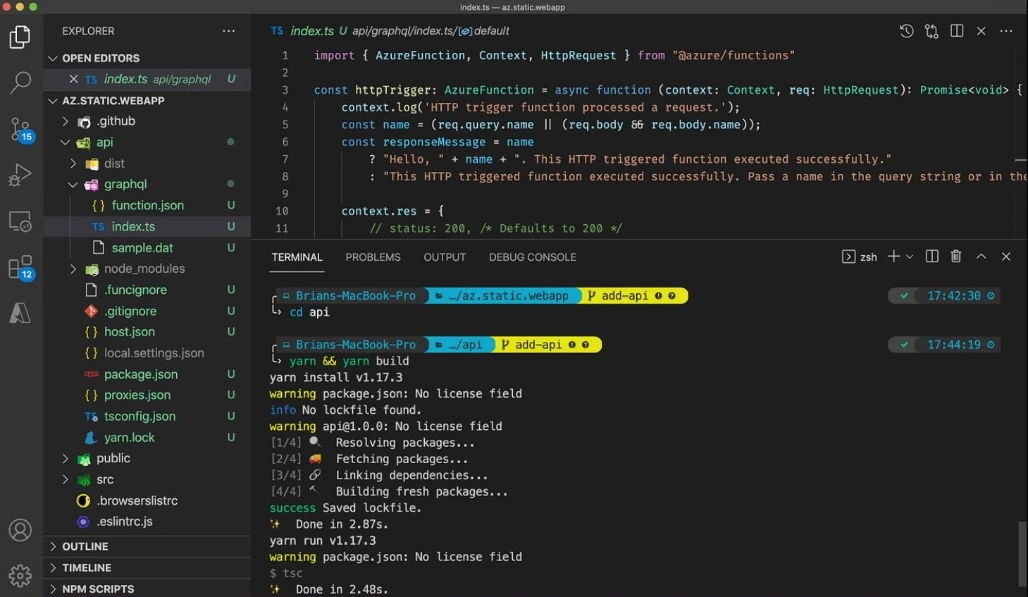
Fabric Apps supports server-side functions written in TypeScript.
These functions run on the backend and can be invoked from your frontend through a typed client.
An important advantage is that sensitive operations and credentials can remain on the server rather than being exposed in frontend code.
3. Connect to existing Fabric data
Now, this is where I think Fabric Apps becomes particularly useful for organisations already investing in Microsoft Fabric.
You don't necessarily need to create another database and start loading all your existing organisational data into it.
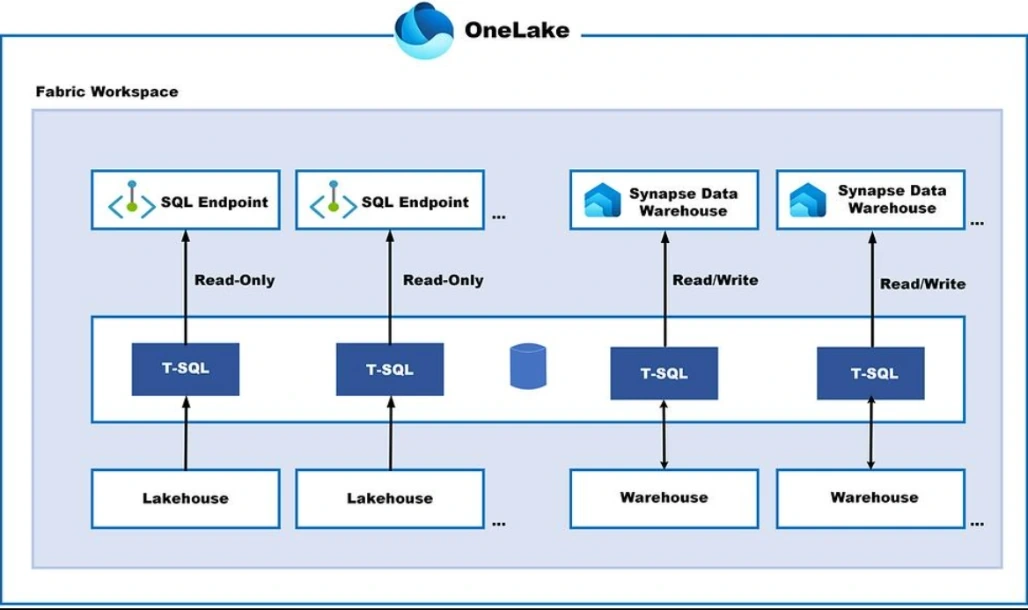
Fabric Apps provides connectors that allow applications to work with existing Fabric data sources, including:
- Fabric Lakehouse.
- Fabric Warehouse.
- SQL databases in Fabric.
- Power BI semantic models.
The supported operations depend on the connector.
For example, you could build a custom frontend that retrieves information from an existing Lakehouse or queries a semantic model to display business metrics.
There is an important distinction here: connecting an application to a data source does not automatically grant users access to the underlying data. The appropriate source permissions are still required.
4. File storage
Another useful capability is built-in file storage.
Imagine developing an application where employees need to upload customer documents, invoices, product images or other supporting attachments.
Fabric Apps allows developers to define typed folders and configure access policies for managing files.
The application can then support operations such as:
- Uploading files.
- Downloading files.
- Listing available files.
- Deleting files.
The underlying storage is backed by OneLake, and file storage requires the Data service.
This means you can incorporate document management capabilities into your application without having to build an entirely separate file-storage integration.
5. Built-in authentication
Authentication is another area developers would normally have to consider when building applications.
Fabric Apps provides built-in authentication capabilities, including session management, token handling and authentication flows.
For deployed applications, Fabric uses Microsoft Entra ID through Fabric Single Sign-On (SSO).
This is particularly useful for organisations building internal business applications because employees can use their existing Fabric identities.
For local development, email and password authentication is also supported.
6. Static hosting
What happens after building the frontend and backend?
You need somewhere to host the application.
Fabric Apps supports static hosting, allowing developers to build and serve frontend application files alongside their backend services.
Depending on the configuration, access to the hosted frontend assets can be protected or anonymous.
The important thing is that Fabric brings together several components required to develop and deploy an application within one environment.
How does the architecture work?
Let's put everything together.
A Fabric App essentially combines frontend hosting with managed backend services.
Your frontend communicates with the Rayfin client SDK, which provides access to the application's data APIs, server-side functions, file storage and connected Fabric data sources.
Microsoft Fabric manages the hosting, networking and scaling of the deployed application.
Here is a simplified representation:
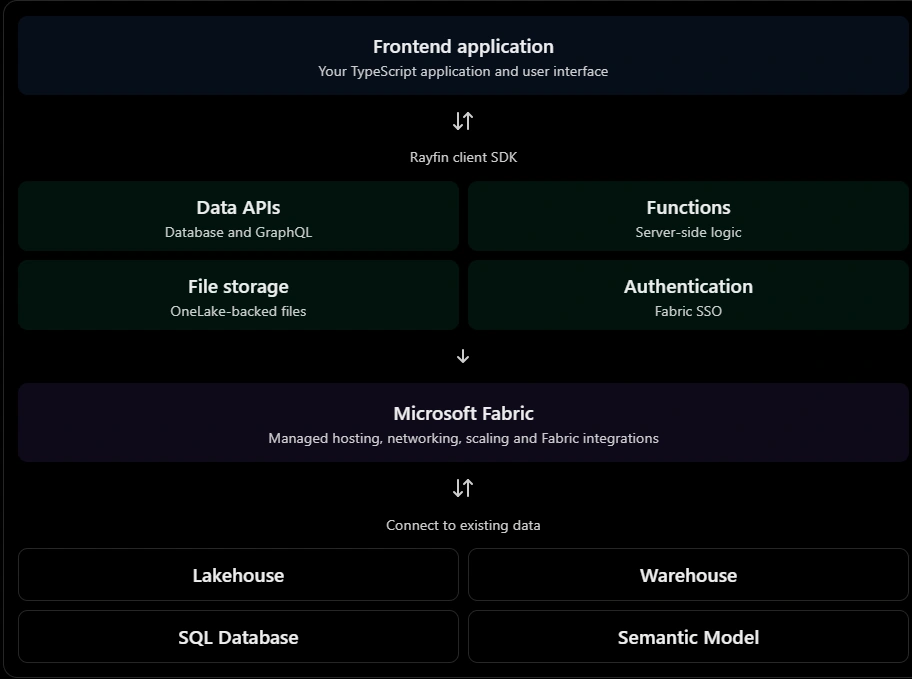
The beauty of this architecture is that you can combine your existing analytical assets with a custom application experience.
How do you develop and deploy a Fabric App?
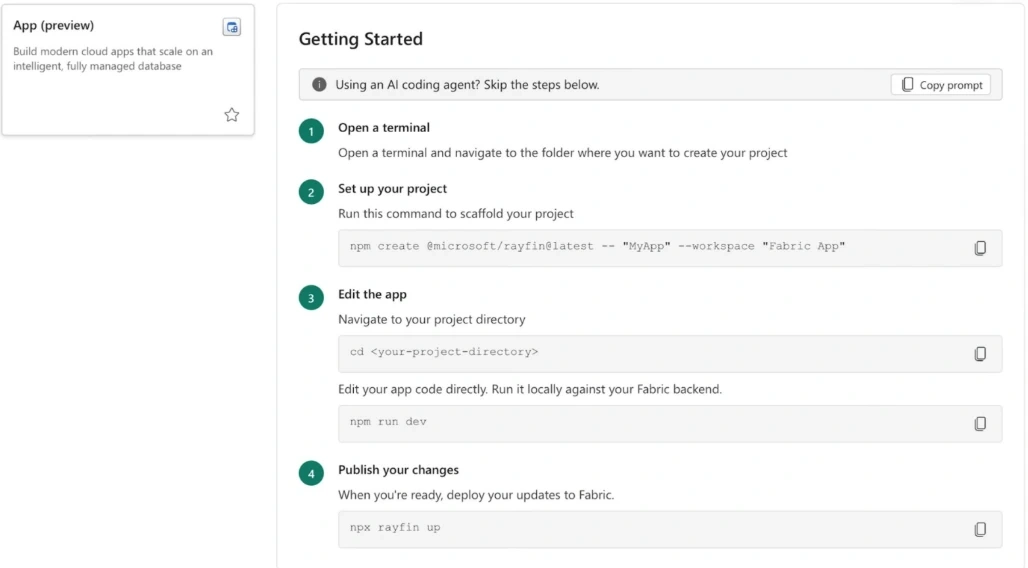
Fabric Apps uses the Rayfin CLI for project scaffolding, local development, schema synchronisation and deployment.
For example, you can create a new project using:
npm create @microsoft/rayfin@latest
Once your project has been configured, you can deploy it to Fabric using:
npx rayfin up
And when you need to apply database schema changes:
npx rayfin up db apply
The development experience also supports working with GitHub Copilot and other coding agents.
This is particularly interesting because it brings AI-assisted development into the process of building applications that integrate directly with Microsoft Fabric.
Licensing and prerequisites
Before jumping into development, there are a few things worth knowing.
Fabric Apps supports two licensing experiences:
- Capacity-backed experience: The workspace must be assigned to an active Fabric capacity or Fabric trial capacity. Application services consume capacity units.
- Power BI Pro experience: You can use a Pro workspace without assigning Fabric capacity, subject to Power BI Pro limits.
There is also an important tenant-level requirement.
A Fabric administrator must enable the Fabric Apps workload through the Fabric Admin Portal before users can create Fabric Apps items.
This setting can be enabled for the entire organisation or restricted to specific security groups.
Security and permissions: Something you shouldn't overlook
Building an application is one thing. Making sure the right people can access it is another.
Fabric Apps includes several security capabilities, including:
- Microsoft Entra ID authentication through Fabric SSO.
- Row-level security using
@role decorators. - HTTPS.
- PKCE.
- Workspace-level and item-level permissions.
However, developers still have responsibilities.
For example, API keys, credentials and sensitive information should never be embedded in frontend assets or committed to source control.
Also, workspace roles do not automatically override item-level permissions.
Users generally need the appropriate Run and interact permission to access a deployed application and invoke its backend APIs. Editing and deploying the application requires additional permissions.
This is an important consideration when designing applications for enterprise environments.
When would I consider using Fabric Apps?
Personally, I find the most interesting opportunities around internal business applications and data-driven solutions.
Consider these examples:
Business requirement | Possible Fabric App |
|---|
Employee management | HR administration application |
Customer information | Customer management portal |
Document management | Invoice and document upload application |
Business analytics | Custom operational dashboard |
AI integration | Application with persistent data for AI agents |
However, Fabric Apps isn't necessarily designed to replace every traditional application development platform.
Microsoft highlights that applications requiring complex multi-step transactions, stored procedures or authentication providers other than Fabric SSO after deployment may not be suitable.
It is important to understand these limitations before deciding whether Fabric Apps is the right architecture.
My final thoughts
What interests me most about Fabric Apps is the opportunity to move beyond simply building pipelines, transforming data and creating reports.
We can now explore building complete data-driven application experiences that interact with the analytical assets already available within Microsoft Fabric.
Think about the possibilities: an organisation could have its data engineering pipelines running in Fabric, its analytical models powering business intelligence, and custom applications providing employees with a way to interact with that data.
That's a compelling direction for the Microsoft Fabric ecosystem.
And I think this is an area worth paying attention to, particularly for data engineers, analytics engineers and developers looking to expand their skills beyond traditional BI development.


Join the conversation! Your thoughts help the community grow.