

Introduction
Goto https://developers.facebook.com and sign in using your credentials, then click Add New App Button.
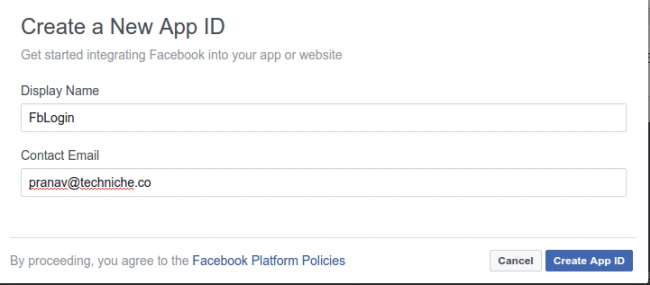
Put the application name and contact email ID on the page and click Create App ID button.
There you will see a page like the following, from there please copy the value of App ID,
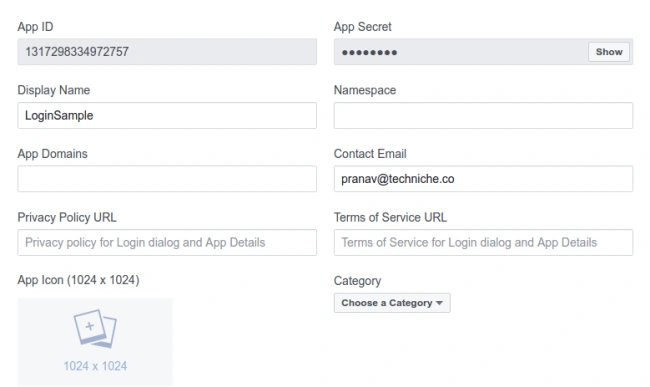
In the bottom, there will be one button named Add Platform and click on this button and select Android.
There you need to enter the package name and hash code of your Android Studio.
The package name can be copied from the manifest file.

For generating the hash code run the following code
- try {
- PackageInfo info = getPackageManager().getPackageInfo("demoapp.techniche.com.fblogin", PackageManager.GET_SIGNATURES);
- for (Signature signature: info.signatures) {
- MessageDigest md = MessageDigest.getInstance("SHA");
- md.update(signature.toByteArray());
- Log.e("KeyHash:", Base64.encodeToString(md.digest(), Base64.DEFAULT));
- }
- } catch (PackageManager.NameNotFoundException e) {} catch (NoSuchAlgorithmException e) {}
After entering all the fields please click on save changes. That time if the package name is not listed in the Google Play store then it will show one dialogue, and there you have to select "Use this package name".
Now, you can go to the project and in the gradle.build a file of your project adds the following line.
- repositories {
- mavenCentral()
- }
- compile 'com.facebook.android:facebook-android-sdk:4.+'
And click sync now. This will add the Facebook SDK into your application.
Now open your string.xml file and add the APP ID you selected form developer.facebbok.com into here.
- <string name="face_book_app_id">1234564545454</string>
Now, go to the manifest file and put the following code inside of the application tag.
- <meta-data android:name="com.facebook.sdk.ApplicationId" android:value="@string/face_book_app_id" />
- @Override
- protected void onCreate(Bundle savedInstanceState) {
- super.onCreate(savedInstanceState);
- FacebookSdk.sdkInitialize(this.getApplicationContext());.....
- }
Join the conversation! Your thoughts help the community grow.