

Introduction
This article describes a simple approach to fading out a form. The
approach used permits the user to define the number of incremental steps used to
fade out the form; the form is faded by decreasing the forms opacity from 100%
down to 0% using the number of steps defined and by an equivalent amount in each
step.

Figure 1: Fading Out a Form (Test Application)
Getting Started
The solution contains two Windows Forms (frmMain.vb and frmDirections.vb) and a single class (FadeEffect.vb). The class contains a single public shared method (FadeForm) which accepts a Windows Form and a byte value as arguments. The form argument is the form to fade out of existence and the byte value allows the user to configure the number of incremental decreases in opacity that will be required to fade out the form (0 to 255). In the examples provided, this value is set to 50 but you can set it to any valid number with larger values creating slower fades and smaller values creating faster fades.
All of the code necessary to fade out a form is contained in the FadeForm class.
The two forms call the FadeForm function within their overridden dispose
functions such that, whenever either form is disposed of, the fade effect is
generated.
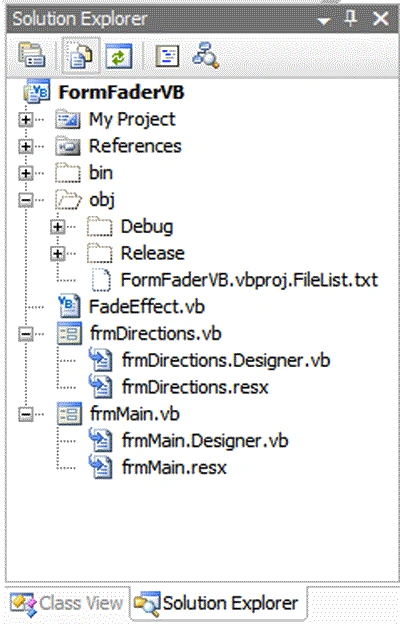
Figure 2: Solution
Explorer with the Project Visible
Code: Fade Effect (FadeEffect.vb)
This class provides all of the functionality required to fade out a Windows Form. The code for this class should be easy enough to follow. The class begins with the standard library imports; System.Windows.Forms was added as the FadeForm method accepts a Windows Form in its argument list.
Imports System.Windows.Forms
Public Class FadeEffect
The FadeForm function accepts a Windows Form and a byte value as its arguments. The Windows Form identifies the form to be faded; the byte value defines the number of steps though the form will be faded out. For example, if 25 is passed to the function, the form will be faded out in 25 equal steps. The amount of opacity decremented in each step is defined by dividing the starting point (100%) by the number of steps.
<summary>
Function used to fade out a form using a user defined number of steps
</summary>
<param name="FadeForm"></param>
<param name="NumberOfSteps"></param>
<remarks></remarks>
Public Shared Sub FadeForm(ByVal FadeForm As Form,
_ByVal NumberOfSteps As Byte)
Dim StepVal As Double =Convert.ToDouble(100.0F / NumberOfSteps)
Dim dOpacity As Double = 100.0F
Dim b As Byte = 0
For b = 0 To NumberOfSteps
Join the conversation! Your thoughts help the community grow.