One of the features of binding in WPF is the ability to support Fallback Values. Fallback Values are used when a binding comes up with an inappropriate value that in turn can't be set on the binding target. There are 2 types of Fallback Values.
TargetNullValue
As the name suggests, when a source object's property is null, the TargetNullValue is the alternate value you want to set for the target. So, whatever value is set for TargetNullValue will be set for the target. Pretty simple, isn't it ?
FallbackValue
This is used when a binding cannot determine a value at all, based on the the data source and the path. Or in other words, FallbackValue is used when the property bound to the source is not at all available. In that case, the value supplied for FallbackValue will be considered at the target end.
Getting into the code
Now, let's see the code for using both of these. Here the purpose is to bind the given text box with the EmployeeName property.
My code behind class contains just the basic code to create a property for employee name, so that we can bind it with a TextBox. Here is the code:
public partial class MainWindow : Window
{
Employee employee = new Employee();
private string _employeeName;
public string EmployeeName
{
get { return employee.Name; }
set { _employeeName = value;}
}
public MainWindow()
{
InitializeComponent();
this.DataContext = this;
employee.Name = “Mannie”;
}
}
public class Employee
{
private string _name;
public string Name
{
get { return _name; }
set { _name = value; }
}
}
And my XAML file contains the following code:
<Window x:Class="FallbackConcept.MainWindow"
xmlns="http://schemas.microsoft.com/winfx/2006/xaml/presentation"
xmlns:x="http://schemas.microsoft.com/winfx/2006/xaml"
xmlns:local="clr-namespace:FallbackConcept"
Title="MainWindow" Height="150" Width="325">
<Grid>
<Grid.ColumnDefinitions>
<ColumnDefinition Width="auto"/>
<ColumnDefinition Width="auto"/>
</Grid.ColumnDefinitions>
<Label Content="Name" Width="auto"/>
<TextBox Text="{Binding EmployeeName}" Grid.Column="1"
Height="25" Width="150" Margin="0,2,0,84" />
</Grid>
</Window>
Until this point, we haven't done anything extra. It's pretty simple and self-explanatory code. Let's go ahead and quickly change the code a bit.
Demonstration of TargetNullValue
As I mentioned earlier, TargetNullValue is relevant only when your source object is null. To make the source object null, let's proceed to the minor changes in the code, as:
public MainWindow()
{
InitializeComponent();
this.DataContext = this;
employee.Name = null;
}
Now, the next step is to set the value for the TextBox, that will be displayed if the source object (in our case the source object is EmployeeName) is null. Let's modify the XAML file for this:
<Grid>
<Grid.ColumnDefinitions>
<ColumnDefinition Width="auto"/>
<ColumnDefinition Width="auto"/>
</Grid.ColumnDefinitions>
<Label Content="Name" Width="auto"/>
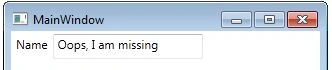
<TextBox Text="{Binding EmployeeName,TargetNullValue='Oops, I am missing'}"
Grid.Column="1" Height="25" Width="150" Margin="0,2,0,84" />
</Grid>
Now, when you run the application, you will find the TargetNullValue is set for the TextBox as:
Demonstration of FallbackValue
This FallbackValue is useful when binding is unable to resolve the source. So, for this missing source, one can set the default value for the target. Let's have a look at the code:
<Grid>
<Grid.ColumnDefinitions>
<ColumnDefinition Width="auto"/>
<ColumnDefinition Width="auto"/>
</Grid.ColumnDefinitions>
<Label Content="Name" Width="auto"/>
<TextBox Text="{Binding EmployeeNames,TargetNullValue='Oops, I am missing',FallbackValue='I am default'}"
Grid.Column="1" Height="25" Width="150" Margin="0,2,0,84" />
</Grid>
In the code above, instead of binding TextBox to EmployeeName, I am binding it to EmployeeNames, which is not the correct property because there is no such property is defined with that name. Hence my FallbackValue will be used and will provide us the following output:
Enjoy learning !!!



olivermodePosted Aug 23, 2016, 2:59 AM
Thank You So Much!!!+1
Steve BouchardPosted Apr 15, 2016, 10:55 AM
Very Easy to understand, Thank You So Much!!!
Sr KarthigaPosted Feb 5, 2016, 10:11 AM
good one mam
Shweta LodhaPosted Mar 8, 2014, 6:31 AM
Not only WPF. It is available for Windows store apps also.
Lakshmanan Sethu SankaranarayanPosted Mar 4, 2014, 12:01 AM
This feature is available only in WPF?